
AlexanderK.
Members
-
Joined
-
Last visited
Everything posted by AlexanderK.
-
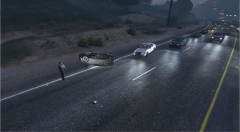
From the album: LSPDFR Gameplay
CHP Crash Investigator Conducting an Investigation at an earlier 1180-1141 (Accident, Major Injuries - Ambulance Required).© AlexanderK.
-
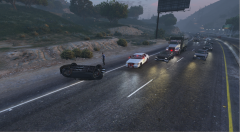
From the album: LSPDFR Gameplay
CHP Crash Investigator Conducting an Investigation at an earlier 1180-1141 (Accident, Major Injuries - Ambulance Required).© AlexanderK.
-
-
Here is an alum with photos from various RolePlay servers. It contains images from SARC v.3(closed) and DOJ RP. All photos are mine and from my gameplay. Custom edited via Rockstar Editor and Adobe Photoshop. Happy Gaming!
-
![Ambo 703 [BLS] Responding Code3](//s3-gallery.int-cdn.lcpdfrusercontent.com/monthly_2019_06/small.Screenshot_15(EDITED).png.1b1d93d469d3419a46aa0e1cc2cb6e6d.png)
From the album: [FiveM] Role Play
Ambo 703 [Basic Life Support] Responding Code 3 to a Standoff.© AlexanderK.
-
.png.001185db7126e79fa632a24baa15b645.png)
From the album: [FiveM] Role Play
Fire Services Off Duty Vehicle Tahoe outside of Strawberry Fire Department. [Station 7] Engine 703 ALS 703© AlexanderK.
-
.png.17d4245bdf223dc6ec36bc8610a76ec4.png)
From the album: [FiveM] Role Play
Fire Department Personal Off-Duty Vehicle 2015 Chevy Tahoe. Red-White setup. +Siren© AlexanderK.
-
.png.ebcde1f453685e30aef177cc98e9ac28.png)
From the album: [FiveM] Role Play
A 911 caller had called and hang up. Police were sent to the location the phone was traced. Upon arrival, they saw a Civilian laying on the ground. EMS Medic 5 were called for a possible Heart Attack.© AlexanderK.
-
Hello all, I'm developing a Callouts Pack. And I decided to add some custom tracks such as Radio PTT, Outro, Notification etc. sounds. (.wav) I tried to have the same folder names as other callout packs with custom sounds. The path is: LSPDFR / audio / scanner / [Callouts Pack Name] / {Tracks in .wav} Speaking of code, that's an example of my code: Functions.PlayScannerAudio("NOTIF_SOUND"); Game.DisplayNotification("~g~Code 4~w~, return to patrol."); Functions.PlayScannerAudio("PTT"); Functions.PlayScannerAudio("ATTENTION_ALL_UNITS WE_ARE_CODE_4"); Functions.PlayScannerAudio("END_3DPRT_PTT"); Note that, ATTENTION_ALL_UNITS & WE_ARE_CODE_4 samples work. My custom ones doesn't. Another example Functions.PlayScannerAudio("PTT"); Game.DisplayNotification("Dispacth, I see the lost pet. Let the Owner know my location to come and take it."); Functions.PlayScannerAudio("REPORT_RESPONSE_COPY"); Functions.PlayScannerAudio("END_3DPRT_PTT"); When NOTIF_SOUND and END_3DPRT_PTT and PTT play, they just produce a 1 second -very loud- static noise. Any idea why that happens? Thank you! 🙂
-
-
Jeff Favignano!
-
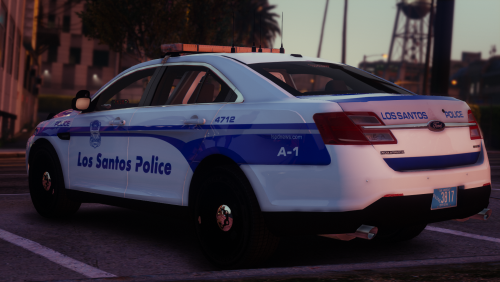 Can't express how happy I am. It is very detailed, nice and good looking liveries. Boston police liveries have something that get me to love them. Thank you very much!
- 26 comments
- 13 reviews
-
How? Any code update?
-
Thanks! Worked as expected!
-
Still updating the Plugin? Can't wait to try it.
-
Hello everyone. I have this code in my Process() class and I have added a code to make a dialogue. Everything works fine, until the dialogue is executed. Then, I cant cancel the call, end it or do anything else. Whats wrong? Is it something to do with the while ?? Here is the whole Callout Code if it helps. Thanks
-
Ok.
-
You have a code typo. In line 34...36 you don't have {} the code has to be: internal static bool wasJustPressed(Keys keyToCheck) { if (ModifierKey == Keys.None) { return Game.IsKeyDown(keyToCheck); return Game.IsKeyDownRightNow(ModifierKey) && Game.IsKeyDown(keyToCheck); } } May be another problem also, but for now, the typo is important.
-
Thank you very much!
-
It think it will be much easier and better! Nice to let me know I helped you!
-
You can create 2 Callouts that are identically the same, but on the 2nd to change the plot. As you said: Other than that, you can do it on 1 file, (callout) but you may mess up with the code in C#. You can see:
-
How can I mention the Player in code, like: (Pseudocode) private Ped Suspect if Player == Suspect >30f { ......... ; ......... ; } Thanks
-
Is there any way for the game to understand what division the player is? Like, when the player is FIB, to load a callout that is only for FIB officers?
-
@creator2013 And what are the available colour options? RGB Format? Thanks
-
Did you find out how to do it? If yes, you can post here your answer, so if anyone has the same problem as you, to help him. Thanks

.png.1b1d93d469d3419a46aa0e1cc2cb6e6d.png)
.png.001185db7126e79fa632a24baa15b645.png)
.png.17d4245bdf223dc6ec36bc8610a76ec4.png)
.png.ebcde1f453685e30aef177cc98e9ac28.png)