


TheStegosaurus
Members
-
Joined
-
Last visited
Everything posted by TheStegosaurus
-
When you launch RPH, click the little cog icon to go into the RPH settings, and change the timeout threshold from 10000 to 60000. Sometimes LSPDFR times out before it can load, and RPH cuts it off, thinking it's no responding.
-
Are you frisking the ped with the vanilla lspdfr option, or using another mod like interaction+?
-
As above, I don't think it's allowed to help people with illegal copies of the game. Sorry.
-
I believe it's because RPH only works on a retail copy of the game, so you would need to buy it. Also, the LSPDFR forums do not support cracked games, so we would be unable to offer any further assistance.
-
How long is your timeout threshold in your RPH settings? Try setting it to 60,000 if it's not already, as LSPDFR can sometimes 'timeout' before it's loaded fully and it'll lock you in a loading loop
-
Mine's also a Charger 🙂 I don't think it matters what the car is though, as I've had it crash without any car mods in. It just doesn't like Police2 for some reason, I guess it could be because POLICE2 doesn't *usually* spawn in the vanilla game in traffic. If you want to use the Charger, change the PoliceOld1 (Yankton cop car) to the charger, and add that to the agency/eup list, that's what I ended up doing
-
If you can't find it, then I'd install Albo's DLC mod folder, which I linked above. He also has a video about how to install it and how to use it, which is on the download page 🙂
-
Remove it from both just so we can eliminate it entirely and we'll go from there 🙂
-
You could also try changing the timeout threshold to 60,000 in the RPH settings (press the little cog when you're launching RPH)
-
Yeah, you should only need to remove it from the agency.xml I believe, as that sets up the cars and equipment you can select when going on duty, as well as what the other officers will be using/driving when responding to ambient events. Always worth giving that a try.
-
That was likely me hahaha. I found the fix for that, was to edit the 'agency.xml' in the lspdr folder, and removed police2 from the lspd roster. That's the only thing I can think of. What were you doing at the time of the crash by the way?
-
Hmm... Do you have any other crash logs at all? I know I had a similar issue when the game spawned 'POLICE2', and it seems it did that just before the 'arrestmanager' crash, so could be linked. I wondered if there was a pattern?
-
Ah you mean the one that comes with lspdfr?
-
Probably the mod isn't compatible with 0.4.2 yet. Remove it and carry on playing
-
Go to your GTA V directory, and go to Update>x64>dlcpacks>patchday20ng>dlc.rpf>x64 and just copy the levels folder from that surely, and put it into mods>Update>x64>dlcpacks>patchday20ng>dlc.rpf>x64 Assuming that's the one you deleted, going from your pic? I've always found it easier to use Albo's modding dlc to replace vehicles, as it stops you from having to look through all the patchday folders. You can download it here:
-
I wonder if it had something to do with Windows update 1803? I know it caused a lot of Ryzen users a lot of issues - myself included. Hoping 1903/1908 fixes the issues I was having, and boost performance a little
-
Will be downloading this tonight - looking forward to it, thanks guys for working so hard! Can anyone confirm if the fps drops have been improved at all? It wasn't unplayable, but it bugged me that my brand new rig (Ryzen2700x 4.0ghz, rtx2080 etc.) was struggling to get over 35-40fps.
-
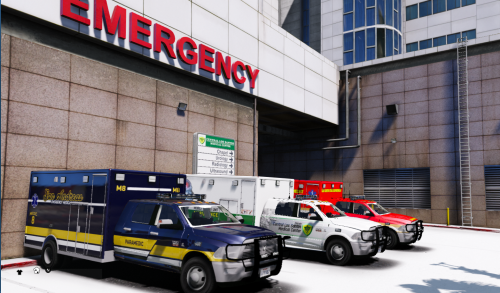 I don't have discord so I can't bug report - but if I crash into the passenger door, and it falls off, it spawns another whole ambulance model that glitches around. Not sure if it's just me that has this issue?
- 46 comments
- 7 reviews
-
So, I've finally upgraded my PC, (specs below) and decided to jump back onto LSPDFR. But now I'm facing gigantic fps drops as soon as I go on duty. When I play vanilla GTA V (with real vision enhanced, and the police car mods) I get 110fps easily with all my graphical settings on the highest. When I play LSPDFR 0.4.1, I can barely get over 30-35, my lowest has been 28... I never had a problem with FPS on 0.3 on my old rig, which was far slower... Please can someone explain why 0.4.1 is draining my fps. System is brand new, and is as follows: Mobo - Asus ROG Strix X470-f Gaming CPU: Ryzen 7 2700x 3.7ghz RAM: 32gb DDR4 3200mhz GPU: RTX2080 8GB Game installed on a fairly empty SSD. All drivers are up to date
-
Hi all, hopefully an easy one for you guys. Where do I add the <livery>x<\livery> tags when I’m editing the police vehicles, so only that livery will spawn on the cars in certain areas. also is there a map with the list of areas on it to edit the patrol/police agency areas? thanks
-
Build Name Giga Please Operating System Microsoft Windows 10 Pro x64 Case Corsair 570X RGB Mid Tower Motherboard ASUS ROG Strix X470-F Gaming AM4 Processor AMD RYZEN 7 2700X 8-Core Memory Corsair Vengence LPX32GB DDR4 3200Mhz Graphics Card(s) Gigabyte Geforce RTX2080 8GBDDR6 OC Storage Drive(s) 1TB Samsung 860 EVO SSD 5TB Toshiba X300 HDD 5TB Toshiba X300 HDD Removable Drive(s) N/A Power Supply Corsair TXM850W Cooling System Corsair H100i-Pro-240mm
-
Think this is just an issue with 0.4 sadly. My machine runs GTA V at 60fps usually, but as soon as I go on duty, I can barely get above 20.
-
0.4.2 can’t come quick enough! 🙂
-
Not a clue lol, one of the many quirks of lspdfr/rage I guess
-
Ah, see I'm always having it with police2, no matter what car (modded or vanilla) I have in that slot haha


