




Zenitae
Members
-
Joined
-
Last visited
Everything posted by Zenitae
-
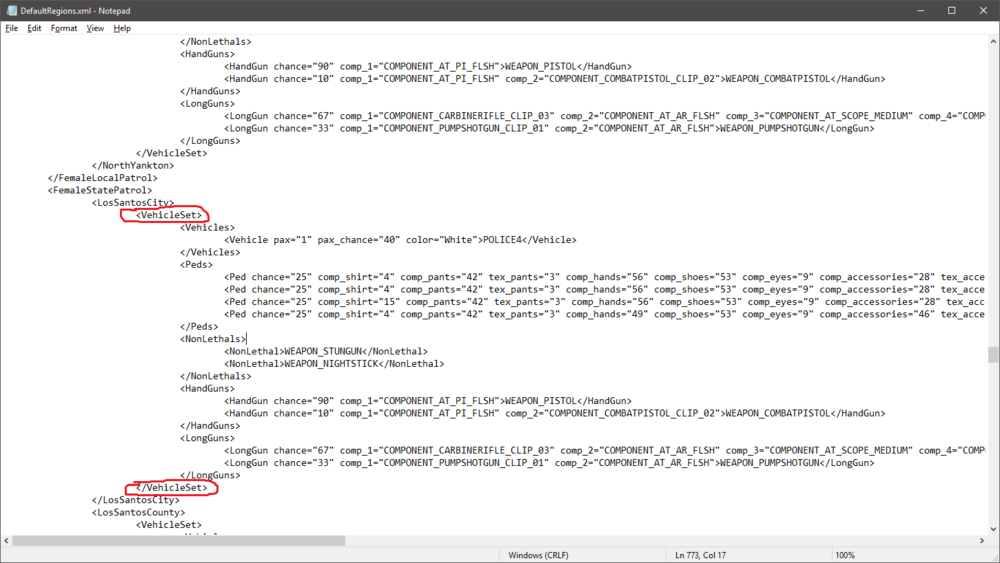
Hi there, You haven't edited your defaultRegions.xml or customRegions.xml file for UltimateBackup properly - I can't tell which one, but it's one of them. Go to Grand Theft Auto V\Plugins\LSPDFR\UltimateBackup and open both of those files using notepad. Go to line 766, column 6 (look in the bottom right of notepad for reference) and look at the <VehicleSet> tags. You should start with <VehicleSet>, then end it with </VehicleSet>, which you most likely haven't done. I've included an image of my own .xml document and circled the key tags. Make sure yours do the same and your game should work 🙂 Thanks, Zen
-
Hi, thanks for the info. Try going into your lspdfr.ini (found at Grand Theft Auto V\LSPDFR) and setting your WorldEvents.MaxNumberOfEvents to 0. Also, run the configurator while you're there. Thanks, Zen
-
Double check to make sure you've sent the right log. The one you attached doesn't show anything past the game loading. The best way to do it is to play until it crashes again, then send the file straight after 🙂 I'll be awaiting your reply. Thanks, Zen
-
Have you tried setting your plugin timeout threshold to 60000 inside of your RagePluginHook settings? Thanks, Zen
-
Hi Orange, Are you able to go on duty without using PLD? Do you have any other .asi files being loaded at the same time? Are you using ASISupport or not? Since you don't think your RPH log will help, I assume you've already checked in there for error messages? I'm not meaning to be a smart-mouth, I'm just asking for more information 🙂 Thanks, Zen
-
Go to Windows Security > Virus & Threat Protection > Manage Settings > Add or remove exclusions > Add your entire Grand Theft Auto V folder to that list. Keep me updated. Zen
-
Hello, The issue is definitely your backup.xml. Redownload LSPDFR manually, and only take the backup.xml file from the download folder and replace the one you currently have. You can leave anything else in that downloaded folder. Thanks, Zen
-
Hello there, Are you sure you aren't cancelling it with your keybinds? Also, try setting the maximum ambient events in your lspdfr.ini as 0. Thanks, Zen
-
Try going into your RPH settings and setting the timeout threshold to 60000. It may be worth not loading any plugins on startup too, then using "ReloadAllPlugins" inside of the RPH console when you're in game. Let me know if that helps, Zen
-
Hi Sheriff, Please post your RagePluginHook log and I can try to help you further. Unfortunately, what you've posted doesn't really tell me much 🙂 You can find the log inside of your main GTA V directory. It's a text file named RagePluginHook (.log extension if you can see those). Thanks, Zen
-
Hi, In your MenuModifier key at the top, change that to "LControlKey" instead. That should fix your issue 🙂 Thanks, Zen
-
Hi there, Glad that got rid of one issue! Upload your latest RagePluginHook crash log and I can take a further look. Unfortunately that photo doesn't tell me much :I You can find the log inside of your main GTA V directory, it's a text file name RagePluginHook (it's a .log extension if you can see those in your explorer). Thanks, Zen
-
If you're still having issues, rename your mods folder to _mods and try and run the game. If that works, then something inside of your mods folder is causing the crash, such as a vehicle not installed properly or something similar. If that doesn't work, make sure your entire GTA V folder is on your antivirus exceptions list. Finally, if that doesn't work, make sure any ASI files, such as ELS or trainers are fully installed and updated inside of your main GTA V folder. Thanks, Zen
-
Hi, Sorry for the delayed response. The crash is coming from a vehicle-related related plugin, such as Traffic Policer. Any plugins that interact with vehicles, such as checking license plates, should be reinstalled properly. This should fix your issue. If the crash is still occuring, please upload your latest log again and I'll take a look 🙂 Thanks, Zen
-
Hi, Go into your lspdfr.ini file located in Grand Theft Auto V\lspdr and set Main.PreloadAllModels = false. If that doesn't work, check the following post below: I hope this helps! Zen
-
Hello! Do you use a mods folder? If so, rename your mods folder to _mods and then try relaunching your game. If it works, then something inside of your mods folder is causing the crash and you'll need to remove the files or install them properly. If it crashes still, add your entire GTA V folder to your antivirus exceptions. Thanks, Zen
-
Hi, Can you post your full RPH log? Make sure your graphics drivers are up to date and try running RPH as an admin. Do you have a lot of add-on vehicles installed? Thanks, Zen
-
Hi there, Something inside of your Interaction+.ini is causing the game crash, or you're missing the .ini file entirely. It could be a word spelled wrong, a wrong key inserted and so on. You can either show your .ini here and we can look for the fault, or you can just reinstall Interaction+ and it should fix the error. Thanks, Zen
-
Hi there, It's also worth noting that RPH was recently updated to specifically be compatible with the new R* launcher, and LSPDFR was too. Please make sure you have the latest versions. Thanks, Zen
-
Hi there, If you're using the base sirens, you can press J to toggle the sounds. If you're using ELS, the default key is G - you need to be in Light Stage 3 for sirens to be activated though. Thanks, Zen
-
-
That's strange! Oh well, at least you have a partial fix for next time! Sorry I couldn't be of more use. Zen
-
Hmm, have you tried taking ownership of the GTA V folder and all sub-folders using your windows account, and then giving yourself full control? This is strange indeed! Zen
-
That's a lot of content! Wow! The issue is with your mods folder then. If your game is crashing without RPH, then the issue is with a game file. Have you made any changes from when it last worked? Thanks, Zen
-
It won't go to the options even if you hold down shift immediately after launching (hold it down until the settings screen opens)? If not, open your commandline.txt file and add the following line (remember to delete the previous -DX__ command each time) and save the file after each change: -DX11-windowed If that doesn't work, try: -DX10_1-windowed Then again if no result: -DX10-windowed Each one should be on the same line. One big line, no spaces, use - at the beginning of each one. If you already have text inside, add it to the end of the line. Retry RPH after each change. Thanks, Zen


