




Zenitae
Members
-
Joined
-
Last visited
Everything posted by Zenitae
-
Sounds most likely an antivirus thing. Have you checked your AV? Try launching GTA V first, then launching RPH when you're in game. Are there any error messages at all? Thanks, Zen
-
Can you provide your RPH log? Double check your antivirus too to make sure that it's not blocking anything. Add your entire GTA V folder to the exceptions if you need to. Head to your RPH settings and try running in windowed mode too. Thanks, Zen
-
Welcome to the community Zarus! I hope your stay is enjoyable and you catch plenty of bad guys! 😄
-
Can you post your RagePluginHook log please? That will give more information 🙂 Thanks, Zen
-
Same here, does the installation instructions specifically mention to put it in a male folder? Zen
-
Hi O'Donnell, Have you tried looking in: mods\update\x64\dlcpacks\eup\dlc.rpf\x64\eup_componentpeds.rpf\ for it? There is an executive_01 folder in there for me. Hope this helps! Zen
-
My best advice is to remove all of the plugins (just copy them into a folder and save to your desktop - you can re-add them later) from the plugins\lspdfr directory, and only keep BejoIjo's plugins inside of there. If it works fine, then another plugin is causing conflicts. Thanks, Zen
-
The plugin is loading and initialising fine, so I'm going to assume it's a keybinding error or conflict. I'd recommend double checking your StopThePed.ini and your LSPDFR keys.ini to make sure no conflicts are popping up. It may also be a case of another plugin is conflicting, so anything that does similar things should also be checked. Thanks, Zen
-
Hi Momo, Can you upload your RPH log? It's inside of your GTA V main folder and is a text file called RagePluginHook with a .log extension if you're able to see those. This will give a lot more information to work from 🙂 Regards, Zen
-
Hi Mario, Can you supply your RPH log? It's found in the GTA V main folder, it's a text file with a .log extension if you can see those. Also, make sure that you've installed the RageNativeUI files from each plugin as they'll all change it in different ways. Thanks, Zen
-
Can you post your RPH log so I can see the plugin details? You can find it in your main GTA V directory, it's a text file named RagePluginHook and uses a .log extension if you can see that. Thanks, Zen
-
Hi tman, Some examples of keys that LSPDFR uses: Keyboard LControlKey A = A key B = B key Controller DPadLeft A = A button B = B button X = X button Y = Y button RightThumb = clicking the right thumbstick in As far as I'm aware, ELS doesn't allow you to add your own modifiers in. If it's any help, I've disabled almost all of the LSPDFR keys and replaced them with BejoIjo's plugins instead. You can also lock/unlock ELS controls by using the Scroll Lock key on your keyboard. Hope this helps, Zen
-
Hi Koala, Are you installing the vehicles into the correct folders? Also, make sure to put the vehicle xml files into the pack_default folder inside of your ELS folder. Go to mods\update\x64\dlcpacks\patchday__\dlc.rpf\x64\levels\gta5\vehicles.rpf\ and install the vehicle files there. For the patchday__, use the latest patchday which is currently patchday21 🙂 Hope this helps, Zen
-
Mandatory Evacuation Order being carried out on a local trailer park. One citation was given and another was taken into custody.
-
A selection of images from various callouts and scenes that I have attended. I hope you enjoy!
-
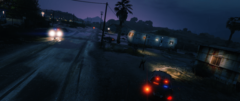
From the album: LSPDFR Callouts
With the assistance of other officers, a Mandatory Evacuation Order was enforced at a trailer park. Most residents had already evacuated or were in the process of doing so, though a couple refused to comply. One person was given a $200 citation and another was taken into custody.© Zenitae
-
 Excellent file, makes driving (in the city in particular) much better. Great work!
- 366 comments
- 32 reviews
-
-

- 1
-
-
Right click your .exe file and go to properties. Make sure it's not being blocked. If you run it, does it appear in Task Manager?
-
Hi Juan, Try loading into the game first, and then launching RPH. Regards, Zen
-
Open your RPH settings, then go to the Plugins section, and don't load anything on startup. When you're in-game, try opening the console and ReloadAllPlugins. See if you can go on duty from there. Also, make sure your graphics drivers are all up to date. Open Task Manager (shortcut Ctrl + Shift + Esc), go to Details and look for GTAV.exe. Right click it and set your priority as High or Realtime. Next, open your lspdfr.ini and set Main.PreloadAllModels = false. Now restart and retry your game. Regards, Zen
-
Hi Celty, LSPDFR itself is single-player only game mode, with the exception of FiveM servers - though they are completely separate entities in their own rights. Regards, Zen
-
Do you use a "mods" folder by any chance? Also, try reducing the graphics on your game settings if the game is running slowly. Once your game crashes again, send me a fresh log and I'll have another look. The one you provided earlier doesn't look to have any plugin crashes, which makes me think that something outside (perhaps in your mods folder) is causing the crash. Though, I could always be wrong and am overlooking something. Thanks, Zen
-
You can reload your plugins by pressing opening the command console (F4 by default) in game, then ReloadAllPlugins. This will essentially restart LSPDFR so you'll need to go on duty again. If it's mods (such as vehicles and weapons using your "mods" folder), then you'll need to restart your game for them to reload. Hope this helps. Zen
-
Remove RagePluginHook, disable Avast and redownload and install RagePluginHook again, then try running it again. Regards, Zen
-
If you have an antivirus, try allowing your entire GTA V folder as an exception. If you need help with that, let me know what antivirus you use and I can guide you from there. If you use the standard Windows Defender, you can go to your firewall settings and allow it via that. Thanks, Zen

