




Zenitae
Members
-
Joined
-
Last visited
Everything posted by Zenitae
-
Reinstall the manual LSPDFR download, replace files if prompted. That will update your RPH and LSPDFR to the latest versions. Do not use the RPH official website.
-
This is can be an issue with a keybind you've added or changed. I'd suggest you rename Plugins > LSPDFR to _LSPDFR and test again. If it works, the issue is one of your .ini file configs in that _LSPDFR folder. If it doesn't, the issue lies within either Plugins or your default LSPDFR keys (GTA V > lspdfr > keys.ini). For what it's worth, I'd remove TrafficPolicer and PoliceSmartRadio - they both have not been updated in a long time.
-
-
I can't see the bottom half of your folder, so I'm going to assume you don't have ScriptHookV installed, which you need for ELS to work. You can get it from here: http://www.dev-c.com/gtav/scripthookv/ Drag dinput8.dll and ScriptHookV.dll into your main GTA V folder, replace files if prompted. You don't need the Trainer files.
-
Ah, excellent! Well I'm glad you're enjoying LSPDFR and everything it has to offer, I hope you stick around to see the many good things I'm sure are to come 😄 Zen
-
Hi Pilot! Welcome to the community! It's a great feeling having a new PC, even more so when you've wanted to play something for a while! Is there anything about LSPDFR you're particularly looking forward to? Regards, Zen
-
Hi Cal, welcome back! The community has sure grown a lot since then, and the content has improved too! There's stuff available now which completely enhance the experience of playing LSPDFR. Have you ever considered picking up LSPDFR again? Zen
-
Sure! Here you go: The easiest way to think of it is this: LSPDFR has Plugins that add to it, such as pedestrian interaction and much much more. LSPDFR requires RagePluginHook (included) to run. LSPDFR is a Plugin in itself to Rage. Therefore, the vanilla LSPDFR is simply LSPDFR without any other plugins inside of it. LSPDFR provides a basic foundation for other community creators to build from! Regards, Zen
-
Hi Chip! Welcome to the community, we're happy to have you here! There's a lot of things you can do, there's not really a one-size-fits-all guide - I'd recommend installing the vanilla LSPDFR mod first, getting comfortable with it, then expanding from that. You'd be surprised at what you can do! We'll be awaiting your arrival once you get your PC! Regards, Zen
-
For your new error, make sure to add your GTA V folder to your antivirus exceptions, and disable any in-game overlays through software such as GeForce Experience or Radeon Software. If you have Rivatune or other performance enhancing software, try disabling that too. For your CTD error, can you run GTA V fine without Rage? Thanks, Zen
-
That's exactly what it was, my contrast was too high... I feel so stupid now! 🤣 Thanks giving me the nudge! Zen
-
Make sure you're using the latest trainer. Also, there's a minor Rage update you need - I don't think it'll make a huge difference, but it's worth a try. You can find it on Rage's website, you want 1.78 Zen
-
Do you have any ASI files, such as a Trainer, ELS, or something similar in your main GTA V folder? Thanks, Zen
-
Okay you're fine, the log there is showing your game is up to date. Are you getting any error message popups? Does Rage close itself down? Zen
-
Just to check and be sure, can you send the actual log file please? It's this highlighted file: Thanks, Zen
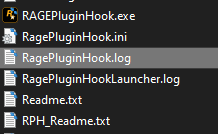
-
Please send your RagePluginHook log, it's the highlighted file here: Thanks, Zen
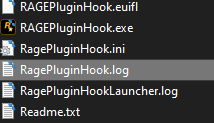
-
For some reason your Rage is showing you're using version 1868. Have you updated your update.rpf in your mods folder too? Regards, Zen
-
You can try to run Rage at a higher priority via Task Manager. Go into Task Manager > Details > Right click Rage > Set Priority > High. If that doesn't work, add: Networking.DisableDiscordRichPresence = true To your lspdfr.ini, located at GTA V > lspdfr Zen
-
There's no clean cut crash in that, there were one or two errors but they were handled. I'd suggest running a clean LSPDFR, then re-adding your plugins one by one and gradually testing them all, keeping in mind any file dependencies. Zen
-
You should verify your game files. Go to Steam Library > Right click GTA V > Properties > Local Files > verify integrity. Let it do its thing and verify. Do you only have one GTA V install? Thanks, Zen
-
You need to update your GTA V, you're using 1868 when the latest is 1868.1 🙂 In addition, if you have more than one GTA V installation, the one you want to use must be called Grand Theft Auto V. The other installation must be called something else. Regards, Zen
-
You're welcome! We did offer that a while ago, but it's a bit of a curveball sometimes as we find it encourages people to just let others do it for them - it also opens up some issues with people impersonating staff and offering remote access, only to mess things up. In addition, it's also incredibly time-consuming, and we sometimes have a lot of people to help, so it wasn't always practical or feasible. To be safe, we just say no to all requests. We do have a ticket system where you can request 1-to-1 support where one of our staff can guide you through everything step by step. We prefer to try and educate people, rather than just fix their stuff. In an ideal world, we wouldn't be needed as everyone could fix their own problems and the game would work perfectly... but alas, that's not going to happen so here we are lol. I'm a little cautious about talking too much about it though, I don't want to break any forum rules for advertisement etc. If you want more information or have further questions about my server, feel free to drop me a private message on here 🙂 Have fun, Zen
-
Your mods folder is in your GTA V main folder, and will overwrite any files. It doesn't change them, it just tells GTA V to load the mods folder files instead of the vanilla ones. In OpenIV, go to your GTA V installation, find the file you want to export, and right click > export > browse to your desktop. Then drag it from your desktop to the required location in your mods folder. Zen
-
You can restart, just take the original GTA V files you need from outside of your mods folder and put it on your desktop, then replace your modded versions with the original ones from your desktop 🙂 Zen
-
If you didn't edit it, that's fine. It's likely that the meta file is causing it, did you replace the file, or did you copy and paste the contents? Also, was the car replacement or add-on? Thanks, Zen


