




Zenitae
Members
-
Joined
-
Last visited
Everything posted by Zenitae
-
Reinstall the manual LSPDFR download, replace files if prompted. That will update your RPH and LSPDFR to the latest versions. Do not use the RPH official website.
-
This is can be an issue with a keybind you've added or changed. I'd suggest you rename Plugins > LSPDFR to _LSPDFR and test again. If it works, the issue is one of your .ini file configs in that _LSPDFR folder. If it doesn't, the issue lies within either Plugins or your default LSPDFR keys (GTA V > lspdfr > keys.ini). For what it's worth, I'd remove TrafficPolicer and PoliceSmartRadio - they both have not been updated in a long time.
-
 I love seeing how you've developed this plugin over time @holexion! Clearly you're putting in a lot of effort, and it's really paying off 😄
- 262 comments
- 21 reviews
-
-

- 1
-
-
I absolutely love this plugin. It's simple in regard to functionality but it works so well. I've completely replaced my old setup for vehicles (I was using a combination of two other plugins) with just this. The controller controls are very friendly to use too! 😉 In all seriousness, brilliant work Holexion.
- 262 comments
- 21 reviews
-
-
- 1
-
-
A selection of images from various callouts and scenes that I have attended. I hope you enjoy!
-

From the album: LSPDFR Callouts
With the assistance of other officers, a Mandatory Evacuation Order was enforced at a trailer park. Most residents had already evacuated or were in the process of doing so, though a couple refused to comply. One person was given a $200 citation and another was taken into custody.© Zenitae
-
 Excellent file, makes driving (in the city in particular) much better. Great work!
- 366 comments
- 32 reviews
-
-
- 1
-
-
 Incredible callout pack! I particularly enjoyed the Evacuation Order callout, it was extremely refreshing and something different from the usual bar fights and pursuits. I'm not sure if this was intentional, but the Evac Order came through as a storm rolled in, which set the THE PERFECT scenario. It was dark, the rain was heavy, the wind was howling and lighting pierced the sky to the sound of rolling thunder. It was almost like a huge storm was on the way and that's why the evacuation order was issued. Regardless of whether it was all just a fortunate coincidence or not, the callout experience was fantastic. I've included a screenshot of my officer taking those who refused to evacuate to jail 😁 Amazing work PeterU, please keep up the good work! No crashes or bugs and everything flows nicely - very impressive! 100% recommended!
- 546 comments
- 103 reviews
-
-
- 1
-
-
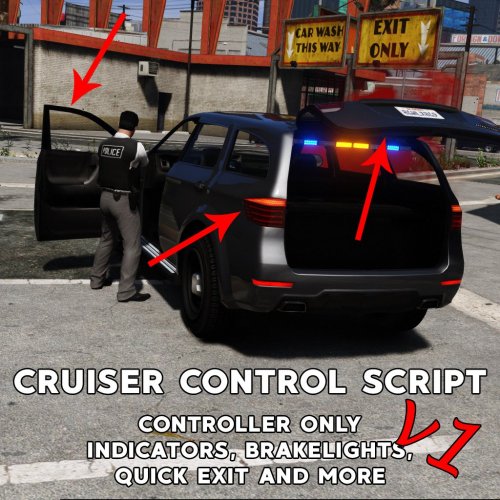 Works perfect in every way. I don't like using too many car functions and this has just the right amount for me. Basic indicators and hazards are all I really need. No complaints here.

