


HCDPS
-
Joined
-
Last visited
Everything posted by HCDPS
-
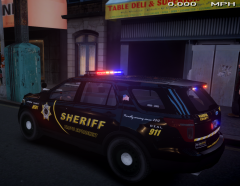
From the album: 2 years with Harbor County
A sneak peek of one of Harbor County's new Traffic Enforcement vehicles currently undergoing equipment installation at the fleet service center. The Sheriff's Office "HIT Team" (High Intensity Traffic Team) specializes in traffic enforcement, accident investigation and reconstruction, and DUI enforcement. The Sheriff's Office has been upgrading it's fleet with new and refurbished vehicles throughout 2014 and has selected the Ford Police Interceptor Utility as the new SUV patrol vehicle to support it's traffic enforcement and patrol operations. The Interceptor Utility provides the equipment and storage capacity necessary to support vehicle accident reconstruction and investigation, while maintaining the performance and durability necessary for patrol operations. The new Interceptor Utility should be hitting the streets later this month. -
2014 marks Harbor County's 2 year anniversary of providing the most consistent, realistic, and professional role play available.
-
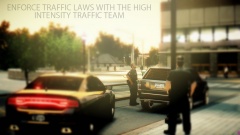
From the album: 2 years with Harbor County
The High Intensity Traffic Team is a unit of Patrol Deputies dedicated to traffic related incidents. From aggressive traffic enforcement, DUI checkpoints, accident response and investigation, to aggressive pursuit intervention, the H.I.T. Team is here to ensure the roads and highways of Harbor County remain safe for all drivers. Photo courtesy of Cadet Sherman. -
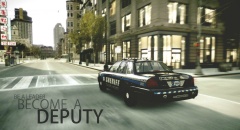
From the album: 2 years with Harbor County
Whether city police officers, county Deputies, or State Troopers, every day around this country thousands of men and women step up to lead by example. Photo courtesy of Cadet Sherman. -
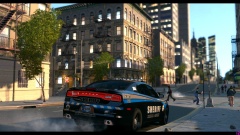
From the album: 2 years with Harbor County
Deputies often focus on "problem areas" throughout the county. Here we see a patrol Deputy watching over an intersection with a high number of reported vehicle accidents. Photo courtesy of Cadet Sherman. -
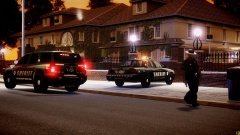
From the album: 2 years with Harbor County
Deputies responded to a residential burglary early this morning in the Beach gate subdivision. The suspect was taken into custody and no one was hurt during the incident. Photo courtesy of Cadet Sherman. -
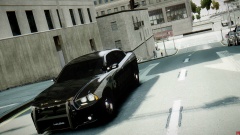
From the album: 2 years with Harbor County
Even during the day shift, the stealth charger looks mean. At night, it's downright terrifying. Photo courtesy of Cadet Sherman. -
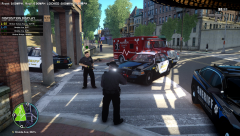
From the album: Tour of Duty
As part of Harbor County's 2 year celebration, members were on duty for a full 8 hour shift today from 10am-6pm. This is a quick image from a shots fired call where EMS was treating one person and Deputies were setting up a perimeter and gearing up to search Outlook Park for the suspect. -
As part of our celebration after 2 years of operations, today, July 7th, members of the Harbor County DPS Community participated in an 8 hour Tour of Duty event today from 10am-6pm.
-
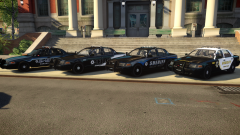
From the album: 2 years with Harbor County
The different liveries and cars used by the Harbor County Sheriff's Office over the last 2 years. -
From the album: 2 years with Harbor County
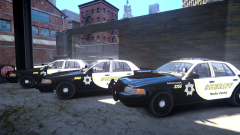
The first shipment of decals has arrived and been applied to the new HCSO patrol cars. These cars will begin final service checks on Monday and should begin hitting the road by the end of the week. -
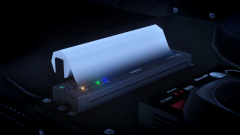 Yeah from a distance it does look like a paper towel roll doesn't it. I suppose it's easier to see it as a printer once you know what it's supposed to be, lol. Thanks! I modeled it after my local real world Sheriff's Office, and it seemed like a good project to cut my teeth on while learning zModeler.
 -
From the album: 2 years with Harbor County
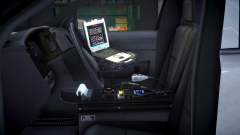
Starting next month, all of the Harbor County Sheriff's Office patrol cars will be receiving a technology upgrade. This upgrade will include features such as the legendary Panasonic Toughbook mobile computer, and a printer mounted in each patrol car. The Toughbook computer is a ruggedized laptop specifically designed to withstand the abuse of police work and features a mobile broadband internet connection, a touch screen interface, and access to local and national criminal information databases allowing Deputies to search through a wealth of information all from their patrol cars. One of the biggest improvements in technology comes in the form of a custom in car printing system, designed by Brother International. Using the Brother PocketJet thermal printing system, each patrol car will have the ability to print directly from their in car computers. “This is going to be a big increase in the quality of the service that we provide to the public,†explains Sheriff Dan Shaw, “With our current system, when a citizen needs information about a service call such as the Deputy’s name or case number, we use a hand written business card. That’s a small piece of paper and handwriting can be hard to read and fades over time. With the new in car printers, our Deputies can quickly enter all the relevant information for their reports in real time on the scene of every call, and can then print a special summary page with their name, case number, and any relevant information.†Sheriff Shaw also explained that the new system will allow Deputies to print citations, notices to appear in court, warrants, and other legal documents that historically have been hand written on carbon copy paper. “With electronic records we don’t need old fashioned carbon copies and paper any more. So our Deputies will be able to simply swipe in a drivers license or ID card through the integrated card reader to add a person’s information, enter any charges or narrative statements about an event, and then print the appropriate citations and other documents. It’s going to allow our Deputies to not only do their job faster and more efficiently, but do a better job for the public too.†Thanks to Evanscornelius for the console, NickieB for the Whelen Sapphire, Ridgerunner for the Toughbook, and JohnClark1102 for the PocketJet printer. -
From the album: 2 years with Harbor County
Starting next month, all of the Harbor County Sheriff's Office patrol cars will be receiving a technology upgrade. This upgrade will include features such as the legendary Panasonic Toughbook mobile computer, and a printer mounted in each patrol car. The Toughbook computer is a ruggedized laptop specifically designed to withstand the abuse of police work and features a mobile broadband internet connection, a touch screen interface, and access to local and national criminal information databases allowing Deputies to search through a wealth of information all from their patrol cars. One of the biggest improvements in technology comes in the form of a custom in car printing system, designed by Brother International. Using the Brother PocketJet thermal printing system, each patrol car will have the ability to print directly from their in car computers. “This is going to be a big increase in the quality of the service that we provide to the public,†explains Sheriff Dan Shaw, “With our current system, when a citizen needs information about a service call such as the Deputy’s name or case number, we use a hand written business card. That’s a small piece of paper and handwriting can be hard to read and fades over time. With the new in car printers, our Deputies can quickly enter all the relevant information for their reports in real time on the scene of every call, and can then print a special summary page with their name, case number, and any relevant information.†Sheriff Shaw also explained that the new system will allow Deputies to print citations, notices to appear in court, warrants, and other legal documents that historically have been hand written on carbon copy paper. “With electronic records we don’t need old fashioned carbon copies and paper any more. So our Deputies will be able to simply swipe in a drivers license or ID card through the integrated card reader to add a person’s information, enter any charges or narrative statements about an event, and then print the appropriate citations and other documents. It’s going to allow our Deputies to not only do their job faster and more efficiently, but do a better job for the public too.†Thanks to Evanscornelius for the console, NickieB for the Whelen Sapphire, Ridgerunner for the Toughbook, and JohnClark1102 for the PocketJet printer. -
From the album: 2 years with Harbor County
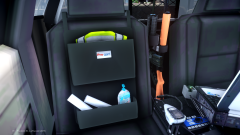
Sheriff's Deputies use many different tools and pieces of equipment every day, and part of the Harbor County Sheriff's Office plan for upgrading their fleet is to make that equipment easier for Deputies to access when they need it most. Seat Organizers like the one pictured above can be a valuable asset in storing equipment, paperwork, and other tools that might normally be stored in the trunk of a car. Thanks to Vertex3D for the original release of the Pro Gard seat organizer. -
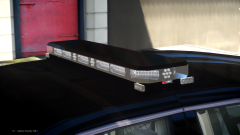
From the album: 2 years with Harbor County
After weeks of testing and evaluation of new public safety lighting equipment from top manufactures such as Whelen Engineering, Code 3 Inc, and Federal Signal, the Harbor County Sheriff's Office has selected the Code 3 RX 2700 MC as their new light bar. The Sheriff's Office will begin installing the new light bar on their patrol cars in June 2014 and they expect their entire fleet to be equipped by the end of the year. -
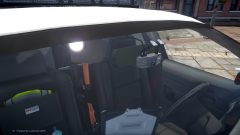
From the album: 2 years with Harbor County
Thanks to internal fundraising and an increase in grant funds, the Harbor County Sheriff's Office will be upgrading the technology in all of its patrol cars in 2014. One of the upgrades will included the latest innovation in digital video technology, the WatchGuard 4RE system featuring the Zero Sight Line (ZSL) camera. The new ZSL camera mounts conveniently behind the rear view mirror of a patrol car, and does not obstruct the officer's view while driving. This technology not only enhances the safety of the officer driving the car, but can aid in court cases by not only providing video evidence, but also audio evidence recorded by a microphone worn on the officer's body. The first of these new camera systems will be installed in June 2014 and the Sheriff's Office has said that they expect their entire fleet to be equipped by the end of the year. Thanks to 0taku for releasing the ZSL camera. -
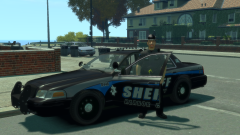
From the album: 2 years with Harbor County
The HCSO Patrol Division is the largest unit in the Sheriff’s Office. Deputies are responsible for patrolling the county, responding to routine calls for service, emergency responses, traffic enforcement, and maintaining a positive police presence throughout the county. -
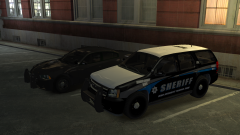
From the album: 2 years with Harbor County
The High Intensity Traffic Team is a unit of Patrol Deputies dedicated to traffic related incidents. From aggressive traffic enforcement, DUI checkpoints, accident response and investigation, to aggressive pursuit intervention, the H.I.T. Team is here to ensure the roads and highways of Harbor County remain safe for all drivers. -
From the album: 2 years with Harbor County
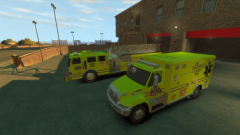
The Harbor County Fire Department HAZMAT and Decontamination Team. The HAZMAT team not only responds to high profile HAZMAT situations, but also specializes in cleaning up fuel and oil spills at motor vehicle accidents and is responsible for HAZMAT inspections at the various industries throughout Harbor County. -
From the album: 2 years with Harbor County
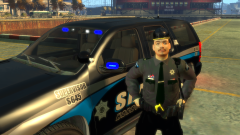
Chief Deputy Coffield speaking at a public involvment event earlier this month. The HCSO has several public involvement initiatives from the Citizen's Police Academy, Neighbrhood Watch Program, DARE program in schools, and other tools to help engage the public in proactive policiing and education about law enforcement and safety. -
From the album: 2 years with Harbor County
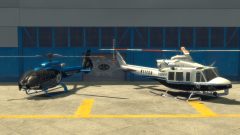
The HCSO Patrol Division is supported by a Eurocopter EC130 and a Bell 412 helicopter equipped with flood lighting, infrared, and various other high tech methods of assisting Deputies in locating suspects, vehicle pursuits, and various other functions. -
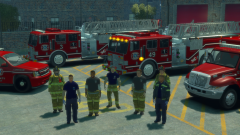 They were created by members of our community, based on the tutorial for combining ped meshes by cp702. His guide for mixing ped meshes can be found in the tutorials section.
 -
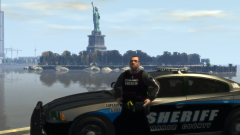
From the album: 2 years with Harbor County
Training Sergeant Honcho during a promotional photo shoot with the Statue of Happiness. -
From the album: 2 years with Harbor County
The latest HCFD livery, created by members of the community,


