


Hisel
Members
-
Joined
-
Last visited
Everything posted by Hisel
-
 Has anyone else ran into the issue of replacing the default lights with all blue lighting, and when switching sirens the top/main light bar gets stuck to solid blue? It happens weather I change the ELS file or not. It seems to be an issue replacing the light textures themselves. @BradM; what says you?
- 206 comments
- 94 reviews
-
I want the car in question, in this case policet, to spawn as a solid black or white Tahoe (the particular model I'm using). It can alternate between the two colors or always spawn as one color, it honestly doesn't matter to me. I'm going to mess around with the .ytd because I have a theory, and I'll report back with my findings. Sorry for the wrong section post, but thanks for moving it to the appropriate section!
-
I don't think the particular vehicle itself matters, as I know the liveries are located in the two .ytd files (i.e. police.ytd and police+high.ytd in this instance), but I'm unsure of how to make this vehicle spawn without a livery and in only one of two colors; black or white. The vehicle in question is to be used only as transport and not dedicated to any one specific agency, so an LSPD/BCSO livery kind of ruins it. Also, I have a model that I want to use and am not interested in any already unmarked recommendations. I'm trying to keep my models, lights and light patterns consistent. Thanks in advance for any help!
-
I read the part about your mapping maybe being incompatible with other mods, but thought I'd ask anyway since it doesn't specifically mention it. Thanks for your reply though!
-
Hey @Narobic, awesome mod and even cooler that you do requests! I was wondering if I could get a custom set that does the following: Disable phone in vehicle/on foot. Disable taking cover on foot (i.e. hiding behind a car). I'm an avid LSPDFR player and these two, but especially the taking cover on foot, is a big issue for me. I tried your default button configuration #5 with the specialty add-on to remove Cover [LB,RB,X,RT] but somewhere along the way it disabled my ELS controller buttons, which are not configurable. Thanks for any help!
-
So Free Me! does exactly what I'm looking for, but it also disables the use of DPadLeft to enable my ELS lights and B to toggle through sirens. So for right now I guess I'll deal with the cowering behind a car thing, because lights and sirens on the fly are pretty important IMO.
-
I find it handy to access my police radio with the right shoulder button, but given GTA V's default controls, that leaves me unrealistically cowering behind cars and other objects when requesting a tow, transport, etc. Has anyone found a workaround to that?
-
I think this is as close as you will get to what you're looking for. I'm not sure if the creator does requests, but I guess you could ask him for a real LAFD skin if you so please.
-
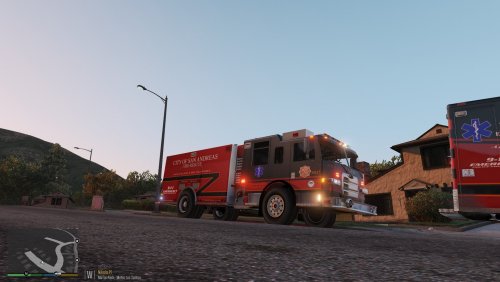 I love that my firetruck mostly matches my ambulance now. Looks really legit when they're both responding on scene. Great texture! Also sending you a PM, so hopefully you don't mind. 5/5 here!
- 1 comment
- 4 reviews
-
-

- 1
-
-
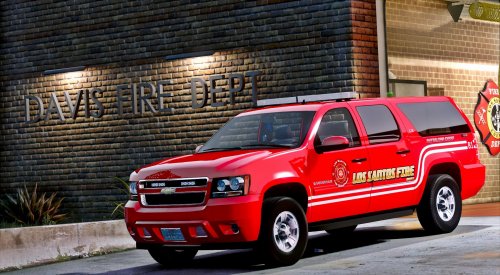 Same results, unfortunately. Like I said though, no big deal. It's still a superb model and is hardly ever seen without other blues on scene, so no biggie. I did, however, see a little blue dot in the top passenger side of the windshield. That's the only source of blue on the car, but there is no actual light there.
- 29 comments
- 10 reviews
-
-
-
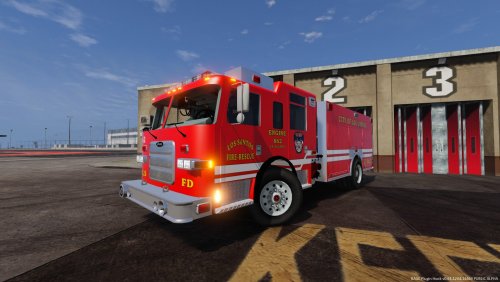 Your truck works beautifully. Lights are ample (with Radiance V anyway), no weird texture issues that I've found, etc. The interior is a little wack, namely the steering wheel, but I never play first person, it's just something I check on every model for some reason. 5/5 from me.
- 28 comments
- 12 reviews
-
I realize I'm almost a year late, but sometimes you just don't find these treasures new, ya know? Anyway, I replaced the file in the appropriate .ytd (it worked) and changed the one line from blue to red (it saved accordingly), but I still see some blue on the passenger side from this Tahoe even after both of these steps. Not a deal breaker, but it would be nice to fix. Do you (or anyone else) have any suggestions?
- 29 comments
- 10 reviews
-
I think you forgot to include the ELS XML? At least, I can't find it. Anxiously awaiting the ELS file.
- 28 comments
- 12 reviews
-
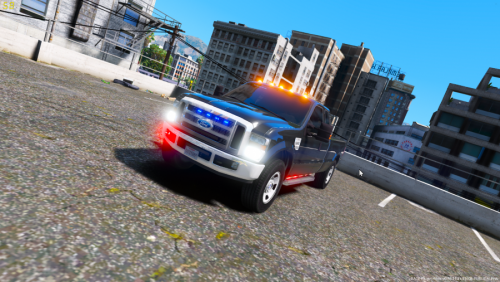 This isn't a bad model by any means, but there are two things I've noticed that are driving me crazy: 1) The environmental lighting shows what looks to be a yellow traffic pattern flash that is most noticeable at stage one, but less prominent as you advance the lighting stages, yet there are no yellow lights on the truck, and 2) the two lightbars at the front of the truck light up the rear of the truck and the rear environment as opposed to what is in front of you, and presumably what one is trying to highlight. These two fixes and I'll gladly rate the truck 5/5.
- 15 comments
- 3 reviews
-
If I have to make due then I will, but last time around I had no trouble reassigning the command key and would really like it back. Once I get going on this new version I plan to avoid updates as long as humanly possible. I hate this. Lol
-
That doesn’t work for me either. I’m using Simple Trainer and have tried Native Trainer as well. Both trainers are defaulted to the F4 key the same as RPH.
-
Long time LSPDFR player here, and I've never had an issue as simple as this, and even though I know how to fix it, I can't! So I'm starting over by deleting everything, reinstalling GTA V altogether, etc. It's something I do after playing several patches behind for awhile. Anyway, I use to have the console box activated by the F1 key versus F4, and even though I change the setting to that again, it only opens by F4. F4 interferes with my trainer, which funnily enough, also doesn't respond to having its command key changed. And when verifying the setting in RPH by holding down the SHIFT key, it has defaulted back to F4. So any suggestions on how to change either the trainer or RPH console key to F1, make it work, and make it stick? Thanks in advance.
-
Maybe we're talking semantics now, but that's a sound file as far as I'm concerned. Lol In the vehicles.meta I changed the POLICEB "<audioNameHash />" to <audioNameHash>POLICE3</audioNameHash>" to rid of the motorcycle sound for a typical police car sound. Worked wonderfully. I'm not picky in the least as far as handling goes. As long as my car isn't rolling when turning I'm fine. Now I know how to properly adjust it though, so that's great!
-
I greatly appreciate your help, again. Lol I remember my mistake last night was editing only the handling.meta file when trying to get a car to work in the POLICEB slot. Obviously that alone won't make it functional. I am up and running without a bike now, thankfully! All that's left to do is change the officer's outfit to the highway patrol outfit. Also make sure to edit your sound file so your new vehicle doesn't sound like a motorcycle. Haha
-
As long as I can get POLICEB to function as the Charger I want, all is well. Going to try my hand at it now. Thanks for your help and I will update.
-
Would taking the POLICE/POLICE2/POLICE3/etc. vehicles.meta and replacing it in POLICEB's slot suffice? I'm totally unfamiliar with replacing the motorcycle for a vehicle.
-
So I'm looking to do one of two things here, and I really don't have a preference as to which; 1. Reassign the state patrol vehicle to use the "POLICEOLD1" slot, as it's otherwise unused but is a really nice SAHP Charger model. Or... 2. While leaving the spawn name as "POLICEB", the default state patrol vehicle, change whatever I have to change in order for that slot to be occupied by said Charger in the "POLICEOLD1" slot. Just renaming the car files and VCF doesn't work as the car sits tilted (like a leaning motorcycle) and is totally inaccessible. Any help and/or recommendations? Thanks in advance!
-
Well that's a little disappointing. Oh well though. Thanks (again lol) for your help!

