


Hisel
Members
-
Joined
-
Last visited
Everything posted by Hisel
-
Check out this thread for a list of 0.4 compatible mods. Better EMS is working for 0.4, but at this time there is no radio integration nor tow truck or coroner.
-
Thanks again for all the help guys! I've made a pretty big update to my original post to reflect some more working and non-working plugins and will continue to work on it and monitor this thread for others' progress. Pretty excited to see some of Albo's stuff start coming around. Desperately awaiting Police SmartRadio and Computer+.
-
I would maybe point to Albo's plugin there. I haven't used STP to make my partner do anything, but I have done several transports and the whatnot and all is fine. Let's keep testing it though. @Fox7; It's not that 0.4 is lacking, it's still brand new. Even in 0.3 those were plugins made after the initial release.
-
Unfortunately the majority of plugins probably won't work in 0.4 right away. Give it a week or two max and I think we'll be set again. Also, currently trying out Albo's plugins since he updated Common. I know he said it wasn't a fix for everything, but I'm gonna see just how far I can get without a crash. Albo's plugins are still broken as far as 0.4 goes. 😞
-
See this thread for a list of plugins and callouts that work from 0.3.
-
Welcome... to that thread. Lol
-
So Traffic Stop Backup doesn't crash the game, but it doesn't work either. It's just completely unresponsive. Weird.
-
I would still launch the game regularly, without Rage, and then minimize it and launch Rage after the fact. I copied and pasted my whole mods -> update folder, so I wouldn't think that's your issue, but things run differently for different people so there's no telling.
-
Added! Thanks!
-
Not at this time, as the author of that mod has removed all of his mods including that one. Not to mention it relied upon Police SmartRadio which also is broken due to 0.4. Edit: I have TSB from 0.3 and I see that it can operate on its own. I'll try it and get back with you.
-
Load the game normally through Steam (not through Rage) and then alt + tab and load Rage.
-
I was having major texture loss with my old cars from 0.3, but after disabling that preload stuff it's working fine now. ELS and all. I suggest removing any car mods and ELS and starting over.
-
You had to have grabbed it before it was taken down. I never did use Ultimate Backup myself, so I don't have those files.
-
Yes, Stop The Ped works. As you said, I'm sure the other three will come in due time.
-
LSPDFR Computer+ has been moved to the 'not working' list. I goofed apparently, as I too am getting crashes now.
-
Hmmm. I'll keep my eye on it. Thanks for your input!
-
That's weird, I have it working no problem. I even pull it up when unnecessary. What exactly happens and what are your other plugins?
-
Interaction+ crashes my LSPDFR as well. Added to the not working list until further notice.
-
Just make sure you drag and drop both the "plugins" folder and the "RAGENativeUI.dll" file into your main directory. Other than that, it should work.
-
I can confirm that Computer+ and Stop The Ped work together harmoniously, so maybe look elsewhere for the culprit? It absolutely pained me to have to start over completely, but I totally understand that when developing 0.4, they have to develop with the base game in mind. The only thing 0.4 desperately needs from a gameplay standpoint right now is a radio that allows for a license plate check while moving and a towing service.
-
Thanks! I will try this one out momentarily. If we both get crashes, I'll add it to my 'doesn't work' list until someone proves different. Thanks for your feedback!
-
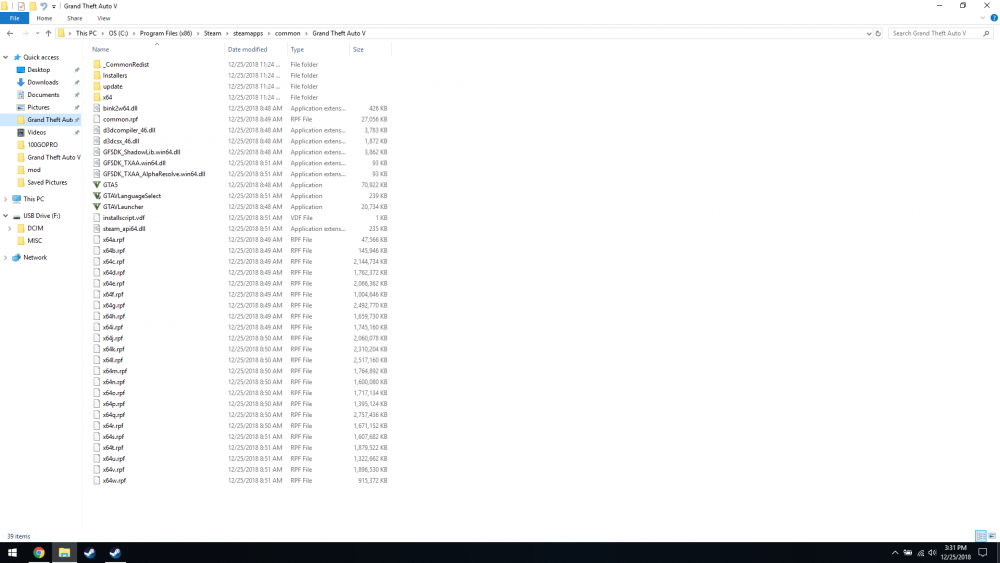
I found it best/easiest/most reliable to install 0.4 in a clean, vanilla GTA V folder and test from there. If you're using Steam, once you have a vanilla looking folder, be sure to run an integrity check and let it download any missing files. Below is what a vanilla Steam copy of GTA V should look like.
-
Try deleting the custom character in the customization menu in a police station and then opening the RPH console and erasing the previous save outfit (just type "duty" without the quotations and read the description of each command, I don't remember exactly which one you need). It may or may not be your fix.
-
Disclaimer: I can't guarantee these will work universally across the board, but these are the plugins and callouts that I have working in my game personally. Remember to always make a backup. I am not liable for your broken game. Keep in mind to remain grateful as this is a modification we are playing free of charge. We are literally just over 12 hours into 0.4's release, so time is needed for authors to make the proper adjustments to their mods for implementation from 0.3. Also, please do not include any visual or audio modifications as these should be irrelevant to the version of LSPDFR being played. 0.4 Plugins Arrest Manager Better EMS Callout Manager Cop Holster EUP Menu (Emergency uniforms pack - Serve & Rescue) Interaction+ Keep The F****** Door Open LSPDFR Computer+ Police SmartRadio Real Police Tape Mod Speed Radar Lite Spike Strips V Spotlight StickyWheels Stop The Ped Traffic Policer Ultimate Backup 0.4 Callouts (install any audio folder manually into GTA V -> lspdfr -> audio -> scanner) Assorted Callouts CalloutsV (MVA callout seems to crash game once pressing "T") Code 3 Callouts Code Red Callouts 2.9.7 PeterUCallouts (some callouts work, some don't) UnitedCallouts Wilderness Callouts 0.4 Miscellaneous Emergency Lighting System NOT WORKING LPCallouts LSPDFR+
-
Haha, no problem, happy gaming!


