


pcGAMEZguy
Members
-
Joined
-
Last visited
Everything posted by pcGAMEZguy
-
https://www.gta5-mods.com/misc/gameconfig-xml-dilapidated Give this a shot
-
 You using ELS? If you are try Go into your ELS INI and look for "ELSTrafCtrlOn" and set to false. Credit (Giordano)
- 1,178 comments
- 137 reviews
-
-

- 1
-
-
So do you have them pulled over, then when you try to access computer+ they pull off?
- 1,178 comments
- 137 reviews
-
Can you take a screenshot of your main directory using snipping tool?
-
Do you have LSPDFR+ installed.
-
Not sure if it's related but you've installed everything in open iv, lspdfr? Just getting and idea on what you've done since you've obviously done it before.Your positive it's in here......just double checking GTA5\Plugins\LSPDFR\ I don't believe this requires either one of these to work.Just the caprice from this pack I just notice that he says the caprice has bugs, possibly that is why. I hate wasting peoples time, I apologize I'm usually better than that on here.Just the taillights waggle. Do i need to possibly copy over the police carvariations to be in the police4 carvariations?Hey guys, Im trying to take a police and put it into the police4 slot. What else do i have to do besides change all files to police4 including the xml file. The car is installing with my liverys but ELS lights arent working. Any suggestions on what i may have missed. Thanks.
 If you get it while downloading try downloading the file directly to your desktop.
- 3,646 comments
- 306 reviews
Agreed!! People DO NOT listen or read ini files! Did you try and just load the MARKSMANPISTOL in the trainer?- 3,646 comments
- 306 reviews
This One?Anyone have a problem with not being able to get on the motorcycle? When spawned it just falls down also (policeb) Solved**Thanks!Is this normal? When the vehicles spawn dirty. No big deal just curious.This actually helped me a lot understand replacement vehicles and add-ons. https://www.youtube.com/watch?v=_ZMbZolbtYw&t=20s&list=PLEKypmos74W8PMP4k6xmVxpTKdebvJpFb&index=12 This is a playlist with a bunch of tutorials. https://www.youtube.com/playlist?list=PLEKypmos74W8PMP4k6xmVxpTKdebvJpFbthis helped me understand a lot.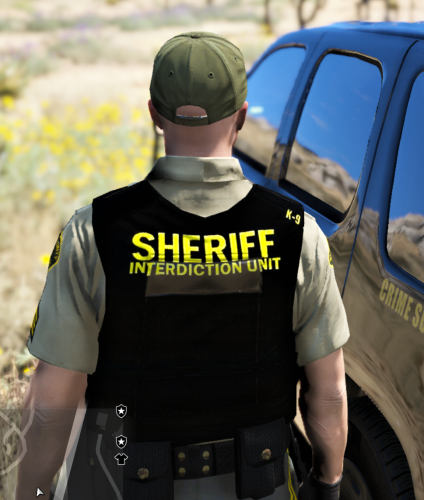 I believe this is the path D:\SteamLibrary\steamapps\common\Grand Theft Auto V\mods\update\update.rpf\x64\eup\eup_componentpeds.rpf\mp_m_freemode_01_male_freemode_mplts\ task_diff_000_c_uni.ytd task_diff_000_d_uni.ytd task_diff_000_e_uni.ytd Rename downloaded file to one of these and replace. In Simple Trainer its a texture option for the armor I believe.
- 22 comments
- 7 reviews



