


Fox Frenzy
Members
-
Joined
-
Last visited
Everything posted by Fox Frenzy
-
 I think we need to understand how, exactly, plugins are made and updated. There is no magic button the author clicks on to make it stable. It's not like going into the Update Center on Windows and clicking "Update Now!" There are tens of thousands of lines of code in this plugin and one errant line can cause your game to crash. Since there's some that are crashing and some that are not, there is clearly a conflicting force outside of Traffic Policer that is causing issues for some. Removing Traffic Policer may abate the symptom, but likely did not resolve the underlying issue. Yelling at the author "UPDATE UPDATE UPDATE" like some deranged Johnny Five clone is unhelpful. For those "taking out all their plugins and putting them back in" it's important in the troubleshooting process to know in what order? Start with ZERO plugins, then the plugin you suspect the most (in this case TP). If TP works as the only plugin, then TP is not broken. Try adding TP first and playing the game - then add one plugin at a time until it crashes. The last plugin you added has a conflict with TP and you will need to decide which plugin you want more.
- 3,646 comments
- 306 reviews
-
-

- 1
-
-
Brief question. Is there something a modeler has to do to their vehicle in order to make it tow objects? I am trying to get a vehicle to tow a trailer. It is an add-on vehicle, therefor I had to make the CarVariations and Vehicle entries myself. I gave the vehicle both flags for attaching trailers (highway and city) and I added the trailer names as items under <trailers> in the same place. This vehicle still won't pick up trailers. What is the trick to adding trailer capabilities to a vehicle? All relevant information: Target Vehicle CarVariations Entry: Vehicles entry:
-
Since the author @ALLENjr12 uploaded the vehicle as a Police2 object, I just robbed the CarVar template from Police2 and applied it to the carvar for this vehicle. Spent the last hour and a half trying to get it to hitch to ANY trailer and I think what's missing is a "hook point" that wasn't added to the vehicle model when it was made because I have tried absolutely everything. The correct Flags are being used, the correct trailers are added to the VehMeta. So that's all I'm left with is that there's some object that needs added to the vehicle in Zmodeler so the game knows where to attach the trailer to? I don't know.
-
I added the gamesettings, it didn't help. I put the Fireresc back into the VehMeta file but left it out of CarVarMeta. Assuming the game checks all files as it loads them into memory, does this drill the problem down to the CarVar entry? Or, if it's not in CarVar, does the game just IGNORE the VehMeta entry?
-
I was just using common sense with the trailer add-on. lol Every other vehicle with Trailer capabilities is shown like mine is so I just copied to this vehicle, so I'm sure it's not that. I don't think the problem is with the trailer. The trailer is in the game and the game runs fine with it. When I pulled the details for the Fireresc vehicle from VehMeta and CarVarMeta, RPH stopped crashing. It was crashing with a 107 "Unable to stat out-file". You know; the One Error To Rule Them All. Something about one of those two scripts it doesn't like.
-
I edited nothing on the trailer itself, but did a lot of editing for the vehicle. I gave it the Bobcatxl handling line since I use another Tahoe with that same handling line and it's perfect. I changed the name from Police2 to Fireresc and copied my other Tahoe's vehicle.meta info to it and copied a few of the flags from Firetruk and added the trailer as a trailer option (trailer will likely need spawned in as I'm not privy to any method of having it just lying around the parking lots of Fire Stations). I used your example CarVar to put it in CarVariations. The Trailer and Corspeedo are my only two additional cars to the game. Fireresc would be number 3.
-
@Giordano Resident expert. I need your assistance. I am trying to add a vehicle to the game - something I've done with success many times, but this one is giving me a hard time. Once I removed the vehicle from VehMeta and CarVarMeta the game loads. I'm doing something a little special with this one and that is, I'm giving it the Mobile Command trailer. This is the vehicle I am attempting to add. VehMeta Data: CarVar Data: It might be I'm overlooking a livery flag.. I have also changed my BetterEMS to dispatch this vehicle instead of the FBI2 vehicle. Dollars-to-Donuts the mistake is in the CarVar file as I'm not very proficient with that file yet.
-
Make it crash again and post your RPH log file. We can get to the bottom of this. Lights Out At Night is a little ... wonky in this build. I agree with you. But I just set mine to 350 instead of 0 and now I don't have 19 vehicles at an intersection all turning their lights off. Also, you can make these changes: //This is the minimum time before a new event can take place. E.g. when an event is created, the next event won't be created until x seconds after the first one. //The time is in seconds. //Maximum=200 NextEventTimer=180 //This is the number of events to be created before the timer is set. //E.g. if this is set to 2, the timer set above will only start counting down once 2 ambient events have been created consecutively. //Minimum is 1. NumberOfAmbientEventsBeforeTimer=1
- 3,646 comments
- 306 reviews
-
 PSA: Version 1.1.1 @Stealth22 1. Traffic Control has moved from the Plugins Folder to the LSPDFR folder - please make a note of that if you're updating from an older version. 2. The INI file name has changed from "TrafficControl.ini" to "Traffic Control.ini" 3. The plugin will not read the keybind settings from the INI for some reason. To correct this, simply delete the INI file, then reloadallplugins/forceduty. The plugin will recreate the INI file (in a different format) and you can edit the keybinds and settings in this INI file to get things back to normal. Then save it, reloadall/force again. Also, this keeps happening: [5/1/2018 8:03:44 PM.780] LSPD First Response: [5/1/2018 8:03:44 PM.781] LSPD First Response: ============================== [5/1/2018 8:03:44 PM.781] LSPD First Response: UNHANDLED EXCEPTION DURING GAME FIBER TICK [5/1/2018 8:03:44 PM.781] LSPD First Response: ------------------------------ [5/1/2018 8:03:44 PM.781] LSPD First Response: Origin: Game fiber "<UNNAMED THREAD>". [5/1/2018 8:03:44 PM.782] LSPD First Response: ------------------------------ [5/1/2018 8:03:44 PM.782] LSPD First Response: Exception type: System.Exception [5/1/2018 8:03:44 PM.782] LSPD First Response: Exception message: Processing cache while it's still in use - one or more subcalls may have caused the thread to yield [5/1/2018 8:03:44 PM.782] LSPD First Response: ------------------------------ [5/1/2018 8:03:44 PM.782] LSPD First Response: Inner exceptions: [5/1/2018 8:03:44 PM.782] LSPD First Response: ------------------------------ [5/1/2018 8:03:44 PM.782] LSPD First Response: Stack trace: [5/1/2018 8:03:44 PM.783] LSPD First Response: at }_T~83Fsa~MaT7\]O;V!\*j22%$.?????????????????????????????????????????() in E:\GTA V\LSPD First Response\LSPD First Response\Engine\Scripting\Entities\CPedCache.cs:line 47 [5/1/2018 8:03:44 PM.783] at ?????????????????????????????????????????.?????????????????????????????????????????() in E:\GTA V\LSPD First Response\LSPD First Response\Engine\Main.cs:line 56 [5/1/2018 8:03:44 PM.783] at LSPD_First_Response.Mod.LSPDFR.MainLoop() in E:\GTA V\LSPD First Response\LSPD First Response\Mod\LSPDFR.cs:line 607 [5/1/2018 8:03:44 PM.783] at Rage.GameFiber.Main() [5/1/2018 8:03:44 PM.783] LSPD First Response: ============================== [5/1/2018 8:03:44 PM.783] LSPD First Response: [5/1/2018 8:03:44 PM.789] [TRACE] Thread PlayerSuspectTransport #1 has been shut down [5/1/2018 8:03:47 PM.256] LSPD First Response: [Traffic Control] Error encountered in process thread -- Thread was being aborted. [5/1/2018 8:03:47 PM.258] LSPD First Response: [Traffic Control] System.Threading.ThreadAbortException: Thread was being aborted. [5/1/2018 8:03:47 PM.259] at Rage.GameFiber.SleepThis(Int32 duration) [5/1/2018 8:03:47 PM.259] at Rage.GameFiber.Yield() [5/1/2018 8:03:47 PM.260] at ?????????????????????????????????????????.?????????????????????????????????????????() [5/1/2018 8:03:47 PM.261] LSPD First Response: [Traffic Control] Stopping process thread... [5/1/2018 8:03:47 PM.349] LSPD First Response: All signs removed :(
- 338 comments
- 46 reviews
-
I do not remember what the original commands were. If you changed them, make sure you use the correct Member Name from this here. They are case sensitive: ControlKey will work - Controlkey will not. Make sure you use a key that is not assigned to something else. ELS is a bit territorial when it comes to its key binds. It is compatible with the current release of the game. I guarantee it as mine works well enough (I still get the stupid "Unable to stat out-file" error constantly). There may be a conflict with another mod as not all mods are designed with the intent to work with one another. Try turning OFF mods (by adding ".off" to the end of the DLL file - easy enough) and see if your situation improves. Also, make sure you have updated to the latest Albo.Common Lastly, the reason it might say it's not compatible is because either the plugin is actually out of date (and the Troubleshooter would have told you that) or Albo forgot to update the version number in the DLL file.
- 3,646 comments
- 306 reviews
-
 https://www.goldwave.com/release.php I recommend using the Volume Maximizer feature. WARNING. INKREESANG T3H VALYOOM UF TA AWDEO PHYL WILL MAYK T3H PHYL BEEGAR
- 51 comments
- 13 reviews
-
You have an invalid button assigned and Smart Radio is the plugin that's crashing. Since you removed Traffic Policer and the game worked, you may have incorrectly named a button in the TrafficPolicer.ini Remember, Member Names are case sensitive. Oemperiod will not work. OemPeriod will. Your version of Traffic Policer is outdated. Download and update to the newer version. I highly recommend everyone download and use the Albo LSPDFR Troubleshooter. It will fix most of the problems posted here.
- 3,646 comments
- 306 reviews
-
 That is just a notifier. It's always there. While it is technically *true* it's not always the VCF file's fault. The problem can also be caused by a VCF file tied to a non-ELS or improperly configured ELS vehicle. If you have a bunch of VCF's, try removing all of them and see if the game launches. If it succeeds, re add one VCF at a time until you find the culprit - unless you can sort out for yourself which vehicle is non-ELS compatible.
- 2,700 comments
- 241 reviews
-
You're going to have to go to the author of that mod. I don't use British Policing, so I'm not really able to help you further. Make sure to not only include the RageHook Log but also a list of Plugins you are using when you post on that plugin's page. Cheers!
- 3,646 comments
- 306 reviews
-
Exception message: Method not found: 'Void British_Policing_Script.API.Functions.add_PedOrderedOutOfVehicle(LSPDFR_.API.PedEvent)'. Something is not jiving with your British Policing mod. Temporarily disable the British Policing (just rename the mod's DLL file to ".off") and see if your game works. It may just be two plugins that don't like each other.
- 3,646 comments
- 306 reviews
-
@layofthenone That's not Traffic Policer. That's a memory access violation caused by RageHook. Try running RageHook as administrator. If you continue to run into problems, the best place for help with general RPH problems is here.
- 3,646 comments
- 306 reviews
-
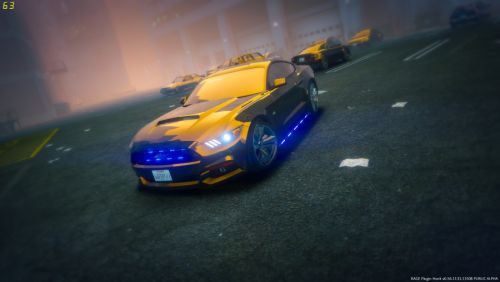 Takedown lights are backwards. I think someone mentioned it, but it was buried with a few other issues they mentioned. Though having reverse takedown lights is really a neat unintentional idea.
- 36 comments
- 8 reviews
-
Yes. The models that I've ever downloaded anyway. I've even seen the problem persist in a lot of Jeff Favignano's videos and he changes models all the time. It's almost like when the vehicle takes damage and a "piece" is supposed to detach, it just EJECTS the previous template into the game world and replaces it with the one showing the damage. There are A LOT of models that demonstrate this problem which starts to make me wonder if there isn't a mod or an alteration I made to cause it. Such as the "Realistic Damage" mod combined with custom vehicles.
-
Seriously, what gives? Every modded vehicle I download does this. I've even installed a completely fresh copy of the game with mostly Albo and Darkmyre mods.
-
Hey, Khorio. I'm investigating an issue with Automatic Roadblocks that causes all traffic to disappear. I've spun my wheels trying to find the program that was causing the problem and I believe it's interfering with another plugin I'm using. All of the details and Hell I've gone through are here in this thread.
-
I've heard this issue going around and it has something to do with WinRar. Try Redownloading ELS fresh and unzip it with 7Zip.
- 2,700 comments
- 241 reviews
-
-
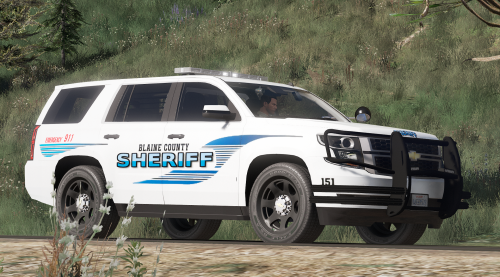 Sometimes the lightbar doesn't work. I have to spawn the vehicle in several times to get a working lightbar. When I call for backup, the backup also shows up without working lightbars. Thoughts?
- 28 comments
- 3 reviews
-
 Rename the ZIP file to something with the UTF-8 garble in there (%20 instead of spaces) and see if that helps.
- 1,081 comments
- 166 reviews
-
Windows has a file name character limit of 260... There may have been an issue during the download causing the file to retain its hash name. Clear your browser cache and re-download the plugin again.
- 1,081 comments
- 166 reviews

