Fox Frenzy
Members
-
Joined
-
Last visited
Everything posted by Fox Frenzy
-
 Best advice to offer is Double, Triple, QUADRUPLE check the read-me files. If you replace a file that you've replaced already, the most recent is going to take effect. For instance, if you replace Handling.meta for better car physics, but then replace it down the road because you added a car - your physics settings are now gone. Second bit of advice; don't be too eager to upgrade to the latest "whatever". Keep backups of old versions of plugins and mods just in case the new ones clash with something else. Always unzip your mods/plugins to a special "Fresh, Unedited Plugins" folder and then into another appropriately named folder that includes the name of the Mod and the Version number. Always keep track of what you add to your GTA V directory. You can make ANOTHER folder that's set up exactly like your GTA V directory but without the GTA V game in it. This way you know what files are plugins and what files are the game itself, making it less confusing when you're trying to troubleshoot a broken plugin. Always use the Mods folder in OpenIV and back up anything you replace to a special folder. Name the folder, or include a .txt file (you can right click and select "New Text File" inside any folder in Windows) with the Date and the Reason you were backing it up. i.e. handling.meta, backup.txt -> "7/13/17 This handling.meta includes corspeedo, whambulance5000 and realistic damage. Replaced with Megalords Super Real Jumping mod." You can edit META files with Notepad++. Simply export them as TXT from OpenIV and rename them whatever.meta. Then open it and copy another mods changes to your new mods changes. Not sure what a mod changed? https://github.com/pnedev/compare-plugin/releases/tag/v2.0.0 Compare Plugin for Notepad++. Compare your old whatever.meta to the new one. Some mods were made for older game versions and don't include necessary information, but don't exactly EFFECT that new stuff. So if a beloved mod is broken on 1103, you may be able to restore it yourself by just finding the differences and copying the relevant information to your existing meta file and then placing it in OpenIV. ... Got way on a tangent there. Sorry!
- 2,661 comments
- 234 reviews
-
-

- 2
-
-
I'm running the new scripthookv and not having any issues with ELS. I'm not familiar with how ELS is coded in the ASI and there may be something it's not agreeing with on your computer (some plugins flip their lid if the system clock is wrong). Without any support from LTCaine, I'm not sure what to say to those having problems. I've had issues on and off with ELS and typically fix them by replacing the XML files. There has to be a potential conflict. Some plugin or mod that those having this ELS issue all have in common. Try pulling out all of your plugins in the main GTA folder (back them up somwhere). I have ParksTools (for better EMS), TrainerV and PLD (Player Location Data) and my ELS works, so those are fine. Also, rename your plugins folder to "_plugins", create a new "plugins" folder, then copy "LSPD First Response.dll" and "LSPD First Response.pdb" to the new plugins folder. Then, rename your mods folder to "_mods", create a new "mods" folder and copy JUST "Update, x64, dlcpacks, patchday15" and put ONE ELS police car in there. Run the game. You should be playing with an extremely vanilla version of GTAV: LSPDFR short of redownloading the entirety of the game. If ELS still doesn't work, the odds of this being a game problem are starting to slim. Especially if the ELS log isn't throwing any errors because, let me tell you, ELS is ing picky when it comes to everything being JUST SO and will crash the game otherwise.
- 2,661 comments
- 234 reviews
-
-
- 1
-
-
Couple things. 1) This car replaces the "Police" model in the game. Though the instructions say "Place in Patch Day 11" I always either: a) Find and replace the original car (in this case, Police is in x64e/level/gta5) or b) Place in the most recent patch day (in this case, patchday15). *Always make sure you copy to Mods folder and always make a backup of whatever you're replacing. 2) The VCF (XML) file that comes with this car looks wrong to me. All of the lights were set to False for LSTG3. Replace this snippet of code with my edits and see if that works: Lastly, your ELS.LOG should look like this for that model: If there's an Error, post it. If your game crashes as a result of changing the XML then that's my bad and just put the fresh copy back in. Make sure it's in PACK_DEFAULT as well.
- 2,661 comments
- 234 reviews
-
From your video, I notice a couple things wrong that indicate the XML file for your vehicle is corrupt, incompatible with the vehicle or improperly altered. 1) When you activate a stage, it should turn orange while the rest are in gray. Yours are orange all the time. <INTERFACE> <LstgActivationType>invert</LstgActivationType> <DefaultSirenMode>standby</DefaultSirenMode> <InfoPanelHeaderColor>grey</InfoPanelHeaderColor> <InfoPanelButtonLightColor>orange</InfoPanelButtonLightColor> (Some may say GREEN and that's fine) </INTERFACE> 2) Your WigWags are running but the WW is not lit, also indicating an issue with the XML file for this vehicle. 3) When your lights come on solid, those are "Cruise" lights. The ELS Panel shows the "CRS" turn orange when you click them on. Turn your Cruise lights off or go into your XML and edit this line: <CRUISE> <DisableAtLstg3>true</DisableAtLstg3> (This needs to say TRUE) <UseExtras Extra1="false" Extra2="false" Extra3="false" Extra4="false" /> </CRUISE> Bottom line, your XML file for that vehicle is FUBAR. I would suggest deleting it and adding a fresh XML file from the download source to correct this issue. When the modeler built your vehicle, they use "Extra 1", "Extra 2" and so on to indicate the different light bars. This is what ELS picks up on out of the model files in order to instruct them to flash differently. The XML file you have may have an inadvertent false flag somewhere in these lines: <EOVERRIDE> <Extra01 IsElsControlled="true" AllowEnvLight="true" Color="red" OffsetX="-0.70" OffsetY="-0.20" OffsetZ="0.50" /> <Extra02 IsElsControlled="true" AllowEnvLight="true" Color="red" OffsetX="-0.25" OffsetY="-0.20" OffsetZ="0.50" /> <Extra03 IsElsControlled="true" AllowEnvLight="true" Color="red" OffsetX="0.25" OffsetY="-0.20" OffsetZ="0.50" /> <Extra04 IsElsControlled="true" AllowEnvLight="true" Color="red" OffsetX="0.70" OffsetY="-0.20" OffsetZ="0.50" /> <Extra05 IsElsControlled="true" AllowEnvLight="true" Color="white" OffsetX="-0.70" OffsetY="-0.20" OffsetZ="0.50" /> <Extra06 IsElsControlled="true" AllowEnvLight="true" Color="white" OffsetX="0.70" OffsetY="-0.20" OffsetZ="0.50" /> <Extra07 IsElsControlled="true" AllowEnvLight="true" Color="amber" OffsetX="-0.40" OffsetY="-0.80" OffsetZ="0.40" /> <Extra08 IsElsControlled="true" AllowEnvLight="false" Color="amber" OffsetX="0.00" OffsetY="-0.80" OffsetZ="0.40" /> <Extra09 IsElsControlled="false" AllowEnvLight="true" Color="amber" OffsetX="0.40" OffsetY="-0.80" OffsetZ="0.40" /> <Extra10 IsElsControlled="false" /> <Extra11 IsElsControlled="false" /> <Extra12 IsElsControlled="true" /> </EOVERRIDE> *Do not copy this code. The offsets will not be correct for your vehicle. One of them may be set to false. Make sure you know what your vehicle addon options are (Like push bars on the front) because you don't want to set those to true; otherwise your push bar will blink in and out of existence as if it were a light. I would set Extra01 -thru- Extra09 to true and see what happens.
- 2,661 comments
- 234 reviews
-
-
Make sure: //Setting this to true disables Siren Mastery functionality for vehicles that have an ELS VCF file. DisableForELSVehicles=false In the Siren Mastery General Config. You may experience conflicts using Siren Mastery with an ELS vehicle. You have been told. :P
- 2,661 comments
- 234 reviews
-
I'm no expert, but it may be the XML files are not installed or configured correctly. Make sure this line: <INTERFACE> <LstgActivationType>invert</LstgActivationType> Is set to Invert and not Manual for AI-driven vehicles. Also make sure the XML files are named after the YTD files. "Ambulance.ytd" should have an "Ambulance.xml" file. XML files belong in %GTA Folder%\ELS\pack_default I honestly have no idea at this. Maybe go into your ELS.ini and change "sound_manul" to another key? If you set "AllowController" to False that will unhook ELS from your controller, but you'll have to activate lights and sirens from your keyboard. Unless you use something like XPadder to emulate your keyboard and Free My Controller or Who Needs Em to release the buttons from being hooked by the game, you may be stuck with this.
- 2,661 comments
- 234 reviews
-
 All Traffic Disappears I've been spinning my wheels trying to troubleshoot a problem. All of the AI Traffic will disappear after Traffic Policer Code 4's or Cleans Up a Street Racing event (whether I pursue the suspects or ignore them). I've turned it off as an ambient event. I'm still troubleshooting this, but I've been able to effectively get recreate the problem multiple times in a row. I don't know if this is a conflict with another plugin or Mod that I have, but it's starting to look that way since nobody else appears to have the issue. %99 of the time it happens as a result of the end of a chase. Whether I ignore the Street Race event, participate in it; whenever TP cleans up the Street Race event - all AI traffic is gone. The link above is an LSPDFR forum thread I started trying to troubleshoot it. There's even a video of the end result. If anyone else has this issue, please respond on THAT thread above so information can be collected in one place. Since this plugin hasn't been updated for the new Albo.Common, I'm wondering if that's the primary cause.
- 3,646 comments
- 306 reviews
-
-
Um. It should've come with ELS. Weird. Here, you can have mine. AdvancedHookV.dll It's a "Feature". Best option is use the R key or go into "Settings > Vehicle General" and change it to another unused key. I would avoid UIOPJKL because ELS uses ALL of those. You can also use OEM keys like []\;',./-= and you can find those here.
- 2,661 comments
- 234 reviews
-
-
There doesn't appear to be anything out of the ordinary. Are you talking about: "Parsing file. *A crash before all clear indicates faulty VCF.*"? That's just a tip about where to look for potential issues if there's an issue parsing the VCF.
- 2,661 comments
- 234 reviews
-
-
I sorted my issues out with ELS and it works fine for me on the latest everything. Try loading the game without ELS, then do a quick save as soon as you're in, then return the ELS files back to their rightful place and start the game again.
- 2,661 comments
- 234 reviews
-
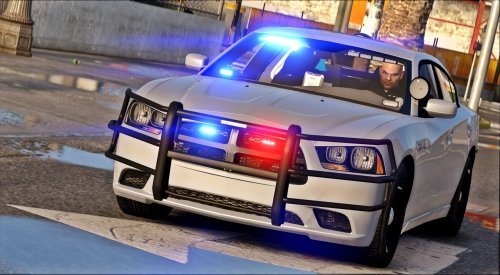 @POLICESCO In the XML file, is there any way to get the light bar in the back to generate an amber or yellow light? I can see the colors in the YTD file. What I'd like to do is program that back light bar to flash an Amber or Yellow pattern when I'm out of the car and all light stages are off.
- 13 comments
- 17 reviews
-
@Lt.Caine Hi! Just wanted to let you know of a bug I found; or maybe I just shouldn't do what I did. My game was crashing trying to load into the story mode (like...RIGHT before it goes into the game world) and I believe it was caused by ME having Quick Saved the game with my lights running. For one thing, I DID change the XML file for my car trying to experiment. I wanted to see if I could change which lights came on with which stage and I also wanted to set some defaults so I didn't have to fark around with the ELS panel every time I booted the game. I DID replace the edited XML with a fresh copy from a working backup and the game still crashed anyway. Right now, with ELS removed, my game is working. I made another quick save with Franklin back at his home so that when the game loads it does NOT load my car parked at a P&Q with lights running. TL;DR - DO NOT quick save the game with ELS lights running, your game will crash when it attempts to load back in. <3!
- 2,661 comments
- 234 reviews
-
-
- 1
-
-
-
@Albo1125 Updated everything of yours today and my game is crashing. Just the game, not RPH. RPH just closes and doesn't present a crash report, so I'm assuming RPH hooks successfully. Story mode loads and instead of going into the game world, GTAV vomits all over itself, falls down and whacks its head on the edge of the bathtub. I went through all of my plugins, one at a time, changing .dll's to .dll.old's so that they don't load and it still continues to crash in the same place. Again, it wasn't doing this last night; just after I put in the new albo1125.common.dll and updated LSPDFR+, PSR, ArrMan & AssCall (lol "asscall"). Right now I'm verifying game files through steam, just in case. I haven't unhooked my mods folder yet. Might give that a try, but nothing in there has changed since last night. I was still troubleshooting an issue where all traffic disappears. If that's some how relevant you can view that ongoing issue here but I don't think that has anything to do with today's problems. Thanks!
- 124 comments
- 25 reviews
-
 Suggestion. ^^ Have EMS call the Coroner if a body is determined dead. But make sure to include a marking system so the Coroner's attend to only the body's the EMS release and don't go around scrounging up potential survivors.
- 781 comments
- 85 reviews
-
 Makes sense, but the odd thing is, there's no verbal communication during these Traffic Stop Backups other than screen text. I did re-enable WMP and these are working, now. I'm not gonna complain; I just prefer VLC, but I'm presuming these are hard-coded to specific codecs that only WMP uses. I'm not a programmer (outside of PHP), but I can take educated guesses! Now I just need to figure out why ELS and Carcols don't work.
- 1,081 comments
- 166 reviews
-
I have a few callouts that are not working. Assorted Callouts was the first mod I installed when I started playing this just a couple days ago (I now have, like, 792 mods. It's boss). This is the only one I'm having trouble with. Specifically (but not limited to) Traffic Stop Backup. When I press "Y" to talk to the officer, the plugin crashes. Here's a section of the log detailing the event: [6/27/2017 5:48:38 AM.819] [TRACE] Callout created: #1 [6/27/2017 5:48:38 AM.846] LSPD First Response: AssortedCallouts.TrafficStopBackup [6/27/2017 5:48:39 AM.022] [TRACE] Thread ZoomThread #1 initialized [6/27/2017 5:48:42 AM.396] LSPD First Response: SituationNumber: 8 [6/27/2017 5:48:42 AM.399] [TRACE] User accepted callout [6/27/2017 5:48:42 AM.626] setting up new cop: null [6/27/2017 5:48:42 AM.626] [TRACE] New ped recognized as cop [6/27/2017 5:48:42 AM.627] setting up new cop: null [6/27/2017 5:48:42 AM.627] [TRACE] New ped recognized as cop [6/27/2017 5:48:46 AM.184] setting up new cop: null [6/27/2017 5:48:46 AM.185] [TRACE] New ped recognized as cop [6/27/2017 5:48:48 AM.972] [TRACE] Asked thread ZoomThread #1 to abort: Timeout exceeded [6/27/2017 5:48:48 AM.974] [TRACE] Instance cleaned (ZoomThread #1) [6/27/2017 5:48:48 AM.978] [TRACE] Thread ZoomThread #1 has been shut down [6/27/2017 5:48:52 AM.283] setting up new cop: null [6/27/2017 5:48:52 AM.283] [TRACE] New ped recognized as cop [6/27/2017 5:48:52 AM.283] setting up new cop: null [6/27/2017 5:48:52 AM.284] [TRACE] New ped recognized as cop [6/27/2017 5:48:52 AM.284] setting up new cop: null [6/27/2017 5:48:52 AM.284] [TRACE] New ped recognized as cop [6/27/2017 5:48:53 AM.794] Removing options for Menu [6/27/2017 5:48:54 AM.441] [TRACE] Cleared PD [6/27/2017 5:49:05 AM.536] setting up new cop: null [6/27/2017 5:49:05 AM.536] [TRACE] New ped recognized as cop [6/27/2017 5:49:05 AM.537] setting up new cop: null [6/27/2017 5:49:05 AM.537] [TRACE] New ped recognized as cop [6/27/2017 5:49:06 AM.049] setting up new cop: null [6/27/2017 5:49:06 AM.049] [TRACE] New ped recognized as cop [6/27/2017 5:49:06 AM.555] setting up new cop: null [6/27/2017 5:49:06 AM.555] [TRACE] New ped recognized as cop [6/27/2017 5:49:15 AM.473] LSPD First Response: Added ambient event fibers to cleanup [6/27/2017 5:50:02 AM.011] LSPD First Response: System.TypeInitializationException: The type initializer for '?????????????????????????????????????????' threw an exception. ---> System.Runtime.InteropServices.COMException: Retrieving the COM class factory for component with CLSID {6BF52A52-394A-11D3-B153-00C04F79FAA6} failed due to the following error: 80040154 Class not registered (Exception from HRESULT: 0x80040154 (REGDB_E_CLASSNOTREG)). [6/27/2017 5:50:02 AM.012] at System.RuntimeTypeHandle.CreateInstance(RuntimeType type, Boolean publicOnly, Boolean noCheck, Boolean& canBeCached, RuntimeMethodHandleInternal& ctor, Boolean& bNeedSecurityCheck) [6/27/2017 5:50:02 AM.012] at System.RuntimeType.CreateInstanceSlow(Boolean publicOnly, Boolean skipCheckThis, Boolean fillCache, StackCrawlMark& stackMark) [6/27/2017 5:50:02 AM.013] at System.Activator.CreateInstance(Type type, Boolean nonPublic) [6/27/2017 5:50:02 AM.013] at System.Activator.CreateInstance(Type type) [6/27/2017 5:50:02 AM.013] at ?????????????????????????????????????????..cctor() [6/27/2017 5:50:02 AM.013] --- End of inner exception stack trace --- [6/27/2017 5:50:02 AM.013] at ?????????????????????????????????????????.?????????????????????????????????????????(String , List`1 , Ped ) [6/27/2017 5:50:02 AM.013] at ?????????????????????????????????????????.?????????????????????????????????????????() [6/27/2017 5:50:02 AM.014] LSPD First Response: Assorted Callouts handled the exception successfully. [6/27/2017 5:50:02 AM.018] [TRACE] Instance cleaned ( #1) This also happens with "Store Shoplifting" and "Gas Theft". I've temporarily disabled them in the INI file. I have run the troubleshooter and the only thing it complains about is Windows Media Player not being installed. I checked out the CLSID and, sure enough, it's a WMP embedded com class. Is there any way you can change this so WMP isn't necessary?
- 1,081 comments
- 166 reviews
-
-
- 1
-
-
These mods work great for making people move over when you're flying up behind them, but when you make a traffic stop in a tight area, traffic will queue up behind you or just crash into each other instead of just going around you. Now, I've sat out on this run road radaring and I watched a truck hit a bunny rabbit. This rabbit laid dead in the middle of the road and every single car that came down WENT OUT OF THEIR WAY to go around this roadkill. We NEED something that applies that same logic to a stopped police car with it's lights on (driver in or out of the vehicle).
-
I second this. I make a traffic stop or there's something else going on and I have my cruiser parked in a lane, the AI will either; A) Stop behind me. B) Crash into me. C) Go around and crash into something else. Also, when I use the Traffic Policer or Traffic Control mods to stop traffic or slow it down in a given area, traffic outside of the cone just keeps going at normal speed until it hits a stopped car. They have absolutely no ability to register what's going on more than 5 feet in front of them and by then there's already 177 cars all smashed up on both sides of the highway just because I made them slow down.
-
Ongoing issues with "assisting an officer" in a traffic stop. Actually, anything that requires me to "Press Y to talk" to an NPC causes the call to crash. I ran your fixer and it only detected I did not have Windows Media Player installed. Is there some kind of codec your program is trying to reach out to? [6/25/2017 10:17:01 AM.691] 6/25/2017 10:17:01 AM - released [6/25/2017 10:17:03 AM.469] LSPD First Response: System.TypeInitializationException: The type initializer for '?????????????????????????????????????????' threw an exception. ---> System.Runtime.InteropServices.COMException: Retrieving the COM class factory for component with CLSID {6BF52A52-394A-11D3-B153-00C04F79FAA6} failed due to the following error: 80040154 Class not registered (Exception from HRESULT: 0x80040154 (REGDB_E_CLASSNOTREG)). [6/25/2017 10:17:03 AM.475] at System.RuntimeTypeHandle.CreateInstance(RuntimeType type, Boolean publicOnly, Boolean noCheck, Boolean& canBeCached, RuntimeMethodHandleInternal& ctor, Boolean& bNeedSecurityCheck) [6/25/2017 10:17:03 AM.475] at System.RuntimeType.CreateInstanceSlow(Boolean publicOnly, Boolean skipCheckThis, Boolean fillCache, StackCrawlMark& stackMark) [6/25/2017 10:17:03 AM.476] at System.Activator.CreateInstance(Type type, Boolean nonPublic) [6/25/2017 10:17:03 AM.476] at System.Activator.CreateInstance(Type type) [6/25/2017 10:17:03 AM.476] at ?????????????????????????????????????????..cctor() [6/25/2017 10:17:03 AM.477] --- End of inner exception stack trace --- [6/25/2017 10:17:03 AM.477] at ?????????????????????????????????????????.?????????????????????????????????????????(String , List`1 , Ped ) [6/25/2017 10:17:03 AM.477] at ?????????????????????????????????????????.?????????????????????????????????????????() [6/25/2017 10:17:03 AM.478] LSPD First Response: Assorted Callouts handled the exception successfully. [6/25/2017 10:17:03 AM.483] [TRACE] Instance cleaned ( #2)
- 3,646 comments
- 306 reviews