




MichaelV
Friends of LSPDFR
-
Joined
-
Last visited
Everything posted by MichaelV
-
When in doubt, do both. lol I kinda like it without the pushbar, looks kinda nice.
-
You just perfectly described Double Doppler.
-
With that comment, I could have predicted you are Canadian.
-
The guy above me is correct. lol
-
No, that is only the Demo version. You cannot import things without a registered version.
-
Yes it does! You still need a legit copy of Zmodeler.
-
I would suggest creating banners for each member of your clan, and ask them to put it in their signature, so more people will read it.
-
If the vehicle is Unlocked, then you can mess around with it. You need a program called Zmodeler. You must pay for it.
-
I would say London, they already done most of the well known parts of the United States, and Canada is not that much different unless they want to do GTA VI Prairie Wars. London is something really different and could be very fun.
-
Did you change the line before?
-
It could be a handling line issue. Did the truck come with a handling line?
-
Check out these files. He uses those hubcaps you are talking about. http://www.lcpdfr.com/index.php?app=core&module=search&do=user_activity&search_app=downloads&mid=523
-
Do you find a lot of lag right before it gives you that message? If not, it could also be your internet connection.
-
Use the script I linked you to.
-
You need this. Though, if you want to use a different truck, this can help. http://www.lcpdfr.com/page/tutorials/index.action/_/vehicle-modification-tutorial/how-to-tow-cars-using-snt-r36
-
-
Look at the downloads page for really good skins. Check the other files by that author to see if they are all High Quality, and ask them nicely if they could do the skins for you. I would as well, but I am busy with real life things.
-
Your right, it is awesome, though he is only taking texture requests as he said in his OP. You are asking for a Model done.
-
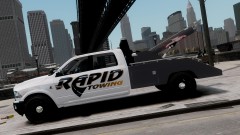 Very nice!
 -
-
Dat Dock! It is so simple, it is pretty.
-
Does it still work? If so, it is just the game changing your computer's resolution, so it can go full screen when in 800x600.
-
This is a GREAT Tutorial. http://www.lcpdfr.com/page/tutorials/index.action/_/vehicle-modification-tutorial/basics-of-adding-materials-importing-models-correct-hierarchy-and-exporting-in-zmodeler-r25
-
Very Nice! The only thing is try not to call it "your" ambulance, as it is not yours, the skin is.
-
Is this a skin or a model?


