




MichaelV
Friends of LSPDFR
-
Joined
-
Last visited
Everything posted by MichaelV
-
-
-
I know. I can make them myself, if only I knew the name to change it in the Admin CP.
-
-
IP Board. Sorry about that, I was contemplating those two forums.
-
Hey guys. I would like to change some of the logo things on a website. I just can't find the proper name for them to search for them. When I say "logo things" I mean like the Rep button, the Message button, the Notification button, and things of that nature. Anyone knows the proper name for them? Thanks.
-
Do you need help to put them ingame? If so: http://www.lcpdfr.com/page/tutorials/index.action/_/vehicle-modification-tutorial/how-to-import-skins-onto-a-vehicle-r28
-
You need Zmodeler. Below is a tutorial on how to do so. http://www.lcpdfr.com/page/tutorials/index.action/_/vehicle-modification-tutorial/basics-of-adding-materials-importing-models-correct-hierarchy-and-exporting-in-zmodeler-r25
-
-
Try deleting the background of the Badge. Or else you will get a white background around it. Pretty good.
- 7 comments
- 13 reviews
-
Before, the extra parts were not connected to the car. What he did was he connected them to the car so it will show the extra parts in game.
-
This is an amazing tutorial. http://www.lcpdfr.com/page/tutorials/index.action/_/vehicle-modification-tutorial/basics-of-adding-materials-importing-models-correct-hierarchy-and-exporting-in-zmodeler-r25
-
Yeah, I thought what you meant was more of the physical side of things. Which is what beta testers mostly do is find the bugs with it. Pretty smart idea to have artistic style testers.
-
You don't really need Beta Testers for skins, as they will be the same for the model it was designed for. All you need is to test them in game yourself to make sure things are in the right places. You don't need multiple people to do that.
-
Update 15/03/2013 Since our last update, many things have changed. First of all, We would like to welcome to the team: rcmpCA- Scripter Visible25- Vehicle Modeler Robert B- Probie (In Training) for Vehicle Modeling Carrythxd- Media Relations/Beta Tester avsg1rl- Media Relations We would also like to welcome back: Beckugan1- Vehicle Modeler 00Stevo- Vehicle Modeler Ceril- Converter K-9 Police 9- Texture Artist Sharp Command- Texture Artist Michael V.- Texture Artist ______________________________________________________________________________________________________________ We have recently Revamped the Website and we now have a Forum for normal use and or Mod Support as well as communicating with the team. [bOTH WEBSITES ARE STILL UNDER CONSTRUCTION] Request Website Forum Website (Create an account if you want) We hope you enjoy using them. If there is any problems, please PM me on LCPDFR. ____________________________________________________________________________ Lastly as of today, we are Re-opening Requests for Textures. Other Modding Areas will take suggestions. TL;DR: Added team members, new websites and Requests and Suggestions are now open. Happy Requesting! -Michael V. A51D
-
-
You have to put the files in your script folder. Then when you start the game, go beside the car and press Ctrl T.
-
-
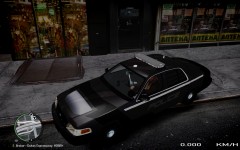 Looks great.
 -
CP702's username. Awww man, Now I am getting 403's. Only for Police Car Website at the moment.
-
Nope, works fine for me. Click here to fix it.
-
It doesn't look like it is happening to me. Do you have an example thread?
-
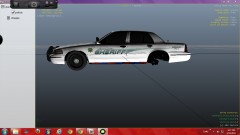 Nice, did you make that skin yourself?
 -
Here it is. http://gtapolicemods.com/downloads.php?do=file&id=460
-
I was already subscribed. Please don't close your Youtube, you make quality videos, and I would hate to see you go.


