




MichaelV
Friends of LSPDFR
-
Joined
-
Last visited
Everything posted by MichaelV
-
-
I recently got a Samsung S4 for my birthday, and I am in love with it. I am thoroughly convinced that it is better than Apple. It is not only a phone, but a mini tablet as well. The screen is huge and so HD that it really feels like you are on a tablet or something. It has practically the same games that you can get on iPhone and much more. I love the locking system as well. You can use a Pattern, PIN, or your own face and voice to unlock your phone. I used to have a Blackberry 9360. That phone was terrible, at least mine was. It wouldn't ring most of the time, and it would crash every time I had like 3 applications running. I didn't use the internet, or Facebook on it, due to the fear of it crashing again. Enough of my soon to be novel. What phone do you have? Do you like it? Why?
-
-
-
-
Thanks! I just realized how much I have diverted this from the initial topic.
-
Totally forgot. My birthday was today, so I am 14.
-
I am still the smallest and lightest in my grade. Thanks. I try my best to differ from the others in my age group, and to be treated as an adult (I don't look like it), lastly, it is fun when people try to guess my age and get it wrong.
-
-
Actually, I think I just reached 5'.
-
When making replicas of skins, they should be fairly exact. I made an OPP Pack when I first came here, and I didn't have the right font, colours, or anything. Try to keep that in mind. Try getting exact fonts, like that one would be something like MicroExtendFLF. The fonts seem to be your main issue. Oh, and lower the decal a little bit. The decal should be at the headlight, not above it. Try to look out for simple things like that. Everything else looks very nice. With real skins, feel free to let your inner OCD run wild, or in a straight line, i suppose. If you don't want to make it exact, make it a Liberty City version. People will be more lenient if it was only 'based' off a real department, at least that is what I have noticed. Good Luck! :)
-
He must be a robot! I think it may be Portuguese Anyways, I don't know how this matters, but I am 80/90 LB last time I checked. I know, I am very light. I eat a lot though, like a lot.
-
I no comprende.
-
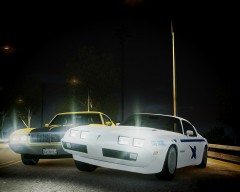 True, but that had some relevance to the original picture.
 -
Probably because it is damn huge. lol
-
WSP took 'undercover' to a whole new level, but he took the wrong car out on patrol? :D
-
That's why he pulled the car over. Duh. ;)
-
Happy 4th of July, you Americans. My gift to you, "The Freedom Truck." (Just overlook the fact that Nissan is an Asian car brand.)
-
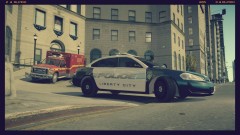 I love convoys so much.
 -
![New LCPD Skin Pack [WIP] (Skin 3)](//s3-gallery.int-cdn.lcpdfrusercontent.com/gallery/album_1302/sml_gallery_23070_1302_13730.png) OOOOO Pwetty.
OOOOO Pwetty. -
But the thing is you just created the texture. What is the model for? You didn't make it, why upload it? You didn't even ask permission.
- 17 comments
- 11 reviews
-
-
Wow. Unbelievable. Maybe Unr3al was right... I am starting to get scared they may contact me to take down my files. I laughed so hard when they mentioned Spiers.
-
No. We are an exclusive club. Only people with funny accents, igloo residents, and Hockey lovers are allowed to join. You have been denied access. I live an hour away, and my birthday is on American Independence Day. I'm still not an American. I'm okay with that, lol.
-
To tell you the truth, I actually forgot it was already Canada Day. I was reminded by the constant fireworks blaring out my window. Happy Canada Day! It feels great to be Canadian.

![New LCPD Skin Pack [WIP] (Skin 3)](http://s3-gallery.int-cdn.lcpdfrusercontent.com/gallery/album_1302/sml_gallery_23070_1302_13730.png)
