


AntEyeVirus
Members
-
Joined
-
Last visited
Everything posted by AntEyeVirus
-
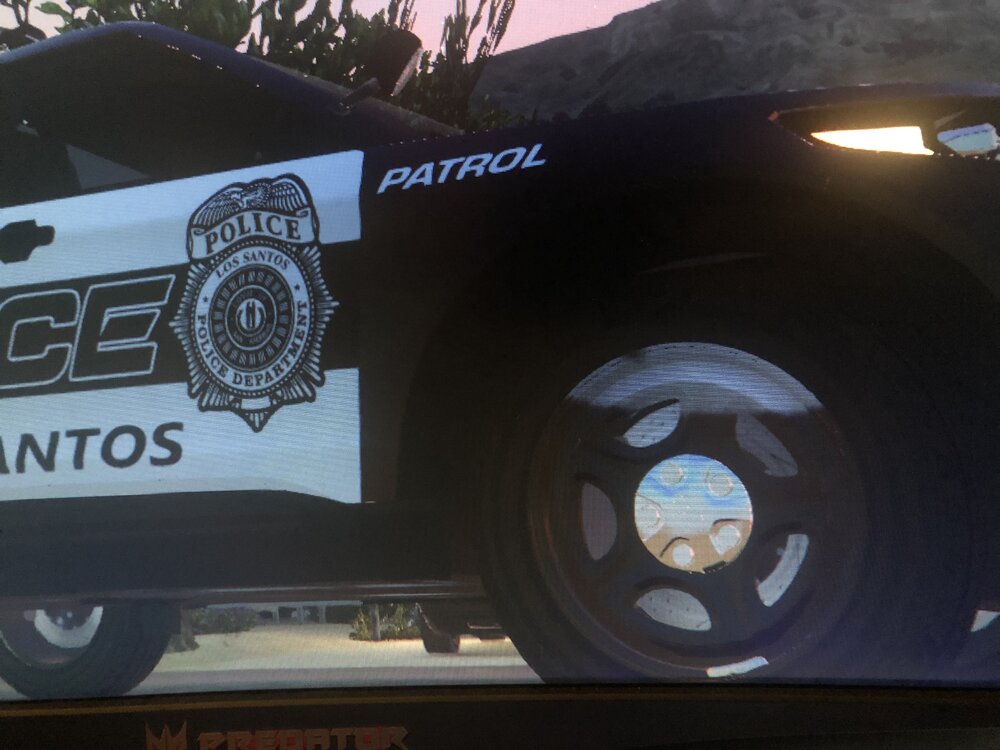
Hey guys, i‘ve been away for a while and recently just got back into GTA and LCPDFR. I downloaded a Valor car pack and on the 2020 Ford Explorer, the rims are showing this white spot, seems like maybe a texture problem? Anyone else have this issue or know how i can fix it? The author stated he isnt fixing his pack any longer. I tried changing the livery and i tried changing a texture that i thought was for the rim, but to no avail. Thanks in advance and sorry if this isn’t in the right spot!
-
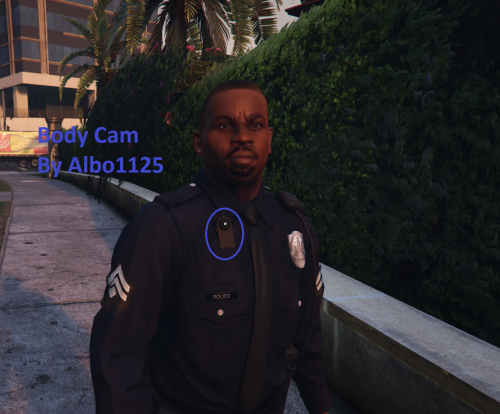 Just an FYI to Albo and anyone that doesn't look at the INI folder, the [s_f_y_cop_01] is listed twice, change the first or second one to [s_m_y_cop_01] if you want the male LSPD officers to have the cameras. But the mod is awesome! Great work Albo.
- 45 comments
- 17 reviews
-
-

- 1
-
-
-
-
Yeah for future refrence thats what you should do, as far as not doing it now though its an easy fix, as long as the ELS mapped lights are the size of the one you already scaled. From the looks of that picture theyre still huge from when you imported it into zmodeler, if thats the case your going to have to scale that down to the lightbar also, but make sure you select the L1 and L2 of that so you dont run into the same problem.
-
If you've already scaled and placed the lightbar on the car that should have been done with the lightbar_L0, so use the copy feature in zmodeler to just copy that twice, youll be there all day if you try to scale the lightbar to the exact same as the first one twice.
-
Ignore the fact its in the middle of the car in open4, that's normal. As far as actually in-game ive never heard of that problem.. could you post screenshots?
-
Thats because you need to delete the lightbar_L1 and lightbar_L2, and then copy the lightbar_L0 twice, and rename them to _L1 and _L2.
-
Im not sure if someone mentioned already, but maybe this could be added to this script or it might have to be whole new thing but im gonna throw the idea out ther of having someone come do this for you on the players stop. Even if the guy isnt wanted, just having a second car pull up behind you on a stop incase things go south could be an awesome feature to add, and this looks like the closest to it so far! But what you have done so far is awesome so keep it up!
-
Its probably because your ELS light polys are connected to the avengers, they should be detached as their own hierarchy labeled extra_1, extra_2, etc.
-
Any way to make that happen more often? Ive never seen it done lol.
-
-
So basically who ever doesn't have them is SOL and whoever does can just post and say they do, but cant give them out? Cool.
-
![[WIP] Patrol Bag for CVPI](//s3-gallery.int-cdn.lcpdfrusercontent.com/gallery/album_838/sml_gallery_324_838_199785.png)
From the album: Ant's Evidence
-
Yeah, because i had to add a new version cause i fixed some stuff that was wrong in the initial release, it has to be approved again -____- sorry lol
-
'?do=embed' frameborder='0' data-embedContent>>
-
Thats just the way it is man, GTA IV is a terrible port to pc.
-
You need to add whatever textures you want, and then import. You can not import first.
-
Uh...well first you need to add the textures....then...click the button that says import. (little blue arrow thingy)
-
I say bad shoot, it sucks that this happens with everything else going on. This is just another thing for the law enforcement haters to thrive on. Anyways he didn't see a gun or anything, definitely wouldn't pull the trigger until i at least saw a weapon. If the trooper was that surprised by the guys actions, pull the gun out and command him to get out, not scream it and start firing anyway.
-
I uploaded it, just waiting to be approved by staff.
-
// Whelen Freedom CVPI - Liberty City Police (Request for BROOKLYNBOY2497) // by AntEyeVirus //================================================== // DO NOT RE UPLOAD WITHOUT MY PERMISSION. THIS IS A LCPDFR.COM EXCLUSIVE! // Changing textures is allowed for personal use. //-------------------------------------------------- // Support: Message me at www.lcpdfr.com // AntEyeVirus //================================================== Installation: Put the police.wft and police.wtd into your vehicles.img. The vehicle is capable of having 4 different vehicle textures but they are all occupied by the same one, so you can change them at your leisure. Just don't forget to add +livery at the end of POLICE in your vehicles.ide Files included: - police.wtd - police.wft - READ ME...PLEASE.txt - template.png - pic (1).jpg - pic (2).jpg - pic (3).jpg - pic (4).jpg - pic (5).jpg
- 8 comments
- 2 reviews
-
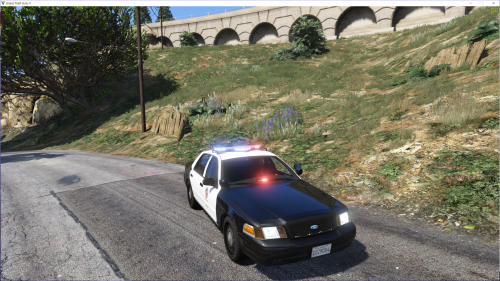
Okay im back at it for a little while, i fixed the alley lights cause they werent working so the lightbar is completely done. i edited the traffic advisor a little bit and im about to start with the interior stuff. Any other lights you want? grille lights or anything? cause all there is right now is the lightbar. Which is fine it doesnt look bad im just asking before i move onto everything else. And if you wouldnt mind sending me the skin you want to use on the car, i need to test a few things out but its hard with an all white car. If i release the car, would you mind if i did with your skin? Almost done, Just have a few more things to add and touch up. The blue lights look different here, theyre not actually different, the picture just came out weird. -----------EDIT------------ Car is done, i dont have time to upload it right now but use this as a chance to look over the screenshots and let me know if its good. Ill try to upload it tonight but ill be at work so if i cant get to it today ill upload it tomorrow. Here it is.
-
Unfortunately i have to stop for the night, but ill continue tomorrow. Here's what i have so far:
-
Yeah i was bored and trying to figure out a new project, you caught me at the right time. Just to give you an idea of how long this kind of stuff takes, i started when i made that first post and i just now finished making the lightbar work like you wanted it to. Also, do you want random interior stuff? Computer, consol, radar?


![[WIP] Patrol Bag for CVPI](http://s3-gallery.int-cdn.lcpdfrusercontent.com/gallery/album_838/sml_gallery_324_838_199785.png)