
JBuzz826
Members
-
Joined
-
Last visited
Everything posted by JBuzz826
-
Patience is a virtue. As said time and time again, it will be released in February of 2019. So now and until the 28th. We shouldnt be killing cats for lspdfr 0.4. 😉 I don’t think @Sam would appreciate that occuring in real life. Just sayin! 😉 I am excited as well. I’m just hoping mods will still be compatible like callouts and what not.
-
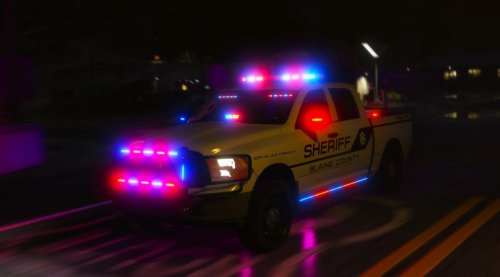 Ahh I forgot to rename it for the slot. I wonder? I’ll logon and check it out.
- 61 comments
- 6 reviews
-
@Discarded2003 Yes the livery isn’t even showing up in game at all. I will send a picture of the windows to you tomorrow. I’m a bit busy this evening.
- 61 comments
- 6 reviews
-
Already did. The window and windshield are also greyed out when in first person view.
- 61 comments
- 6 reviews
-
I agree this truck is sweet and sexy! I myself am running into an issue with it. The livery doesn’t show as well. Tailgate says sheriff but the sheriff on the side doors doesn’t show. Plus the windows are grey in color and I can’t see out of them when I’m first person view. Im not sure what the issue is?
- 61 comments
- 6 reviews
-
So I have an idea and suggestion for LSPDFR 0.4? Since you guys are working to release it. My suggestion is this, since we have our own character in lspdfr 0.4. Can we implement say a garage for police vehicles? Say a take home patrol car in our own garage? I’m not sure if it’s one of the many features being implemented but I know a lot of departments can issue take home patrol cars for some officers meeting criteria. Just a suggestion and hopefully it can be inplemembted. I’m patiently waiting for this as many others are as well.
-
 @Ghnty5 By far the best citation charges and arrestable charges. The newer version is amazing and adds 50+ new charges! Well done! I’m happy to have beta tested this. 🙂
- 60 comments
- 13 reviews
-
@JBin818 i persoanlly prefer PeterU great callouts plus easily customizable to configure which callouts you want. I also use Cheep Callouts and United. I will tell you though, Cheep and Untied callouts don’t use computers + for the callouts. Not sure why? But they don’t. I hope that the authors can make that happen.
-
 @Cheep Great callout pack. I do have a suggestion for immersion. Would it be possible to implement this callout pack with conputerplusnto view the callouts on the computer plus? I recommend that for immersion. Other than that keep up the great work! Definitely love these callouts and the different outcomes.
- 136 comments
- 42 reviews
-
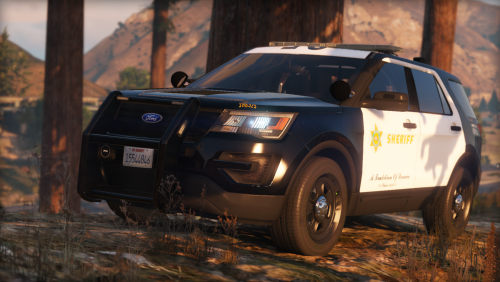 This is a great model! Definitely well done and though of. I definitely have it in my LSSD sheriff fleet. This with improved over lighting pattern with wigwags make this a super awesome vehicle for patrols. Edit: 2/13/19. So so I changed the lightening pattern with a improved stone pattern. You have done a great job making this FPIU! I definitely love having it in my fleet of LSSD vehicles. I would give 10 stars if I could.
- 24 comments
- 7 reviews
-
No problem. 😉 I found out about it when I was in openiv and adding a few new mods. Yeah I agree rockstar shouldn’t keep updating. I recently got back into lspdfr and forgot how much fun I’ve had with it. Thankfully a lot of the mods and call outs I used before are now stable.
-
From what I’ve heard it only affected scripthook and also I had to re install openiv packages I’ve had like MVGA and the like.
-
.thumb.jpg.e75a60efc1ccf5b4b7202a1878d3505a.jpg) Okay, I along with others are having a difficult time understanding this. This is a map editor deal correct? Anyways I also am attempting to understand the concept, is it a DUI checkpoint or what? I haven’t seen a checkpoint setup like this before and even in real life. Good effort but definitely focus on two things, first and foremost, I myself personally go for as real as it can get in patrols, ;) I’ve never seen a checkpoint with super speed cars and heavily armed. Unless it’s military, and two give a better description of the file, does it require a map editor such as Menyoo (not my first choice) or a map editor. Anyways keep up the good work and definitely focus on those more.
Okay, I along with others are having a difficult time understanding this. This is a map editor deal correct? Anyways I also am attempting to understand the concept, is it a DUI checkpoint or what? I haven’t seen a checkpoint setup like this before and even in real life. Good effort but definitely focus on two things, first and foremost, I myself personally go for as real as it can get in patrols, ;) I’ve never seen a checkpoint with super speed cars and heavily armed. Unless it’s military, and two give a better description of the file, does it require a map editor such as Menyoo (not my first choice) or a map editor. Anyways keep up the good work and definitely focus on those more.- 2 comments
- 4 reviews
-
 @BejoIjo question I don’t have ped images loaded in mine. Mine shows no ped image and no vehicle image as well. Will this file you posted get rid of that screen? Just curious. I’m willing to test it out ok. I’ll try it out when I’m off work. Thanks brother!
- 1,743 comments
- 172 reviews
-
@BejoIjo question I don’t have ped images loaded in mine. Mine shows no ped image and no vehicle image as well. Will this file you posted get rid of that screen? Just curious. I’m willing to test it out
- 1,743 comments
- 172 reviews
-
-
Will this work on GTA stability with memory errors?
-
 I can’t now. I can try and pull the log for you. But yeah it’s happened a few times seems like it either conflicts with police radio or something.
- 547 comments
- 103 reviews
-
So I ran into a crash with your callout, the speeding vehicle callout caused my crash. I accepted the call as normal and when I go into getting a description of the vehicle again it crahsed to desktop. I’ve only had issues with this particular callout everything else works as it should
- 547 comments
- 103 reviews
-
-
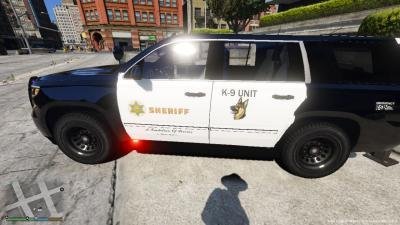 Awesome skin pack! Thank you my friend!
 -
 Well done @Sebo for this mod. Amazing and adds a new realism to patrols. I also love the fact that I don't have cycle through the weapons when they are stored in the police cruiser. I am happy to have tested this for you. Keep up the great work friend!
- 135 comments
- 22 reviews
-
-

- 1
-
-
Mine crashes as well. Usually when I do a manual search of a ped. Although it happened on a traffic stop. Grrrr
- 1,743 comments
- 172 reviews
-
 If I could rate this 10 of 10 stars I would. This adds much more items than your normal search items. Love finding illegal and suspicious items on a person! Impersonator +is awesome btw. Great work @Ghnty5 I am excited to test this as well!
- 50 comments
- 13 reviews
-
-
- 1
-
-

.thumb.jpg.e75a60efc1ccf5b4b7202a1878d3505a.jpg)