Skip to content
View in the app

A better way to browse. Learn more.

LCPDFR.com

A full-screen app on your home screen with push notifications, badges and more.

To install this app on iOS and iPadOS
  1. Tap the Share icon in Safari
  2. Scroll the menu and tap Add to Home Screen.
  3. Tap Add in the top-right corner.
To install this app on Android
  1. Tap the 3-dot menu (⋮) in the top-right corner of the browser.
  2. Tap Add to Home screen or Install app.
  3. Confirm by tapping Install.

Oxide

Members
  • Joined

  • Last visited

  1. Oxide changed their profile photo
  2. FDIC1999 started following Oxide
    • 150 downloads
    • Version 1.0.0
    Thanks for checking out my second skin, feedback and suggestions are welcome! This skin is based off the Ontario Provincial Police department's stealth decals for the ford police interceptor sedan. The pack currently includes 2 versions of the skin, one with BCSO markings and another with OPP markings. I plan to add more agency markings in the next update with an end goal of including LSPD, SAHP, and also LSSD variants. HUGE THANK YOU TO: Bueno - http://www.lcpdfr.com/profile/124129-bueno/ With out him this skin would not be possible. INSTALL 1. First, install MattJeter's 2015 Ford Police Interceptor Sedan: http://www.lcpdfr.com/files/file/11448-2015-ford-police-interceptor-sedan-lspd/ 2. Open your new.ytd file from MattJeter's 2015 Ford Police Interceptor Sedan in OpenIV (edit mode). 3. Select the import option in the top left. 4. Import either the OPP variant or the BCSO variant to the .ytd file (or both im not your dad, do what you want) 5. Save the file. 6. Open GTA 5 and check out your new stealth unit!
  3.    Skin Works reacted to a gallery image: OPP inspired Stealth FPIS Skin
  4.    winglesschip209 reacted to a gallery image: OPP inspired Stealth FPIS Skin
  5. TheCanadianDream started following Oxide
  6.    Skin Works reacted to a post in a topic: Oxides WIP Vehicle Skins
  7. I will post updates to all of my current projects here. Check out the latest image post on this topic by me for the most recent updates on my projects. _______________________ Requests welcome, also if you have any suggestions to improve any of my WIP projects please leave them here. _______________________ Here is a list of all my released projects. Currently working on a stealth skin inspired by the O.P.P. for MattJeter's 2015 Ford Police Interceptor Sedan This is the look I am going for. i will also release the skin with each in-game police departments badge and text abbreviations. This is currently what I have in game. Its missing a few things and others need to be scaled properly but that will hopefully be done soon.
    • 387 downloads
    • Version 1.0.0
    Thanks for checking out this quick texture replacement i threw together that aims to de-clutter the typical police screen but still maintain some features. Feedback and suggestions are welcome. There are 3 different map sections i have included for now (more to come) Downtown Los Santos, San Andreas and Blaine/San Andreas County. I aim to add all of the districts in the game in future updates for those who wish to patrol a specific area or multiple areas that are packed close together. Since there is no script that will change your Computer+ backgrounds on the fly you would have to restart you game to change the image but the option will be there for people who want it. INSTALL INSTRUCTIONS: 1. This texture requires LSPDFR Computer+ get it here it you havent already http://www.lcpdfr.com/files/file/11453-lspdfr-computer/ 2. Open My Computer or File browser and navigate to steam\steamapps\common\Grand Theft Auto V\Plugins\LSPDFR\ComputerPlus\backgrounds 3. Replace the agency specific images with those of your choosing from this download ( there are currently 3 different map images Downtown LS, San Andreas County, and all of San Andreas. you could set the LSPD background to Downtown LS, SAHP to a map off all of San Andreas and so on this way ) 4. Open GTA 5 and open Computer+ in game
  8. Many thanks, solved everything. Ill be sure to give credit when its released.
  9. 2048x2048, the template was provided with the car
  10. So I am currently working on a project but after i add the texture to my game files and load up GTA to check on it there are white lines added from nowhere that look to be about 1 pixel worth of space (see img. for example). When i check on the file in photoshop these lines do not exist on their respective layers or any others. Could somebody please tell me how to get rid of these lines?
  11. Thanks, uninstalling custom sirens worked. Any idea why there was no issue with the custom siren for a few days?
  12. Hello albo i have a game crash i feel i should report to you. This is the first time i have experienced this type of crash and have played with yours and others modifications working successfully. The crash occurred almost right away after loading siren mastery. Log attatched RagePluginHook.log
    • 397 downloads
    • Version 1.0.0
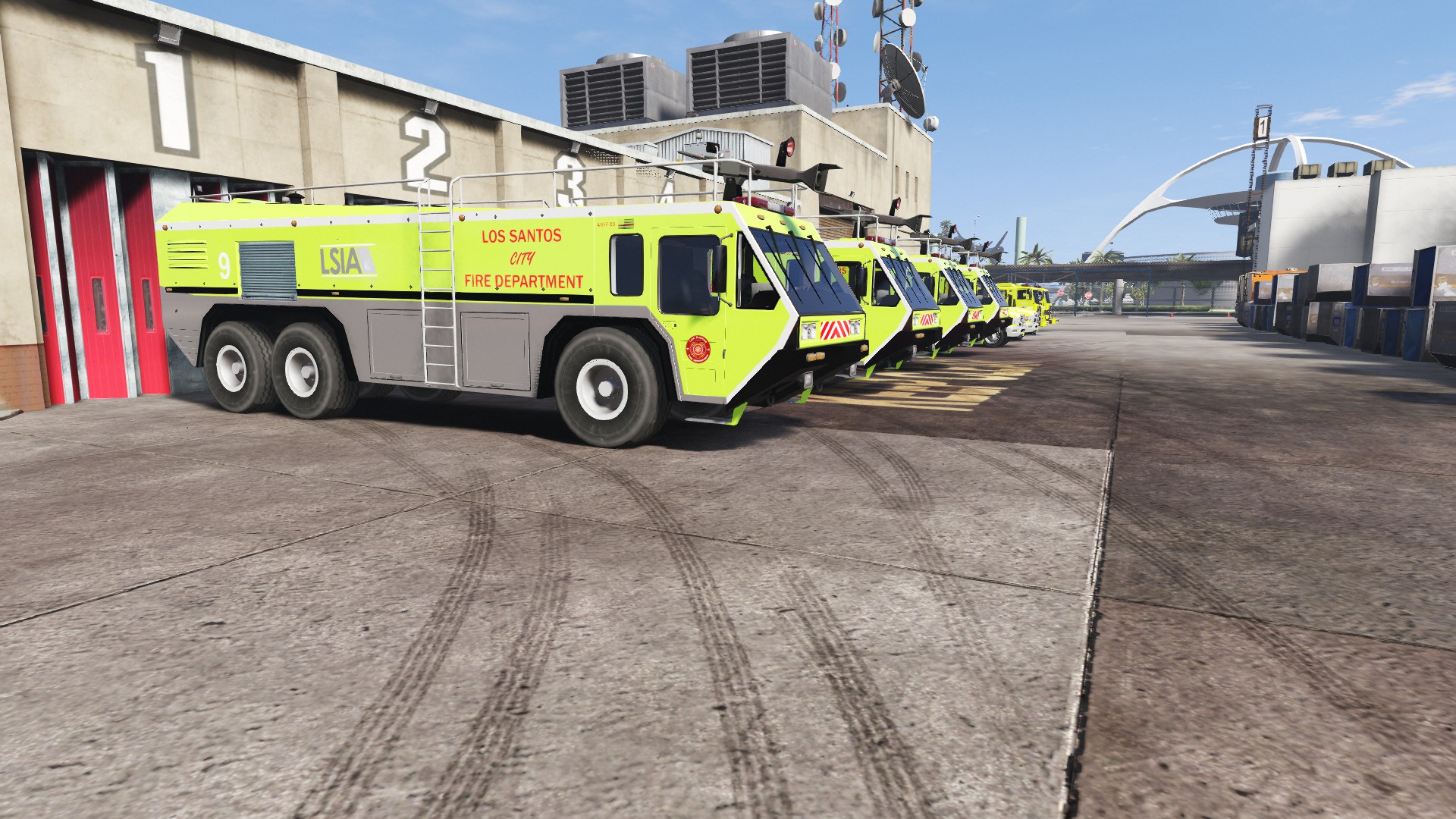
    Thanks for checking out my first skin! Suggestions and feedback is always appreciated. This skin was inspired by the real life LA-X fire trucks and uses in-game logos for Los Santos International Airport and the Los Santos Fire Department. Check out the real life inspiration if you so choose _______________________ Thanks to Game68240 for the original model of this truck. Check out his other files on http://www.lcpdfr.com/profile/289284-game68240/ and also https://www.gta5-mods.com/users/Game68240 Also thanks to Kizacudo for the original template. Check out his other work here https://www.gta5-mods.com/users/kizacudo _______________________ Install 1. First, download the skin 2. Download and install Game68240's HydraMax AERV http://www.lcpdfr.com/files/file/11670-hydramax-aerv-5-skins-template/ 3. After you have installed the HydraMax, in OpenIV (edit mode) open the new .ytd and +hi.ytd for the HydraMax and replace aerv_sign_1 with the image in the download 4. Save the file. 5. Launch GTA V and check out your new vehicle skin _______________________
  13. Thanks for checking out my first skin! Feedback is always appreciated. This skin was inspired by the real life LA-X fire trucks and uses in-game logos for Los Santos International Airport and the Los Santos Fire Department. Check out the real life inspiration if you so choose _______________________ Thanks to Game68240 for the original model of this truck. Check out his other files on http://www.lcpdfr.com/profile/289284-game68240/ and also https://www.gta5-mods.com/users/Game68240 Also thanks to Kizacudo for the original template. Check out his other work here https://www.gta5-mods.com/users/kizacudo _______________________ Install 1. First, download the skin at the bottom of the page or here: Download 2. Download and install Game68240's HydraMax AERV http://www.lcpdfr.com/files/file/11670-hydramax-aerv-5-skins-template/ 3. After you have installed the HydraMax, in OpenIV (edit mode) open the new .ytd and +hi.ytd for the HydraMax and replace aerv_sign_1 with the image in the download 4. Save the file. 5. Launch GTA V and check out your new vehicle skin _______________________ Screenshots LSIAfiretruck.zip

Account

Navigation

Search

Search

Configure browser push notifications

Chrome (Android)
  1. Tap the lock icon next to the address bar.
  2. Tap Permissions → Notifications.
  3. Adjust your preference.
Chrome (Desktop)
  1. Click the padlock icon in the address bar.
  2. Select Site settings.
  3. Find Notifications and adjust your preference.