




MrMistyMoist
Members
-
Joined
-
Last visited
Everything posted by MrMistyMoist
-
Try to remove section 136 callouts, riskier traffic stops, and police smart radio and see if it still crashes. those 3 were the cause of my game crashing yesterday
-
Have you recently added any new plugins? When was the last time you played and it was working? At what point during the process does it crash? Is it the entire game, or just the mod?
-
Hello all, I’ve been away from LSPDFR for about 4 years now. I recently started playing again and it took about a day to remember how to get everything set up. I’m running into a few issues. Few years back, these plugins were basically mandatory to have a good time - LSPDFR + (No longer supported?) - Traffic Policer (No longer supported?) - Arrest Manager (No longer supported?) -Smartradio (To call tow trucks, coroner, transport, etc) (No longer supported?) -StopThePed (Search vehicles, detain peds, frisk and search) - EUP menu (Have the packs installed in open IV, have the menu in my directory, updated rage native, however I can’t get them menu to open????) The features that were offered in those plugins, are they just configured into LSPDFR already? Or are there updated plugins that have replaced them? I don’t think I can search vehicles or peds anymore besides the “frisk” The smart radio plugin is probably what I miss most but it keeps crashing. And I don’t know why because everything is updated. I don’t know what’s going on with the EUP menu either, I’ve reloaded the plugin in the console multiple times and it says it loaded, I’ve tried changing the open console command to everything but still no avail. I know this is a lot of information, but any help would be greatly appreciated.
 Really love the pack. I remember constantly struggling back when I first started LSPDFR to find a vehicle pack for LSPD that actually had cars with good handling, good and MATCHING skins without the design being too unrealistic, and good lighting. I'm really impressed by this pack. I love the dash lights with the lightbar. Our Roleplay Server made custom cars like that one time, and we loved them. Thank you for uploading this pack. If there is any way you would be up for making a red/blue version of these cars, definitely do so haha. Great work!
- 27 comments
- 15 reviews
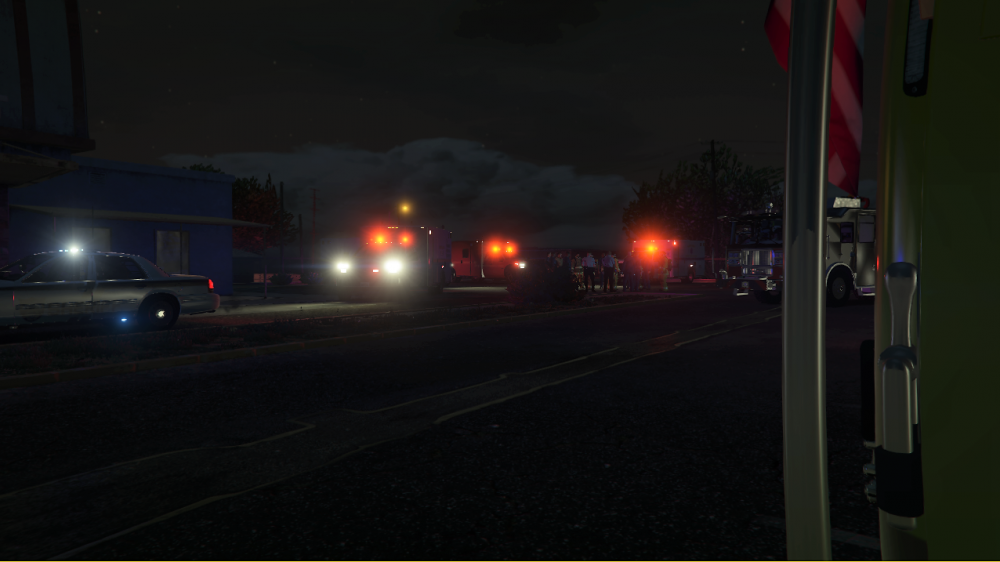
"Shots Fired" Callout - Respond to a call of shots fired, whether the shooter is still active or inactive will vary on your response time, the actions of the shooter, or the amount of victims present at the location Features > "Shots Fired" will only trigger at locations that are a certain distance from the player, no more calls that are right around the block. > Shooter(s) proximity detection! If you do not cut your siren a certain distance from the shooter, he will hear your approach and may flee, take cover, or wait for your arrival. > Not just your average run and gun call. The shooter may take a hostage, or threaten to shoot himself which will require you to talk to the shooter down using an interaction menu built with a casual in game UI. *please note that the UI will not interfere with your ability to lay down fire if need be* > Advanced backup system! Don't you even think about calling additional units to the scene. They are already on their way. There will be a configuration for the amount of units that will respond with you to the call however the distance at which they are from the location will always be a determined variable randomly selected which can be broken down into 3 categories. Close - Depending on where you are, they may get there before you. Usually, they are only about a 45 second lights and sirens drive from the location Proximity - These units will not beat you to the call unless you drive like a grandma, but remember, lives are at stake. These units will most likely arrive on scene about 15-30 seconds after you do, where they will join your 'team' and follow you to take down the shooter. Far - These units will most likely not arrive until after the shooter has been taken down, fled the scene, in hiding, or is threatening to kill himself or another person. These units will either block off the nearest roads if your team has you and 3 other officers or run to the shots fired whether where ever they may be coming from. The backup configuration will work like so: Set (X) amount of units on the city shift (number ranging from 3-14) * number is 10 Set (X) amount of units on the county shift (number ranging from 3-14) * recommended number is 10 **DO NOT** call for units via the LSPDFR backup menu. This will cause the plugin to crash. I am working on a way to disable it while the plugin is active. > Fire / EMS standby. After the shooter is taken care of, fire and ems will be on standby. You will need to press a key to ensure that the scene is safe and then emergency units will begin to spawn. The amount of EMS / Firetrucks that will respond will depend on the amount of registered injured victims and the location > Location list will be released in the next update This is just a brief description of the callout. More features and more details will be revealed soon following the release of 0.4. Thank you for reading and I hope to see you on the download page in the times to come! Here are some images!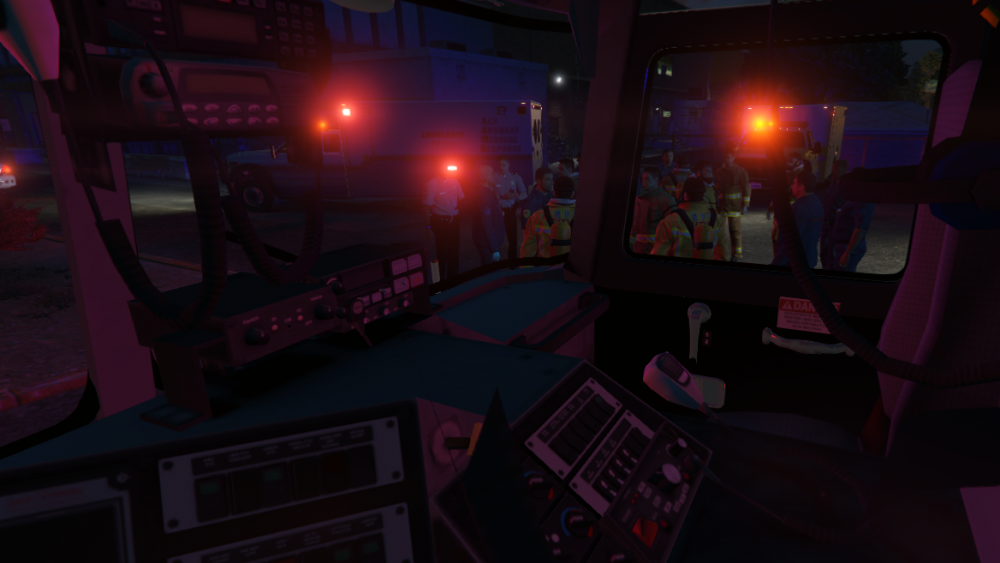
 Hello everyone. After my last project was discontinued last year I thought I would give it another go with more community suggestion. We already have many callout packs, but I would like to hear from you what you believe the game is missing.Hello all, Due to the most recent plugin releases, I have decided to scrap the AvailableUnits project. (almost) everything I had planned for the plugin seemed to have just been released in the past day, which saves me the work! Haha. Thanks all for your support, callout development will continue.: ) Coming soon on blue ray....
.png.4e916453306467bed321deb012fbefee.png) Fiskey111 is extremely busy with a full time job. rw18 has not responded to my messages. Albo probably wont see them for months haha.Development is still in the planning process. I am new to plugin development and was hoping to get some help in building this wonderful plugin with some already written code, but it seems no one is eager to help. Development will continue nontheless, currently am working on another project as well, and so far the work has been there. Callout development is also on my to do list, so I have been learning that mostly. Do not fear, development will pick up, and all features listed will be there. I will not cut corners. The only thing I will not promise is a release date. I will get you a demo video personally as soon as I have one to show. Thanks Officer777Oh you have no idea lol. Lost animals, using the restroom on someone elses property or they simply just don't enjoy the sight, wild pigs in China town with an Asian man chasing them with a knife. I have so many ideas, and so much time lolThanks. I reverted back to 2013 Visual Studio. It works a lot better than 2017 for meEver want to deal with the actual bullshit Police Officers have to deal with ? Well! Now you'll be able to. New callouts on the way! I have been reading the forms a lot and I have been playing lspdfr for a bit over 2 years now, it is sad to see that development with call-outs has slowed down enormously. With that, I decided to put myself up to the challenge of making a new Fresh call out pack with call-outs that have not previously existed or have not been updated, or simply are just trash. With this idea 5-0 call-outs, I want to create 50 brand new (sort of speak) call outs that the lspdfr community wants to have! I am working on a list now, and I am developing as I speak. I am very busy as I am working on three different projects at the moment, so feel free to leave as many suggestions as possible. This is your chance! With this list, I'm about to make one of the moderators very happy You know who you are G I've got 13 calls on the list right now, different domestic situations will count as different calls, but please if you have any ideas let me know. Here's the list Names will obviously be changed to be more professional when it comes down to business. Give me all you got! I've got a whole summer! - Child's bicycle stolen - Welfare checks - Suspicious Persons in parked car (Either having sex or smoking the ganza wonza. Could also be doing nothing, or something. Investigate, you lazy ass) - Graffiti - Cease and desist violated - Noise complaint (Tv, Animal, Karoke!) - Soverign Citizens dialing 911 because i dindu nuffin n know my rights! - Dumbasses calling 911 - 911 Hangup - 911 en español 😉 - Animal abuse reports (not a code 3 response) - Threatening phone calls - Domestic situations (each one will count as its own call but will have very different outcomes every time)Hello all! I hope you are having a wonderful day. I am excited to release the feature list a long with some SmartRadio concept radio images for Available Units. Available Units: Developed by Officer777 Available Units adds 6 different radio buttons and Numpad features With AU, you will be able to customize the amount of backup units that will respond to a call just like you are. You may set the number of responding units to be the same every time the call is offered, or you may set it to random to be more realistic. You may also randomize the spawning distance of your units. For example, one unit may arrive before you, and the second unit does not arrive until you are on scene. In a different call however depending on the location, you may be the first on scene and your closest backup is about 20 seconds away. Be careful though on shots fired calls, because your other units may be about a minute away coming from another location. On a domestic call, it may be a wise idea to wait for your addition units to show up. You may change their spawning from random to a certain variable to keep it realistic if you would like. This plugin is meant to get rid of the need to call for excessive and an unrealistic amount of backup. You may set the number of units that potentially could spawn per call or set it random between two variables. Do not worry, if you need more backup on scene you may call for more. A separate button has been created for this type of backup to help separate it from the chaotic backup responses that the normal backup offers. Any additionally spawned backup by request will act the same way as the units that were originally dispatched to the call. Full support for backup called in using the default LSPDFR backup menu or the custom backup plugin may be added at a later date. The PoliceSmartRadio buttons and their features are as follows: (The photos are just concept, and very well may change) Secure Scene: When selected, units that are on scene will move to different areas of the scene and will guard that location. They may produce police barriers in front of them to prevent any peds/vehicles to come through. Some may also walk around between two areas, and may pull put their flashlight as well to inspect the area. You may use the numpad to have multiple units follow you around the scene if need be, and you may also dismiss any unit. If backup has arrived on scene and you have not secured the scene, units will just wander around you in a small vicinity unless you have them follow you or secure the scene. Step Up Units: When selected, responding units that are code 2 will upgrade to a code 3 response. This means their arrival time will be much shorter, so make sure you will arrive to assist. You may use this when you feel like units need to be on scene faster if you are not close enough yourself, or you need units as soon as possible. This is very useful for shootouts in gang areas where after a short time gang members will attack you for policing on their territory. Step Down Units: When selected, responding units that are code 3 will downgrade to a code 2 response. This means that their arrival time will be much longer as they will be obeying traffic signals and stopping for objects that are in their way. You may use this when you feel like urgent backup is not needed. Code 4: This will dismiss ALL backup units that are on scene without physically ending the call. Units will return to patrol and will leave you on the scene by yourself. See *** at the bottom for further on how you can dismiss individual units. No Unit Req: This will return any unit that is not currently on scene back to patrol. This is useful for when you believe you have enough backup and that guy who is still a minute out should not even waste his time. This will cancel all responding units that are not on scene, but you may dismiss individual units using a different feature. See *** below. Add Unit: This button will send you one additional unit to the scene. You may customize the amount of units this button will provide between 1 and 2. This unit will spawn randomly and may take anywhere from 20 seconds to a minute to respond. *** Using the numpad you will be able to do the following 1 - Make unit follow you 2 - Make unit stop following you, they will now just stand in this area 3 - Dismiss a unit from the scene (they will get in their vehicle and leave) 4 - Have unit secure scene ---- Any questions or comments feel free to leave them below. We are very excited to bring this out as soon as possible.
Fiskey111 is extremely busy with a full time job. rw18 has not responded to my messages. Albo probably wont see them for months haha.Development is still in the planning process. I am new to plugin development and was hoping to get some help in building this wonderful plugin with some already written code, but it seems no one is eager to help. Development will continue nontheless, currently am working on another project as well, and so far the work has been there. Callout development is also on my to do list, so I have been learning that mostly. Do not fear, development will pick up, and all features listed will be there. I will not cut corners. The only thing I will not promise is a release date. I will get you a demo video personally as soon as I have one to show. Thanks Officer777Oh you have no idea lol. Lost animals, using the restroom on someone elses property or they simply just don't enjoy the sight, wild pigs in China town with an Asian man chasing them with a knife. I have so many ideas, and so much time lolThanks. I reverted back to 2013 Visual Studio. It works a lot better than 2017 for meEver want to deal with the actual bullshit Police Officers have to deal with ? Well! Now you'll be able to. New callouts on the way! I have been reading the forms a lot and I have been playing lspdfr for a bit over 2 years now, it is sad to see that development with call-outs has slowed down enormously. With that, I decided to put myself up to the challenge of making a new Fresh call out pack with call-outs that have not previously existed or have not been updated, or simply are just trash. With this idea 5-0 call-outs, I want to create 50 brand new (sort of speak) call outs that the lspdfr community wants to have! I am working on a list now, and I am developing as I speak. I am very busy as I am working on three different projects at the moment, so feel free to leave as many suggestions as possible. This is your chance! With this list, I'm about to make one of the moderators very happy You know who you are G I've got 13 calls on the list right now, different domestic situations will count as different calls, but please if you have any ideas let me know. Here's the list Names will obviously be changed to be more professional when it comes down to business. Give me all you got! I've got a whole summer! - Child's bicycle stolen - Welfare checks - Suspicious Persons in parked car (Either having sex or smoking the ganza wonza. Could also be doing nothing, or something. Investigate, you lazy ass) - Graffiti - Cease and desist violated - Noise complaint (Tv, Animal, Karoke!) - Soverign Citizens dialing 911 because i dindu nuffin n know my rights! - Dumbasses calling 911 - 911 Hangup - 911 en español 😉 - Animal abuse reports (not a code 3 response) - Threatening phone calls - Domestic situations (each one will count as its own call but will have very different outcomes every time)Hello all! I hope you are having a wonderful day. I am excited to release the feature list a long with some SmartRadio concept radio images for Available Units. Available Units: Developed by Officer777 Available Units adds 6 different radio buttons and Numpad features With AU, you will be able to customize the amount of backup units that will respond to a call just like you are. You may set the number of responding units to be the same every time the call is offered, or you may set it to random to be more realistic. You may also randomize the spawning distance of your units. For example, one unit may arrive before you, and the second unit does not arrive until you are on scene. In a different call however depending on the location, you may be the first on scene and your closest backup is about 20 seconds away. Be careful though on shots fired calls, because your other units may be about a minute away coming from another location. On a domestic call, it may be a wise idea to wait for your addition units to show up. You may change their spawning from random to a certain variable to keep it realistic if you would like. This plugin is meant to get rid of the need to call for excessive and an unrealistic amount of backup. You may set the number of units that potentially could spawn per call or set it random between two variables. Do not worry, if you need more backup on scene you may call for more. A separate button has been created for this type of backup to help separate it from the chaotic backup responses that the normal backup offers. Any additionally spawned backup by request will act the same way as the units that were originally dispatched to the call. Full support for backup called in using the default LSPDFR backup menu or the custom backup plugin may be added at a later date. The PoliceSmartRadio buttons and their features are as follows: (The photos are just concept, and very well may change) Secure Scene: When selected, units that are on scene will move to different areas of the scene and will guard that location. They may produce police barriers in front of them to prevent any peds/vehicles to come through. Some may also walk around between two areas, and may pull put their flashlight as well to inspect the area. You may use the numpad to have multiple units follow you around the scene if need be, and you may also dismiss any unit. If backup has arrived on scene and you have not secured the scene, units will just wander around you in a small vicinity unless you have them follow you or secure the scene. Step Up Units: When selected, responding units that are code 2 will upgrade to a code 3 response. This means their arrival time will be much shorter, so make sure you will arrive to assist. You may use this when you feel like units need to be on scene faster if you are not close enough yourself, or you need units as soon as possible. This is very useful for shootouts in gang areas where after a short time gang members will attack you for policing on their territory. Step Down Units: When selected, responding units that are code 3 will downgrade to a code 2 response. This means that their arrival time will be much longer as they will be obeying traffic signals and stopping for objects that are in their way. You may use this when you feel like urgent backup is not needed. Code 4: This will dismiss ALL backup units that are on scene without physically ending the call. Units will return to patrol and will leave you on the scene by yourself. See *** at the bottom for further on how you can dismiss individual units. No Unit Req: This will return any unit that is not currently on scene back to patrol. This is useful for when you believe you have enough backup and that guy who is still a minute out should not even waste his time. This will cancel all responding units that are not on scene, but you may dismiss individual units using a different feature. See *** below. Add Unit: This button will send you one additional unit to the scene. You may customize the amount of units this button will provide between 1 and 2. This unit will spawn randomly and may take anywhere from 20 seconds to a minute to respond. *** Using the numpad you will be able to do the following 1 - Make unit follow you 2 - Make unit stop following you, they will now just stand in this area 3 - Dismiss a unit from the scene (they will get in their vehicle and leave) 4 - Have unit secure scene ---- Any questions or comments feel free to leave them below. We are very excited to bring this out as soon as possible..png.ae6c16184a59302f5b435d083cab5702.png)
.png.076711fd81169a11774332aac05bca4e.png)
.png.9b4662a4ccb55809d6276e903bbefeb6.png)
.png.efe66aa9efa05d091293cb2ba7d90979.png)
.png.d63ee39fdbd58a41c966703f9bac999d.png)
.png.737913673261f7a97cf7ea7c8bef90f0.png) Tried watching older tutorials but they are all older versions of visual studio. If I try to use the universal, it says something about the .NET not being right, so I cant add the RH SDK reference. Any help here?
Tried watching older tutorials but they are all older versions of visual studio. If I try to use the universal, it says something about the .NET not being right, so I cant add the RH SDK reference. Any help here?.thumb.png.9e09c3affeb2be2a54d5823875af0087.png) With AvailableUnits, you will be able to customize the amount of units to respond to each call, as well as the distance. You may set these options to random between a certain set of numbers. This means that with an 'Officer Pressed Panic Button' call, you may set the number responding units between 2 to 5, and have it pick a random number. This means that not every time you get a call the same number of units will respond, to add realism. You may also hard-set the distance of your backup units, or you may also set them random between two variables. One unit may be just 20 seconds down the road while your other two units are about a minute and a half. If you "Step Up" your units from Code 2 to Code 3, your units will go lights and sirens to the location, obviously decreasing their response time. "Step Down" units will also be available when you have arrived either by yourself or sufficient backup and a code 3 response is not necessary. If you believe you have too many units on scene, you may cancel any more incoming units or dismiss any unit that is on scene. Units will stick around until they are dismissed or if you have left the scene for a certain period of time. LSPDFR feels lonely a ton, and this is meant to combat that problem. When on scene with your units, you may have them all "secure" the scene and stand around guarding nearby areas, or you may select certain units to follow you around until you dismiss each one or everyone at the same time. -- It is a very simple ambitious idea but most of the code for it lies in mods that have already been created and in the already existing back up modifications. It just needs tethering together to put simply. This will require some collaboration with other developers, and patience as this is my first project. Thank you for your support! If you have any questions regarding features or suggestions, ask! This is just a brief overview ( : -- Officer777AvailableUnits - Developed by Officer777 -- Tired of spamming code 3 backup when a fellow Officer is calling shots fired? Are you sick of being the only Officer that responds to a silent alarm? Hate being an Officer's only panic buddy? Be sick and tired no more! Well, in a bit. This plugin is being created to give more realism to most of all of the callouts of LSPDFR. When installed, this will make sure you do not show up on scene alone to those crazy shots fired calls or domestic situations. Backup units will respond to calls just like you are, and will respond either code 2 or code 3 depending on the call. Once you arrive on scene however, you may use your PoliceSmartRadio to step down units to a code 2 response. Also, if you respond to a call and another unit is en route and the situation escalates on scene, it is up to you to step up your units using the radio. You will be able to customize the amount of units that respond with you to a certain call, as well as the type of units. You may customize it by location or have it be default for LSPDFR. I look forward to continuing work on this plugin and I hope that many of you will find it useful for your patrols! More details and features will be announced in the future. Any questions? Ask BelowTake roadkill to the food bank?! What the hell...That's not the issue here though. I created a forum post a few months ago to PNWPARK saying that you should have a set of AI officers that never despawn unless they die so it could be more realistic. Sadly, AI is not at that stage yet. Online LSPDFR is really the only wayDoes anyone know of a 2013-2016 impala that has a wraparound rambar or just a rambar? I'm surprised even in captain 14s pack theres not one with a rambar. I want an els modelHey all, I have been playing with lspdfr for over half a year now, and I think i want to try playing online with some people? If anyone has a server or knows of some contacts im definitely down to roleplay, i have real life law enforcement experience. Send me a messageNever had this issue before...anyone know how to solve this? Happens when trying to install packages Yes, everything is up to date
With AvailableUnits, you will be able to customize the amount of units to respond to each call, as well as the distance. You may set these options to random between a certain set of numbers. This means that with an 'Officer Pressed Panic Button' call, you may set the number responding units between 2 to 5, and have it pick a random number. This means that not every time you get a call the same number of units will respond, to add realism. You may also hard-set the distance of your backup units, or you may also set them random between two variables. One unit may be just 20 seconds down the road while your other two units are about a minute and a half. If you "Step Up" your units from Code 2 to Code 3, your units will go lights and sirens to the location, obviously decreasing their response time. "Step Down" units will also be available when you have arrived either by yourself or sufficient backup and a code 3 response is not necessary. If you believe you have too many units on scene, you may cancel any more incoming units or dismiss any unit that is on scene. Units will stick around until they are dismissed or if you have left the scene for a certain period of time. LSPDFR feels lonely a ton, and this is meant to combat that problem. When on scene with your units, you may have them all "secure" the scene and stand around guarding nearby areas, or you may select certain units to follow you around until you dismiss each one or everyone at the same time. -- It is a very simple ambitious idea but most of the code for it lies in mods that have already been created and in the already existing back up modifications. It just needs tethering together to put simply. This will require some collaboration with other developers, and patience as this is my first project. Thank you for your support! If you have any questions regarding features or suggestions, ask! This is just a brief overview ( : -- Officer777AvailableUnits - Developed by Officer777 -- Tired of spamming code 3 backup when a fellow Officer is calling shots fired? Are you sick of being the only Officer that responds to a silent alarm? Hate being an Officer's only panic buddy? Be sick and tired no more! Well, in a bit. This plugin is being created to give more realism to most of all of the callouts of LSPDFR. When installed, this will make sure you do not show up on scene alone to those crazy shots fired calls or domestic situations. Backup units will respond to calls just like you are, and will respond either code 2 or code 3 depending on the call. Once you arrive on scene however, you may use your PoliceSmartRadio to step down units to a code 2 response. Also, if you respond to a call and another unit is en route and the situation escalates on scene, it is up to you to step up your units using the radio. You will be able to customize the amount of units that respond with you to a certain call, as well as the type of units. You may customize it by location or have it be default for LSPDFR. I look forward to continuing work on this plugin and I hope that many of you will find it useful for your patrols! More details and features will be announced in the future. Any questions? Ask BelowTake roadkill to the food bank?! What the hell...That's not the issue here though. I created a forum post a few months ago to PNWPARK saying that you should have a set of AI officers that never despawn unless they die so it could be more realistic. Sadly, AI is not at that stage yet. Online LSPDFR is really the only wayDoes anyone know of a 2013-2016 impala that has a wraparound rambar or just a rambar? I'm surprised even in captain 14s pack theres not one with a rambar. I want an els modelHey all, I have been playing with lspdfr for over half a year now, and I think i want to try playing online with some people? If anyone has a server or knows of some contacts im definitely down to roleplay, i have real life law enforcement experience. Send me a messageNever had this issue before...anyone know how to solve this? Happens when trying to install packages Yes, everything is up to date.thumb.png.cddeb3cf4bb965ed2b177442d95ad472.png) Lundy every time you post a .dat in the forums I install it and corrupt my pc and then it explodes at 0fpsWell...This has never happened before. Pops up when trying to install packages. (EUP)
Lundy every time you post a .dat in the forums I install it and corrupt my pc and then it explodes at 0fpsWell...This has never happened before. Pops up when trying to install packages. (EUP).thumb.png.777f108bd2ee962df818a85eb32e7541.png)


.png.4e916453306467bed321deb012fbefee.png)

.png.ae6c16184a59302f5b435d083cab5702.png)
.png.076711fd81169a11774332aac05bca4e.png)
.png.9b4662a4ccb55809d6276e903bbefeb6.png)
.png.efe66aa9efa05d091293cb2ba7d90979.png)
.png.d63ee39fdbd58a41c966703f9bac999d.png)
.png.737913673261f7a97cf7ea7c8bef90f0.png)
.png.aa43600bbfdfbacf70be3b38e1655ced.png)
.png.bbaaca58972f082fa15ffb32893dbcd1.png)
.png.87859978e3ef7d0189b2bdf05fe497ec.png)