Skip to content
View in the app

A better way to browse. Learn more.

LCPDFR.com

A full-screen app on your home screen with push notifications, badges and more.

To install this app on iOS and iPadOS
  1. Tap the Share icon in Safari
  2. Scroll the menu and tap Add to Home Screen.
  3. Tap Add in the top-right corner.
To install this app on Android
  1. Tap the 3-dot menu (⋮) in the top-right corner of the browser.
  2. Tap Add to Home screen or Install app.
  3. Confirm by tapping Install.

Treyb8m8

Members
  • Joined

  • Last visited

  1. Images added to a gallery album owned by Treyb8m8 in GTA V Galleries
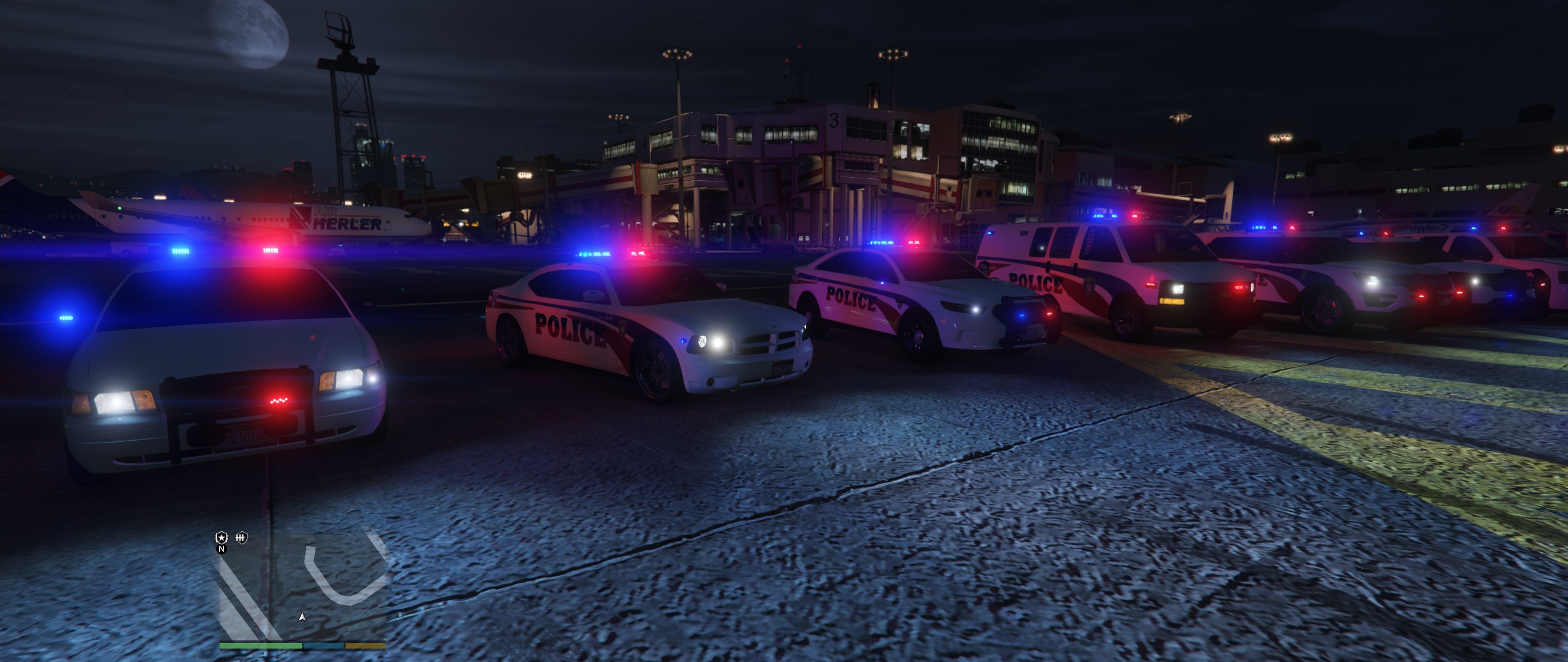
    some pics of a police pack im working on. Going to be high detail and include about 6-10 vehicles. More pics to come. suggestions welcome
  2. twistedleo15 started following Treyb8m8
  3. Liightnew started following Treyb8m8
  4. TrooperDuckyYT started following Treyb8m8
  5. andyc1414 started following Treyb8m8
  6. TWoolfgaming started following Treyb8m8
  7. Trey Ball     Finished responding to a Broken Vehicle in Davis, Grove St
  8. Trey Ball     Responded to a Broken Vehicle in Davis, Grove St
  9. Trey Ball     Finished responding to a Search Warrant in Davis, Brouge Ave
  10. Trey Ball     Responded to a Search Warrant in La Puerta, Alta St
  11. Trey Ball     Finished responding to a CustomerRefusingToLeave in La Puerta, Alta St
  12. Trey Ball     Finished responding to a Missing Person in La Puerta, Alta St
  13. Trey Ball     Finished responding to a CustomerRefusingToLeave in La Puerta, Alta St
  14. Trey Ball     Finished responding to a CustomerRefusingToLeave in La Puerta, Alta St
  15. Trey Ball     Called in support to transport Jamie Stewart to a Police Department in La Puerta, South Arsenal St
  16. Trey Ball     Finished responding to a AAIC-OfficerUnderFire in La Puerta, South Arsenal St
  17. Trey Ball     Responded to a AAIC-OfficerUnderFire in Puerto Del Sol, Dutch London St
  18. Trey Ball     Finished responding to a Robbery in Progress in Puerto Del Sol, Dutch London St
  19. Trey Ball     Arrested Jamie Stewart in Puerto Del Sol, Dutch London St
  20. Trey Ball     Performed a traffic stop on a Graceful Red Felon with registration 06AGT619 in La Puerta, Dutch London St
  21. Trey Ball     Responded to a Robbery in Progress in Puerto Del Sol, Goma St
  22. Trey Ball     Finished responding to a AAIC-OfficerUnderFire in Vespucci Beach, Goma St
  23. Trey Ball     Responded to a AAIC-OfficerUnderFire in Del Perro, Red Desert Ave
  24. Trey Ball     Finished responding to a Carjacking in Del Perro Beach, Red Desert Ave
  25. Trey Ball     Responded to a Carjacking in Davis, Carson Ave
  26. Trey Ball     Finished responding to a AAIC-OfficerUnderFire in Rancho, Macdonald St
  27.    Treyb8m8 reacted to a file: Retro Chicago PD Pack ELS
  28.    Treyb8m8 reacted to a review on a file: Los Santos Police Department Pack {ELS}
  29.    Treyb8m8 reacted to a review on a file: Los Santos Police Department Pack {ELS}
  30.    Treyb8m8 reacted to a review on a file: Los Santos Police Department Pack {ELS}
  31.    Treyb8m8 reacted to a review on a file: Los Santos Police Department Pack {ELS}
  32. Sorry, the original author removed the vehicles. You can use another users model of the vehicles though. The skins can fit any one of the cars.
  33.    Treyb8m8 reacted to a comment on a file: Baton Rouge Police Department
  34.    Treyb8m8 reacted to a comment on a file: Baton Rouge Police Department
  35.    Treyb8m8 reacted to a post in a topic: Reccomended mods
  36.    Treyb8m8 reacted to a review on a file: Los Santos Police Department Pack {ELS}
  37. Yeah that’s my fault. I accidentally set the LODs too low so it disappears when your still close to it. Basically, LODs are “level of detail” depending on the distance you are from the car. Something’s disappear when your far enough away to make the car more optimized and I accidentally set the push bar to disappear to early. Sorry!
  38. Okay when I get off of work I’ll send u the meta
  39. What's up party people this is just one of the vehicles I'll be releasing in my Blaine County Sheriff's Office Pack. This is just a few pics of the first reflective livery I finished so I hope you like! Click links to view the Livery Reflection https://gyazo.com/95bc129c96e05b373028b890f8944bb5 https://gyazo.com/396b9c754b6cf509272ac5c8d41e8b67 PICS OF CHARGER https://imgur.com/gallery/OhctRR3 Gonna try to release this Sunday but it's St. Patty's so idk but it's def. coming soon!
  40. Lastest patchday will be in dlclist folder. So for example the lastest patch day is patchday19. They have a lot of YouTube videos on it too!
  41. In OpenIV, go to ASI Manager and uninstall ASI Loader and OpenIV.ASI and then click install again to reinstall them. Next, restart your PC, and try loading into the game again and see if that works.
  42. Hmm, are any of the lights on the vehicle on a steady burn, where they don’t turn off?
  43. What is happening when you try to turn them on?
  44. I’m actually working on a red/blue mega pack right now that will include sheriff department!
    • 12,316 downloads
    • Version 1.0.0
    Hello! This is my second vehicle pack so let me know what you think! I put the vehicles together using development parts from LSPDFR, (credit below) Vehicle liveries also made by me. The charger is the same from my LSPD Pack but with side runners and a different livery. Install in your latest patchday folder Thank you and hope you enjoy! Credits: Charger: Thehurk Tahoe: Fabe Setina Pack: Twurtleee Partitions: Twurtleee Christmas Development Pack: HP Deskjet Westin Pit Bar Elite (2016 Explorer): HuskyBaud Panasonic Toughbook: OfficerUnderwood Westin Push Bumper Elite XD (15-17 Tahoe): XTheGreatJamesX Turtle Console: Twurtleee Kustom Signals Golden Eagle II Radar: Gump Federal Signal SmartController: OfficerUnderwood ELS Caprice Console: majorpaine2015 Setina Pushbar: PoliceDev ALPR: MrPotato DEV generic Laptop Stand: HDgamerzPC DEV Default Carbine Rifle: SkillfulCorpse DEV Decatur Radar Equipment: HDgamerzPC Whelen Liberty II: Fabe Fenix Fusion 100: krul Soundoff 3000 Lumen work light: krul Generic LED light package: Bueno Whelen LINZ6 Super-LED Lighthead: OfficerFive0 Whelen Dominator Series Converted: Aaron W. Mods SoundOff Intersector Mirror LED: RobertTM Federal Signal/ Soundoff Spotlight: RobertTM\ Siderunners: Raptor2000 Do not re upload these in anyway
  45. Yeah! I was looking for a design for the skins and saw that. I tried to make it similar with the blue stripe.
  46. yeah lol I'm re uploading it rn. Sorry!
    • 69,011 downloads
    • Version 1.0.0
    Hello! This is my first vehicle pack so let me know what you think! I put the vehicles together using development parts from LSPDFR, (credit below) Vehicle liveries also made by me. Install in your latest patchday folder As this is my first attempt at a vehicle pack and just learned zmodeler a few weeks ago, please leave constructive criticism or your opinion on the vehicles. Thank you and hope you enjoy! Credits: CVPI: Thehurk Charger: Thehurk Tahoe: Fabe Setina Pack: Twurtleee Partitions: Twurtleee Christmas Development Pack: HP Deskjet Westin Pit Bar Elite (2016 Explorer): HuskyBaud Panasonic Toughbook: OfficerUnderwood Westin Push Bumper Elite XD (15-17 Tahoe): XTheGreatJamesX Turtle Console: Twurtleee Kustom Signals Golden Eagle II Radar: Gump Federal Signal SmartController: OfficerUnderwood ELS Caprice Console: majorpaine2015 Setina Pushbar: PoliceDev ALPR: MrPotato DEV generic Laptop Stand: HDgamerzPC DEV Default Carbine Rifle: SkillfulCorpse DEV Decatur Radar Equipment: HDgamerzPC Whelen Liberty II: Fabe Fenix Fusion 100: krul Soundoff 3000 Lumen work light: krul Generic LED light package: Bueno Whelen LINZ6 Super-LED Lighthead: OfficerFive0 Whelen Dominator Series Converted: Aaron W. Mods SoundOff Intersector Mirror LED: RobertTM Federal Signal/ Soundoff Spotlight: RobertTM Do not re upload these in anyway

Account

Navigation

Search

Search

Configure browser push notifications

Chrome (Android)
  1. Tap the lock icon next to the address bar.
  2. Tap Permissions → Notifications.
  3. Adjust your preference.
Chrome (Desktop)
  1. Click the padlock icon in the address bar.
  2. Select Site settings.
  3. Find Notifications and adjust your preference.