


HuzzahBritain
Members
-
Joined
-
Last visited
Everything posted by HuzzahBritain
-
Thanks a lot, I can't wait to have everything working. I guess I can get the Law enforcement jurisdiction script now :D
-
Haha omg! I spent all last night trying to figure whether to use the policeold slots for LSSD or SAHP but at least now I can have both :D
-
Thank you very much! I'll definetly be using DLC packs to add more vehicles in now :D
-
Hey there, So I'm looking to add a DLC to the game which basically adds SAHP vehicles. I was wondering if these would work with ELS, given that I renamed the VCF to the name of the vehicle in the DLC and added it to the vehicles.meta that it has a siren? idk tho Any replies are appreciated
-
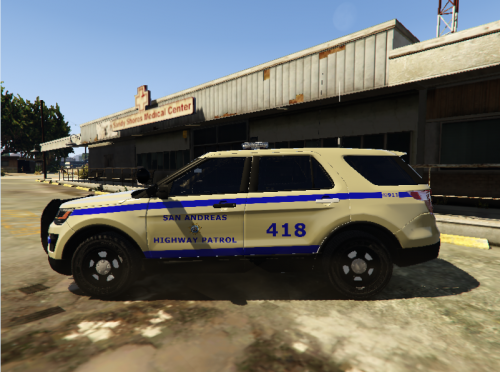 Hey, I think this is a great skin to start off with! However, even from looking at the pictures I can see a few errors. Also, I, along with others I'm sure, would be happy if you uploaded (in this file) some more unit numbers? I know it sounds very small, but small things are what makes a project great :)
 -
-
Hey there, amazing people of LSPDFR! I've begun work on a fictional Los Santos County police skin based off a design I saw here (they do some really nice things, I reccomend beginners going here to see their work). There's a few things missing from the skin, including but not limited to: -LSPD badge (there's one what I've seen before but I'll have to try find it). -Rear signage -Rear grey chevron(even though it doesn't exist on Adgraphix's skin I will still do it) -Rear police markings -Air identifiable markings (at least I think that's what they're called :P) You can view my progress through my Skin WIP album, and I'll occasionally post updates here. Thanks for viewing this! Album:
-
A place where I will be posting all my Work In Progress liveries. Please be sure to express your feelings and visit the forum post I have set up for you to express how you feel and how you think I could improve it.
-
![[In-Game view] [WIP] Fictional LS County Police Skin](//s3-gallery.int-cdn.lcpdfrusercontent.com/monthly_2017_02/small.20170201194145_1.jpg.c51ec071096f85b0c537b766a5c40ebb.jpg)
From the album: Huzzah's Liveries [WIP]
Another view. Should also add there's no rear markings as of now -
![[In-Game view] [WIP] Fictional LS County Police Skin](//s3-gallery.int-cdn.lcpdfrusercontent.com/monthly_2017_02/small.20170201194058_1.jpg.42b4673eebe92612141f8e7cb02b549e.jpg)
From the album: Huzzah's Liveries [WIP]
In-game view. I'm aware about the rear lines looking off. I'll attempt to fix them :P -
Didn't really know where to post this? So apologies if this is posted in the wrong forum :) Anyways so I've been working on my first vehicle skin, and I was wondering if anyone would be able to help me get the font used in this? Before you say "Try the websites, they always work!" I've tried them, and as you can guess, it didn't work :( This is it here
.jpg.62a167d513e0a525bbf9aec88314a7f0.jpg)
-
Hell, don't we all. I guess we'll just have to wait :P
-
Mhmm but LSPDFR mostly crashes when I use ForceDuty :P I guess you could just go on duty in LS and then goto LC
-
When I was in North Yankton, I had LSPDFR active (I was on duty) and I got a callout for Traffic Stop backup. The road name was something like [NORTH YANKON_01] so I think some may work
-
Ahh yes, I did not think about that. I still hope it will work out though, I think it would be a great addition to Grand Theft Auto V
-
I was actually thinking about this as soon as I saw the trailer, Daniel. I think it would be easy for the G17 Media team to pull off. I can tell not all people will won't to download it, despite it's potential (and I don't know if people's PCs will be able to run it xD) however I do believe G17 could make it an additional file. One good thing about this would be that theoretically, the OpenIV team would make more Police vehicle slots for LC and Alderny State, so people could enjoy more Police Vehicles. I once tried LSPDFR in North Yankton. I didn't accept the callout (primarily because I had fell through the world) but at one point I got a callout, so I think generic LSPDFR callouts would work, however custom ones would have to be redone. G17 could easily add stations to go on duty. The only way we will know is to wait and see! I'll be disappointed if LSPDFR didn't extend to Liberty City! **Also I just noticed would it still be called LSPDFR OR would it be called LCPDFR: The Return? XD Wouldn't that be similar to the content creator in GTAV where you can set ped density?
-
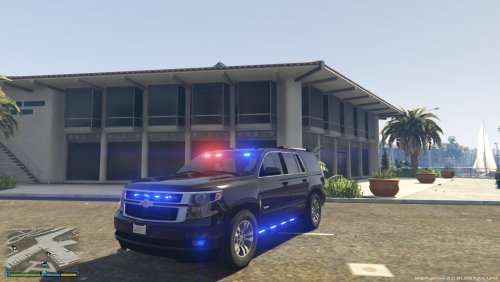
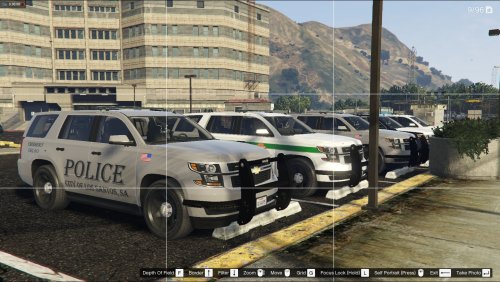 An amazing 2015 Chevrolet Tahoe, will definitely be using this in my BCSO and LSSD patrols! Excellent job, 72will! Overall: In my version of Grand Theft Auto V, I try to have every single one of my Law Enforcement vehicles (that aren't unmarked) fitted with a Whelen Legacy, and I was quite disappointed when I didn't see any non K-9 Tahoes for my 'SHERIFF2' slot. After PMing 72will I soon figured out he was happy to do this version of his K-9 Tahoe. This vehicle has a Traffic Advisor on the Legacy, and not in the rear window, and that doesn't really bother me. Despite lacking a MDT inside, the Tahoe has some very nice features! Pros: Cons: Recommendations: For the user: For the author: Thank you for checking this review out! I hope I influenced your decision in downloading this! Many thanks to 72will for creating such an AMAZING vehicle! I've also added some screenshots at the bottom, the livery I'm using is this: -HuzzahBritain
- 11 comments
- 8 reviews
-
-

- 3
-
-
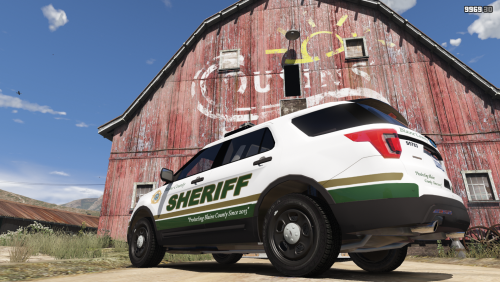 I absolutely love this! It's just a shame there isn't more vehicles you've done this for.
- 5 comments
- 4 reviews
-
-
- 1
-
-
Thanks yall, I figured most of it out. I definitely will be posting some of my creations this year!
-
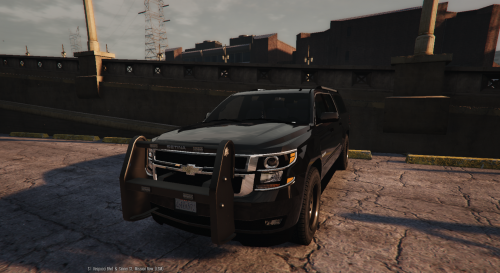 I seem a little late to the party, but I love this! I would really enjoy if the exact same vehicle was made to work with ELS. Great job though!
- 38 comments
- 21 reviews
-
They look spot on! Keep it up!
-
Love it! You got traffic advisors on it?
-
I love this, I'll definitely use it in one of my patrols once it's released! Please keep us all updated on your progress!
-
That looks great! Also is that a Whelen Legacy? Love it!
-



.jpg.62a167d513e0a525bbf9aec88314a7f0.jpg)
