




Murphy
Members
-
Joined
Everything posted by Murphy
-
I love the picture, but your post was particularly hard for me to read.
-
Sorry for the late response. I don't have any plans at the moment to release NYPD radios; however, I posted a comment on the previous page of someone who had found the streams. Here is the data you'll need: [RADIO 1] Radio name=NYPD Special Operations Division and Traffic Stream URL=http://www.radioreference.com/scripts/playlists/1/1189/0-5410560000.asx [RADIO 2] Radio name=NYPD Manhattan Stream URL=http://www.radioreference.com/scripts/playlists/1/12345/0-5410540828.asx
- 33 comments
- 6 reviews
-
Thanks again, OfficerAndrew! I also have what is considered a Low-to-Mid end PC, and I was able to get 30 frames. If you install the files exactly as packed in _Install, everything should work out fine. :) The main features that cause lag for most users (including myself) are DOF and sharpening; both of which have been removed from the standard files in this mod.
- 44 comments
- 7 reviews
-
-

- 1
-
-
No worries with the double post. :) I do hope it will run on your PC. I'm sorry if it does not. In terms of a preview video, I will not be making one due to time restrictions I have. However, anyone is welcome to make one and share it here. :)
- 44 comments
- 7 reviews
-
-
Thank you! As I mentioned in the description and in the files, I could not have done this without Fabriciuz's work on CryENB V1. :)
- 44 comments
- 7 reviews
-
Looks like he's using the iMAGination 3.0 graphics enhancer, by iMAGLaGlacE.
-
I hope that everyone enjoys this modification. It has taken many countless hours to adjust CryENB V1, and I'm happy to finally be able to release this mod to all of you. :) Also, additional screenshots are available in the download. Since there is a limit of 10 here, I only included the most important ones.
- 44 comments
- 7 reviews
-
IV 2015 ENB by Murphy: Based off of CryENB V1 for patches 1.0.7.0 & EFLC, compatible with ELS & multiplayer, IV 2015 ENB was created with the goal of giving the user a GTA V-like visual experience in IV. In addition, IV 2015 ENB was created for users who sync their game time to real time in order to give the gameplay a more realistic feel. The major difference between CryENB V1 and IV 2015 ENB is the adjustment of the Adaptation feature. CryENB V1 and other ENBs that use Adaptation do not work well when IV has been synced to real time or has been set to real time duration, via the Simple Native Trainer. Adaptation controls how bright or dark your game appears, depending on the time, location, surrounding lights, and surrounding shadows. By making the Adaptation values equal, the game no longer gets additionally brighter or darker from day to night. To compensate for this, settings, such as the Environment values for Direct Lighting Intensity, were adjusted appropriately, maintaining the transition from day to night without interference. Countless of additional hours were spent tweaking visualSettings.dat, enbseries.ini, enbeffect.fx, and effect.txt to both optimize and enhance the game's visual experience. Before installing, it is recommended to set your Shadows Quality in-game setting to Off, Low, Medium, or High. Very High causes lag and too sharp shadows. Fabriciuz made very detailed installation instructions, which I made updates to, so be sure to read all of the text files! This mod is recommended for Low to High-End PCs, with an average of 30+ fps on Mid-End PCs. Make sure that you backup your files before installing! _____________________________ CONTENT INFORMATION: _Install: All of the main files for 2015 IV ENB. _Options: Here you can get help and recommended mods. _Settings: Here you can choose the fitting configuration for your hardware. ELS preset: Here you can find all the necessary files to get ELS working. _Install has files set for non-ELS users. Optional presets: Here you can find Depth of Field options, Lens texture options, Godrays and various effects. HD textures: DKT70 newest HD roads and HD trees. Uses ENB Series 0.163 _____________________________ 2015 IV ENB FEATURES: SSAO Skylighting No red sky & no other bugs Dynamic timecyc created from scratch Auto-Focus DoF & Static DOF Dirt Lens (thanks to iCELaGlacE) Godrays (disabled by default) Realistic ELS Lens Flare Motion-Blur Combined SMAA & FXAA And much more.. _____________________________ COMPATIBILITY: 1.0.7.0 EFLC ELS Multiplayer _____________________________ INPUTS: On/Off SSAO - press pause/break On/Off FPS counter - press NUM slash On/Off FPS limit - scroll lock. Screenshot - press print screen Reload config - press NUM star _____________________________ CREDITS: iCELaGlacE for alot of codes and for helping. DOCTORGTA for testing and helping alot. Carrythxd for testing EFLC and helping. DKT70 for codes, HD roads and HD trees. Fabriciuz for releasing CryENB V1. Murphy for all of the modifications necessary to produce IV 2015 ENB. Without Fabriciuz's amazing CryENB V1, IV 2015 ENB would not have been possible to make. A very special thanks for all of his hard work, effort, and time put in to make CryENB V1! _____________________________ ADDITIONAL INFO: Website: http://www.lcpdfr.com/user/31013-murphy/ _____________________________ VIDEO: https://www.youtube.com/watch?v=SFRQ7AJ691s [This video was filmed with the weather setting, Extra Sunny]
- 44 comments
- 7 reviews
-
Very nice, another great video. I forget, but do you have a video thread? If not, it would be great to put all of your videos in one thread. It's a nice and easy way to simply scroll up and view your other great videos
-
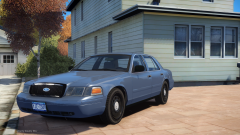 You're missing the dial on the Odometer. ;) You can also fix the "shininess" of the grille by making its specular texture black.
 -
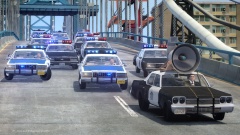 It's always those damned ambulances!
 -
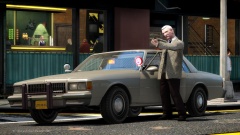 In the last picture: "Yes, yes I do."
 -
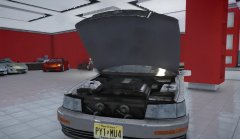 By the way, I should also mention that those stock GTA V Coquettes back there are a highly potential future release. ;)
 -
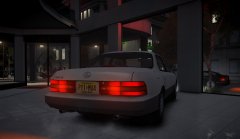 Whoops, I should probably mention the polycount, too. I forgot the exact amount, but these are about right: L0: 26,000 polys L1: 23,000 polys L2: 500 polys
 -
To note, this is the 1UZ-FE engine with an engine cover that was later put on models, such as the 1997 LS400. It would have taken more modeling, but the engine on the 1991 model looked like this:
-
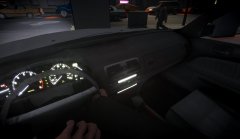 As I mentioned on another image, the indicators were inspired from Compeast's Caprice models. :)
 -
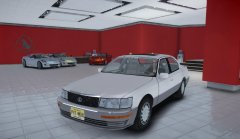 Thanks, everyone! It has been a lot of work for a long, long time. :) For now, I'm not doing a public release. I can release it individually after I change the handling a little bit. :) Thank you! Nothing beats Gen 1, especially when you have the best resource for reference sitting in your garage. ;) Haha, thanks! Coming from your background, that means a lot! I indeed was inspired by your Caprice model to add the indicators.
 -
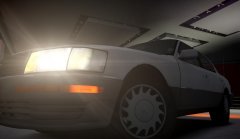 Thanks for the comment, Reibu! I was never really fond of GTA4-Mods, but I will consider a public release because of your input. :)
 -
Note that the spokes on the wheels are pointed in the right direction, as on the real 1991 car. On both sides, the spokes always face the front of the car, and they spin forward. I was able to do this and still have the tires able to be popped using a simple method. Here are photos of the real rims: Left rim: Right rim:
-
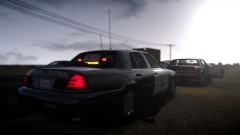 Absolutely astonishing! I especially love the CVPI with those hubcaps.
 -
From the album: Murphy's GTA IV Screens
This is a completely scratch-modeled vehicle, from the body exterior all the way down to the interior. Due to issues with shaders, this model will not be released publicly. -
From the album: Murphy's GTA IV Screens
This is a completely scratch-modeled vehicle, from the body exterior all the way down to the interior. Due to issues with shaders, this model will not be released publicly. -
From the album: Murphy's GTA IV Screens
This is a completely scratch-modeled vehicle, from the body exterior all the way down to the interior. Due to issues with shaders, this model will not be released publicly. -
From the album: Murphy's GTA IV Screens
This is a completely scratch-modeled vehicle, from the body exterior all the way down to the interior. Due to issues with shaders, this model will not be released publicly.

