t0y
Members
-
Joined
-
Last visited
Everything posted by t0y
-
-
-
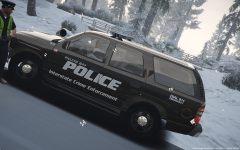
 Again, just because its amber doesnt mean its a traffic advisor... What tahoes are the hands positioned correctly? they may have used a different tahoe DEV model but thats out of my hands, and please show me a picture where the mirror lights are facing the ground...
- 46 comments
- 32 reviews
-
@Marquess Smh. It isn't a traffic advisor, just because its in the back of the car doesnt mean its a traffic advisor. Second this isn't a DEV model, I cant, and frankly wouldn't keep moving the steering wheel around until the guy's hands are just right for every vehicle, you overestimate the ability of modeling on this game. And the mirrors' angle is fine...
- 46 comments
- 32 reviews
-
BxBugs123
-
Maybee
-
 You keep putting it in the models section regardless of what's in it, I will admit though I see now ya didnt put them in there, but still man they are sexy liveries and I dont want it to keep being taken down...
- 12 comments
- 1 review
-
-

- 1
-
-
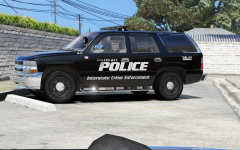 Once I finalize the interior, illl be making an unmarked version
 -
Dude, again you can't post this in the models section or include the models in your file, especially not a file I have taken down...
- 12 comments
- 1 review
-
-
- 1
-
-
-
Fixed the materials :)
-
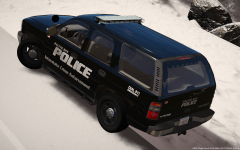
From the album: t0y's GTA V WIPs
© Attractive Studios™
-
-
Been working on this for a few hours today/last night, dont know where im going with it. I have permission to releasing on HSG, but not here yet so still asking:(
-
From the album: t0y's GTA V WIPs
Still getting perms to release on LSPDFR from Bugs, but he gave me perms to release on HSG so... Also gotta fix those materials© Attractive Studios™
-
-
Frequently Asked Questions: Q: WHY THE FUCK IS MY LIGHTBAR TINTED U FUCK U BROKE MY GAME KYS!!!1!1!11111!1 A: Well, for some reason on some of the vehicles, it automatically puts window tint on the vehicles, so to fix this you can just change the window tint to none, or edit your Vehicles.meta with the lines I provided. The tint on affects the 2013 tahoe and the 2015 tahoe. If I find a permanent fix, I will be sure to update it. please post a screenshot yup, reported it
- 46 comments
- 32 reviews
-
-
- 1
-
-
@Assassinz354 The file included just includes the text needed for the vehicles.meta not the entire thing, so it is just in notepad form so you copy and paste it into the slots you need instead of overwriting the whole file in case you have different settings already in there.
- 46 comments
- 32 reviews
-
I swear im not dumb, but can u show me pics pls? im so confused... lol Thank ya man :D Lmao u know where to find me for help :D
- 46 comments
- 32 reviews
-
-
-
;)
-
So, after a lot of work I have finally finished my long awaited BCSO mega pack, it includes 9 vehicles with a variety of lighting, and some are slicktop some aren't. I fully redid the interior(s) from my last models, and added more LODs on the gear that weren't in my LSPD pack so I hope you guys enjoy :) It isn't based on any department so please dont get mad at me for being inaccurate, but the liveries are based on George County, Mississippi thanks Gump for his pictures on Flickr :) Big thanks to @Slendis for the screenshots, and @MrPotato for helping me with this pack :) DETAILS: Title: [ELS] BCSO Mega Pack Version: 1.0.0 (2/24/2017) Lightbar: Whelen Liberty (Evi) Vehicles: 9, police, police2, police3, police4, fbi, fbi2, sheriff, sheriff, and pranger! VIDEO: (Kinda shitty sorry) Lighting/Interior demonstration: Installation: Models: Go to Mods>Update>x64>DLCPacks>Patchday13ng>dlc.rpf>x64>levels>gta5>vehicles.rpf and drag and drop the files. VCF: Grand Theft Auto V>ELS>pack_default Drag and drop. Vehicles.meta: Mods>update>update.rpf>common>data>levels>gta5 CREDITS: Frequently Asked Questions: Q: WHY THE FUCK IS MY LIGHTBAR TINTED U FUCK U BROKE MY GAME KYS!!!1!1!11111!1 A: Well, for some reason on some of the vehicles, it automatically puts window tint on the vehicles, so to fix this you can just change the window tint to none, or edit your Vehicles.meta with the lines I provided. The tint on affects the 2013 tahoe and the 2015 tahoe. If I find a permanent fix, I will be sure to update it. Q: Why r ur lights so shiny pls help :( A: I use RadianceV to make my lights bright, you will need something like this or another mod like it to make your lights as bright as mine. Q: Can you please make an ELS pack for my own personal town? A: Not even a little sorry bb Q: How do I install X? A: I tried including the most in depth installation instructions I could find, but I know when I was new to LSPDFR didnt know anything about installing stuff, so if you have any questions you are feel free to comment with it. There are also instructions though which again, I tried making as in depth as possible to help you out. Q: X isn't working why? A: You may be doing something wrong, or I may have fucked something up. If you do find a bug or have a question please comment with a screenshot or video to give me a better idea of what is wrong and I will get back to you. Please do not redistribute this pack, or any part of it including the liveries, or models, or screenshots. Please do not upload this file or a part of it to any other site unless given explicit credit. Thanks for downloading ;)
- 46 comments
- 32 reviews
-
-
- 22
-
-
Almost done...
-