jacklop21
Members
-
Joined
-
Last visited
Everything posted by jacklop21
-
-
-
-
-
.thumb.png.ff545023a0865d5667af1d6318eaec32.png) When I hit E to open the back door, my character just starts walking in place, and it locks me into an animation.
When I hit E to open the back door, my character just starts walking in place, and it locks me into an animation.- 26 comments
- 13 reviews
-
-
I did some more research and found a post suggesting downsclaing the liveries on the vehicles. All my liveries were 4K, and I downscaled them to 2K, and did about 15 minutes of testing and everything was working perfectly. Usually, the problem is near instant, I spawned in 8 backup unites, drove around and had no issues. Seems like this may have solved my issue.
-
I have replaced all the vanilla police vehicles with custom cars, I try to only use vehicles with proper LODS, and I try to limit the number of vehicles on screen as well (calling less backup). Still, I have issue with textures disappearing (world textures). The issue is much more common in Blaine County (specifically near Paleto Bay and Sandy Shores). Is there a setting I can change that will eliminate this issue? I have all my settings on High, with grass and water on medium and particles and textures on ultra. I've tried adjusting settings in the Nvidia control panel as well. I feel like I shouldn't be having this issues given the power of my PC. I have no other mods or custom vehicles (besides replacing all vanilla police slots), and I'm using roughly 12-15 plugins, but I've had this issues while only havign LSPDFR installed with no plugins. Specs: - Nvidia 1070 (no oc) - i7-7700k (no oc) - 32GB of ram - running GTA off of a 500GB SSD
-
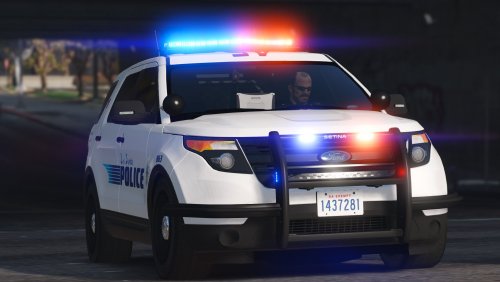
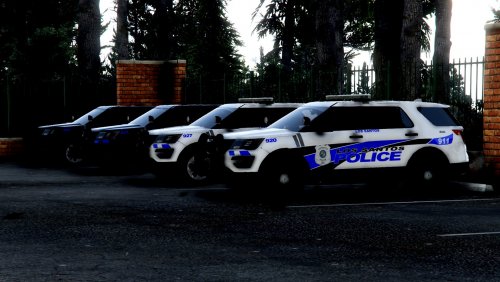
.thumb.png.debb2e8fd42b234303e9e2473fb894e8.png) I updated my FPIU and noticed that the headlights are very dim and don't light the road at all, is this an issue with my setup?
I updated my FPIU and noticed that the headlights are very dim and don't light the road at all, is this an issue with my setup?- 100 comments
- 39 reviews
-
 Love the models and light setup. Quick question (not able to download the pack for a while), how are the LODS on these models? Great first pack mate, keep it up!
- 89 comments
- 63 reviews
-
-
-
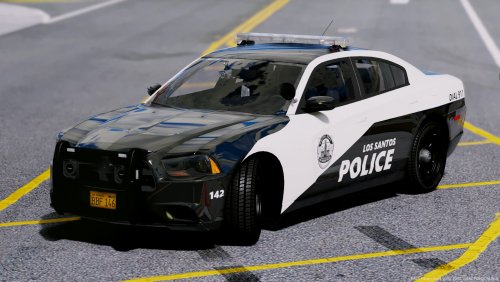 I love these skins! Any chance we'll get a 2013 tahoe livery? Keep up the good work!
- 46 comments
- 16 reviews
-
-

- 1
-
-
-
 I noticed that the model has collision (in the front) past the the actual model. I don't know if I'm wording this correctly. Basically, the tahoe will bump other cars even though the front bumper is about 2 feet away, I'll try to get a screen-shot. Still a great model!
- 39 comments
- 27 reviews
-
My Highway patrol vehicles are NC based. I edited the textures and ELS file to make them all blue and amber. I run a CVPI, 13 FPIU, 14 Charger and a 13 Tahoe. I can share my files if you want just let me know.
-
You can edit the ELS file for individual cars (you have to edit the .ytd textures too) to make them blue only. I edited JJDawkins LSPD pack for all blue/amber. I can share my files if you want.
-
-
-
Hello, I'm currently working on some textures for Him1250's new Albuquerque PD vehicles. I'd like an all blue option, but I have no experience with ELS. Could anyone do a quick all-blue setup for these vehicles or at least edit the VCFs, the retexturing (of the lights) shouldn't be too hard.
-
-
I've done that as well, I'll try reducing the number of plug-ins installed
-
I do not, here are my plugins: Emergency Strobes Configuration, GTA Comes Alive, Rage Show My Location, Siren Switch Honker, Spike Strips V, Spotlight, Traffic Control. LSPDFR Plugins: Agency Callouts, ALRP Plus, Arrest Manager, Assorted Callouts, Bait Car, Better EMS, Code 3 Callouts, Code Red Callouts, Code 3 Callouts, Computer Plus, Crazy Callouts, LSPDFR+, PeterUCallouts, Police Radio, Rednecks, Search Warrant, Secondary Callouts, SWAT Callouts, Toasty Callouts, Traffic Callouts I installed all my cars manually, I have every police slot except the helicopter replaced.
-
Specs: - 16GB DDR4 - Nvidia 970x - 500GB SSD - I5-6600K (Not overclocked) When I play the vanilla game I can drive around and I don't experience any issues (Note: I haven't tried playing for more then about 30 minutes, I don't play vanilla GTA), but when I start LSPDFR I encounter this issues within 10 minutes every time. I monitored task manager, and while CPU usage did peak, I noticed that my SSD usage would peak around the same time these issues started. I've looked up multiple solutions and none of them worked. Some I tried: Setting game priority to high in task manager, setting launch option nohyperthreading in steam, reinstalling, and switching my game to a SSD. Any help would be appreciated.
-

.thumb.png.ff545023a0865d5667af1d6318eaec32.png)
.thumb.png.debb2e8fd42b234303e9e2473fb894e8.png)