


PgUp
Members
-
Joined
-
Last visited
Everything posted by PgUp
-
You know, I really want to know the difference between Redux (with Redux ENB), VisualV and Make Visuals Great Again... Anyone got an answer, or do they all basically look the same/ achieve the same thing?
-
Err.. "Little-Man Syndrome suffering foreman who likes to treat his apprentices like crap because 'he went through the same thing as an apprentice" starter pack??
-
Colorado with amber lights.. Is this the start of the "Little-Man Syndrome suffering mall cop/security guard" starter pack??
-
No crash involved - It's a Ford, it just fell to pieces while driving normally...
-
In other news, anyone had issues with the new GTA update and/or new RPH? I've just been forced to update again (I could roll back but eh, only if there's issues with the update...) from the same game verification loop issue I had ages ago, RPH's fix verification issues option didn't fix it this time so I thought it'd just be easier just to let the bastard update... So I'd like to know what I'm in for

-
Civ version of the Hilux, I'm certain (SR, if it's relevant)
-
Yes - next up we'll be adding bogan street fights, stabbings at maccas, bikie club houses (with ambient AFP raid events), peds walking around shopping centres with no shirt & shoes (some of these peds will have Southern Stars or Ned Kelly tattoos), and also making the roads a whole lot worse.
-
I'll give you some better graphics options and then delve into my experience of gaming laptops: First of all, if you want better frames - you'll need to get rid of GTA Redux. This mod is seriously intensive and I wouldn't be surprised with every other graphics option if you have frequent FPS drops or stutters, especially when playing a CPU intensive plugin like LSPDFR which also knocks off frames. GTA looks okay enough on it's own - ofcourse it's up to you but if you want better performance, you'll have to sacrifice. With the 970m, I believe it suffers the same memory issues as it's desktop counterpart, the GTX 970, which is that the first 2.5GB of VRAM are fast, but the last 500MB of memory are slower, which could lead to bottlenecking the frames or stuttering. My advice is have your graphics options set so you're not chewing more than 2.5GB of VRAM at a given time, it's frustrating that you can't use the last of the juice in the card but nothing can really be done for it. - This one is real important! Only use TWO types of Anti Aliasing at the most! You have FXAA, MSAA and Nvidia TXAA all on, with Nvidia TXAA being the most taxing on the GPU. I'd suggest turning nVidia TXAA off, and keeping FXAA and MSAA, and perhaps then you could turn MSAA up to x4 without so much loss in performance, and I think it looks just as good. - Turn reflection MSAA to x2, possibly x4. I find that I don't really see much of a difference between x4 and x8, but it can be more taxing. This will just affect the edges of things you see in mirrors, windows, etc.. - Unless your laptop comes with a GSync screen, turn Vsync on. This will prevent image tearing, however if you have GSync, it's probably best to keep Vsync off (Having both on can also cause tearing). Although if you've played GTA with Vsync off and don't notice stutters or tearing, I wouldn't even bother turning it on. - Turn Water Quality down one notch, to High. For the most part this won't affect you because you're not always near the ocean but still - unless you're doing marime policing will you notice a little less detail in the waves? - Your choice here: Either turn down Reflection or Shadows by one notch. Unless you're spending your whole gameplay watching windows & mirrors you probably won't care or notice with reflection down to High, and I don't notice if Shadow Quality goes down (shadow draw distance is something that really pisses me off though if it's not far enough) Everything else can pretty much stay where it is, Ambient Occlusion isn't so taxing so might as well leave that at max if you have. If you have an i5, turn down some of the population density/variety scales, if you have an i7, it should be fine with handling the load. I'd leave most things in Advanced Graphics options off unless something like draw distance is not enough for your liking. --------- My experience with gaming laptops has generally been that if you want performance and ultra settings, you'll need to sacrifice the portability and go with a desktop. There ARE some either rather expensive, or rather risky options though which can push you over the line, but the risk or price even may not prove worth it in the end. The expensive option being that you can purchase an external GPU case (I think ASUS are releasing a new one soon/already have maybe) and purchase a graphics card like a 980Ti to put in there. It'll basically plug into your laptop and make it so that the laptop will use the external graphics card instead of the one inside your laptop, meaning better laptop temps and better performance however by the time you do this, you're really sacrificing the portability of a laptop and might as well upgrade to a desktop anyway.. Most/all 'gaming laptop' developers will lock any overclocking option or potential in the BIOS (no matter how they're advertised as "overclocking beasts" or "amazing cooling potential", meaning programs like MSI Afterburner (Primary software used to OC graphics cards, EVGA also has their own version) won't be able to access the options to overclock the GPU for you. Because OC options are locked you also generally won't be able to edit things like CPU clock speeds and fan speeds in the BIOS either. There is a risky way around this, however when I say risky I mean risky, and I would not under any circumstances recommend it - it can lead to bricking your device, and it will always break your warranty! Risky option being: Flashing a new custom BIOS (this is akin to heart transplant surgery but for computers) - it can be risky, buggy, and generally perhaps not even worth the risk. No manufacturer will cover any damage caused by overclocking (or attempts to) or flashing a new BIOS in their warranty, meaning if it breaks you're out of a laptop with no replacement or money! I would highly recommend if you're craving better frames or higher quality you buy a desktop if you have the money - or if you can afford the cheaper option which is to keep the laptop but run it with an external GPU, otherwise I'm sorry to say there is not much you can do with gaming laptops in terms of getting them to run better - the options just aren't there, but there of course is a reason for it.. These manufacturers lock these options so you don't break your laptop, which is why I think it's a good idea to keep it that way.
-
Thanks for your feedback I was thinking the same, most of us which come to this thread on the daily most likely don't need it, but for newbies who don't know what the go is and what's been released over the months... In which case I may continue to (slowly but surely) try and keep up with released, update the front post once every few weeks, especially coming into Christmas, I imagine alot of people still get the game as a gift or buy it on sale.
-
Updates made to front page today, now featuring a graphic by @Vixen! (It had been a void waiting to be filled for a long time) Ya'll tell me if anyone even found me putting the lists of relevant Australian themed mods useful/ if you used it. I'm really unsure if I should keep updating it; especially if no one is using it?..
-
I've only seen Prosegur ONCE in my whole life, and that was recently, they were servicing an Aldi store I think. I see Armaguard everywhere, and Chubb frequently but less than AG..
-
Ah, Thank you I took a minute to think.. Hmm where does this thread belong? And ended up obviously still getting it wrong hahaha. This.. Hmm.. Interests me.. I always assumed it all showed as the same USD price for all countries to keep it consistent internationally, and the bank or paypal would sort out the converting.. Now I feel ripped off.. It probably comes down to this though: Prices usually go up in Australia no matter what the item is to cover air shipping/freight but I mean.. There's nothing physical to bring over here? Either Steam rips us off for no reason or the price covers the cost of server space in Australia if they use it, to make our downloads go a little faster (ha, doesn't work) instead of having us connect all the way to the US.
-
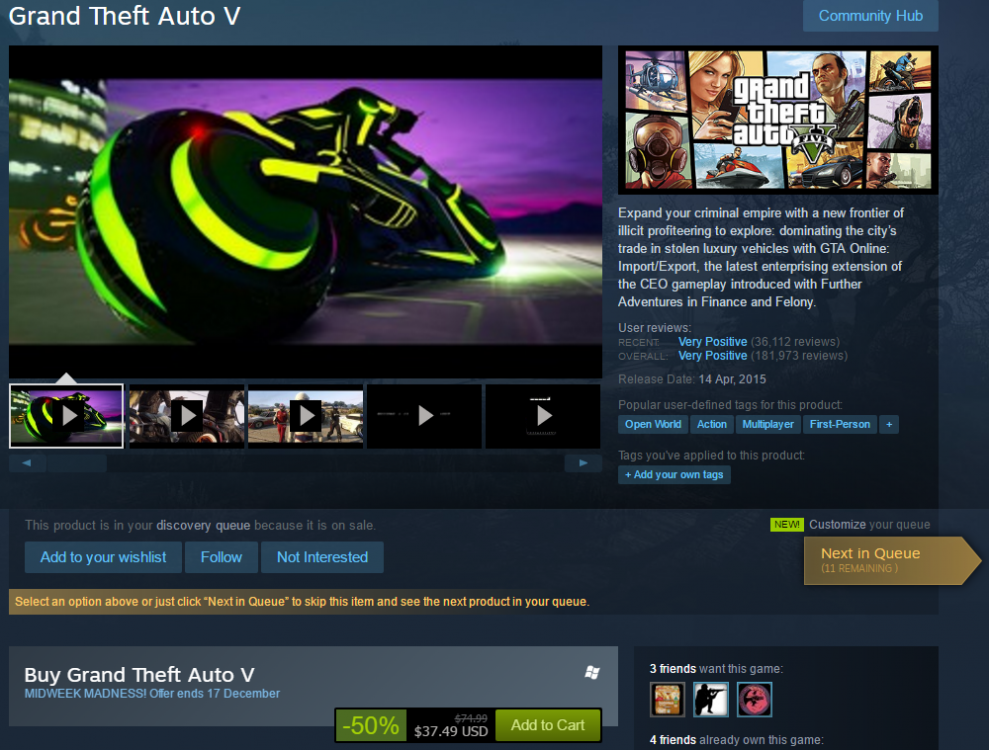
This is not a discussion thread, but rather an information thread with the purpose of spreading the news to relevant users - Please don't bother replying, as I'll probably edit/delete this thread after the sale is over anyway! Thanks! ~~~~~~ This is not intended as an advertisement for Steam, just informing users waiting for a sale! ~~~~~~ Making this thread to inform any users that were waiting to buy GTA V cheap to play LSPDFR (These people exist, I was one of them!) that GTA V is now on for 50% off on the Steam mid-week madness sale. This is probably as good as you'll get for a while, unless you want to push your luck at the winter sales, but somehow GTA V has held it's value extremely well over the years and I can't see it going for much under 50% off. It's now on for $37.49 USD instead of $74.99 USD until the 17th, as per picture.
-
Favourite thing about summer is that it's acceptable to sink piss mid-week under the excuse "just tryna keep cool" As I get older and delve into alcoholism I suspect I'll be doing that through autumn, winter and spring too anyway..
-
Touching on and expanding on the warning above like I always do.. Keep it civil, please. I'm no moderator but I'd like to remind everyone without picking sides to watch what they say on this *public* thread. This is a stressful time of year for many, I imagine all/most of our workplace bosses are being c*nts this time of year like always (maybe just mine?), which causes us to come home in foul moods, as well as the heat getting to us (seriously fking 38 degrees today, God hates Australia confirmed..). We're all going through it, but if you start to feel riled up just walk away for a bit and suckle on a zooper dooper, or blow off your steam in private chat. Don't be a flamin' galah, cheers c*nts
-
Oh god I hate this time of year... I literally just updated and reinstalled everything
-
All g, the last few weeks has been good to us in terms of releases.So I recall something about a uhh bike last weekend @MooseYTYEvoke wagons and HWP Sportwagon's have got to be the best thing to come out of Victoria/Vicpol.Weird seeing a video of an SS stop at a round about and not drop the clutch and start power skidding through it. Also beacons on to drop m'nibba at kentucky lmao.Legitimately lol'd. Well done.I mean I equally want both, so I can settle for either.>"Unmarked could be released this weekend" >"Bike could be released this weekend" >"Ped could be released this weekend" - Unmarked released * "one of two", bike and ped left. Ahhhhhhhhhhhhhhhh which one will it beAAAAAAAAAAAAAAAAAAAAAAAAAAAAAAAAAAAAAAAAAAAAAAAAAAAAAAAAAAAAAAAAAAAAAAAAAAAAAAAAAAAAAAAAAAAAAAAAAAAAAAAAAAAAAAAAAAAAAAAAAAAAAAAAAAAAAAAAAAAAAAAAAAAAAAAAAAAAAAAAAAAAAAAAAAAAAAAAAAAAAAAAAAAAAAAAAAAAAAAAAAAAAAAAAAAAAAAAAAAAAAAAAAAAAAAAAAAAAAAAAAAAAAAAAAAAAAAAAAAAAAAAAAAAAAAAAAAAAAAAAAAAAAAAAAAAAAAAAAAAAAAAAAAAAAAAAAAAAAAAAAAAAAAAAAAAAAAAAAAAAAAAAAAAAAAAAAAAAAAAAAAAAAAAAAAAAAA YES ETA on the orgasm on two wheels?


