


ethan919
Members
-
Joined
-
Last visited
Everything posted by ethan919
-
It would be cool if there is. I'd love to play as a Sheriff or US Marshal.
-
One other thing you can try is unchecking the option that automatically loads LSPDFR plugin in RagePluginHook and instead loading it manually once you are in game. That seems to help with some of the crashes I was experiencing as well.
-
I'm running LSPDFR 0.4.1 and keep getting a crash around 50% of the time just before loading into the world. It happens right before the sky view as you pan down toward your player. I have reinstalled the game twice and this still happens even with only LSPDFR and no other mods installed. 50% of the time it loads in completely fine and the other 50% of the time it crashes unexpectedly rather than starting the sky view. Just seems odd that it happens so frequently and consistently. Has anyone else experienced a similar bug and know of a fix that will stop that from happening?
-
This fixed mine after I was having a similar problem. In your main GTA5 folder look for a file called dinput8.dll. Make a copy of that file somewhere and then delete it from your GTA5 folder. Start up LSPDFR now and see if it runs without crashing. If it loads into the game and everything is fine then that file is your problem. You need that file though otherwise many features will not work. I used an older dinput8.dll file and it fixed my problem.
-
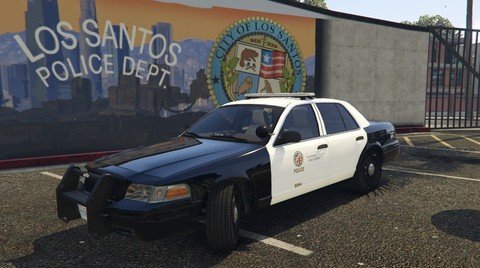 I was hoping someone would make these for BradM's pack. Thank you!
 -
 Hi Brad! Is it possible to make the top part of the lightbar red and blue (similar to LAPD style)? I see the options for the red blue tint, but those only affect the sides of the lightbar. Great job on the pack!
- 147 comments
- 65 reviews
-
My favorite vehicle pack at the moment! You did a perfect job on the lighting. 5/5
- 147 comments
- 65 reviews
-
-

- 1
-
-
Each time I try to launch GTA5 in offline mode I get the "unable to access rockstar servers" error. The top right corner shows a message saying I have signed into offline mode, but the server error continues to exist. I have tried several fix methods I found online, but nothing ever works. I've had this problem for ages and it never changes even after fresh installs and updates. Does anyone have a working fix for this problem? Steps I've tried: Editing command line, Doing a fresh install, deleting and reinstalling social club launcher, setting the launcher to always log in automatically.
-
 Any updates on this? Mine works on the keyboard, but not with the controller. Edit: Randomly started working after I installed ELS.
- 1,196 comments
- 127 reviews
-
.thumb.png.e2108197eebd2a115a71434e78afdd67.png) Here is my Plugins folder. I also reinstalled the mod and still have the same problem. It's odd though, because I just tested it again and there was one unit with lights on, but not any other ones. That happened once before as well with the Swat truck being the only unit with lights on, but nothing else. It's not game breaking and I still love the mod, but the immersion is definitely better with the lights on and flashing.
Here is my Plugins folder. I also reinstalled the mod and still have the same problem. It's odd though, because I just tested it again and there was one unit with lights on, but not any other ones. That happened once before as well with the Swat truck being the only unit with lights on, but nothing else. It's not game breaking and I still love the mod, but the immersion is definitely better with the lights on and flashing.- 31 comments
- 15 reviews
-
A fairly large list to be honest. Most of the popular callout packs as well as replaced cars, visual V, ELS and the like. All of my mods appear to be installed and working correctly other than that simple oddity. All backup units and such have lights functioning normally, just not the initial units that are spawned as part of the callout.
- 31 comments
- 15 reviews
-
I'm loving this callout, but the police cars that are on scene and around the perimeter never have their emergency lights on. Any ideas on how to fix this?
- 31 comments
- 15 reviews
-
Fantastic job on this! I would love a few other locations for this to take place in as well. Keep up the good work!
- 31 comments
- 15 reviews
-
-
- 1
-
-
Do you or anyone else know what happened to his files? I keep searching and they seem to be deleted from here on lspdfr and gta5 mods. I really wanted to download his cars. Thanks
-
It is a very easy change to increase or decrease the overall vehicle lighting. I kept the day lighting bright, but lowered the night lighting so it wasn't so crazy. Edit the visualsettings.dat file in update.rpf/common/data/ and edit the car.defaultlight.night.emissive.on line number. I have my number set to 500 for night and the day line above set to 3500. Lower the number lower the brightness higher the number higher the brightness.
-
 Amazing! This is my new favorite pack now. I really love the lightbar and overall lighting setup.
- 210 comments
- 59 reviews
-
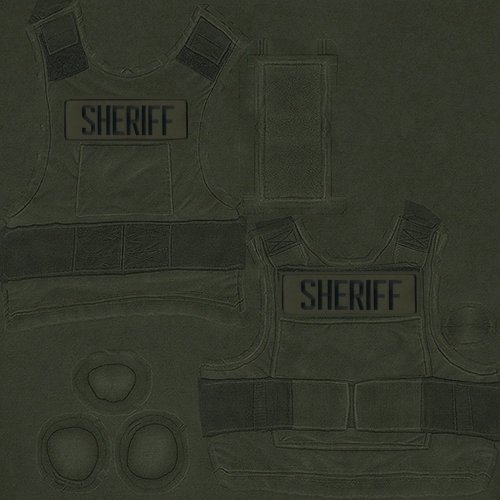 You should find the EUP vests in this location: Grand Theft Auto V\update\x64\dlcpacks\eup\dlc.rpf\x64\models\cdimages\eup_componentpeds\ open m_p_freemode_01_male_freemode_mplts, then click on the vest texture and select replace. task_diff_000_c_uni is the Sheriff texture to replace. Be sure to name the replacement file the same as the original file.
- 16 comments
- 2 reviews
-
-
- 2
-
-
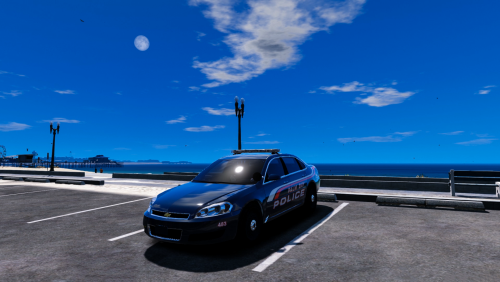 Great model! I was a PBPD officer and drove one of these. Will you be making a model or skin for the chargers they use now?
- 18 comments
- 7 reviews
-
-
 I second this. An option with the original dispatch pitch would be great! Loving the mod so far
- 311 comments
- 39 reviews
-
-
- 1
-
-
-
 This works for the the tahoe, but not the charger for some reason. Extra 5 changes the lights on the tahoe, but none of the extras change the lights on the charger. It's not a deal breaker as the cars are awesome, I just prefer the red/blue setup.
- 445 comments
- 108 reviews
-
Is there any way to use the sheriff charger without the yellow lights and instead have just the blue/red? The sheriff tahoe spawns sometimes with all blue/red, but I haven't been able to find a way for the charger to do so. I've gone through all the extras on both vehicles with no luck.
- 445 comments
- 108 reviews
-
-
.thumb.png.e2108197eebd2a115a71434e78afdd67.png)
.thumb.png.04a1687a445e54a18a959b7926b87d7b.png)
.thumb.jpg.6c80ecc7060134b39a0d153a8d09ac1f.jpg)
