


Reddington
Members
-
Joined
Everything posted by Reddington
-
All in all, ELS is a much better experience than non-ELS, which is why there are rarely non-ELS models uploaded. Aside from the features ELS provides, the lights just look 10x better and you can do more with them. Also, as someone who has previously installed several standalone cars, there are still a lot of variety to choose from with non-ELS vehicles. You just need to look through the vehicles downloads and choose "non ELS" when searching. I know you're wanting newer non-ELS content, but I don't see that happening. ELS is the "norm" now, and I strongly encourage using it if you want new content. (Honestly, new content is just a minor reason to use it when you compare all of ELS's other features)
-
Essential mods are ones that greatly enhance your LSPDFR experience. For example coroner feature, tow truck, etc. Personally, I'm a bit surprised we have VisualV and a callout pack listed as essential, but other than that I agree with all those. Honestly, all of Albo's mods could probably be under essential, as they all add a lot to LSPDFR.
-
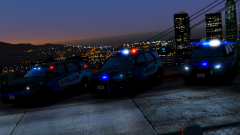 Hmm, at night the blue may be hard on visibility.
 -
Check the links provided by Mags, those are for GTA V. You'll need to create a new topic in the GTA IV section if you want textures for that game as well.
-
This generally means your computer doesn't have enough power to manage the game's demands. My advice is to either remove all of the non essential mods and see how things handle, or remove all your mods except LSPDFR, see what happens, and if there's no texture loss, slowly readd mods until you reach what your computer can handle.
-
Considering you haven't gotten a reply and there hasn't been an update, I'm going to assume no.
-
Honestly, where the cars are is the least of the problems If you installed over the vanilla files and you're now missing two parts of your game folder. You only have two options at this point: 1) Verify integrity of game cache. This should solve the problem. 2) In the event it doesn't, you're going to have to reinstall the game. This topic has been moved to the appropriate forum. Please post in the correct location in the future.
-
Glad you got it sorted. :)
-
In your trainer, when changing liveries, what do you see? Does it say "-1"? This topic has been moved to the appropriate forum. Please post in the correct location in the future.
-
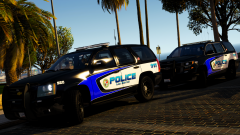 I love that skin! Out of curiosity, have you tried blue chevrons instead of white? Just curious which may look better.
 -
This is a result of Simple Trainer's keybindings. You can either open the trainer in game and disable keybindings, or open tnhe INI/config and disable keybindings there. If you prefer using trainer keybinds, you can just disable this particular one. This topic has been moved to the appropriate forum. Please post in the correct location in the future.
-
For textures, ELS isn't factored into whether or not it'll work on the car. You could have one texture that works on both an ELS and non-ELS model. :) This topic has been moved to the appropriate forum. Please post in the correct location in the future.
-
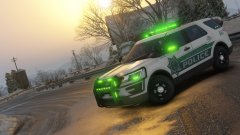 It's....it's....ALIEN POLICE!
 -
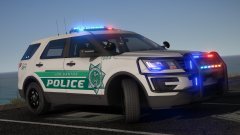 Texture and the car look awesome!
 -
Are you positive the other vehicles.meta and carvariation lines for these addon cars are actually in your game? Go into OpenIV and navigate to where you have them installed. You can double click on files to view them. Just verify everything is there, including the vehicles in vehicles.rpf
-
As we cannot verify legitimacy of users and transactions, we strictly prohibit paying for mods or paying for their creation.
-
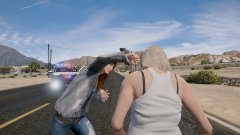
From the album: Red's LSPDFR chaos
-
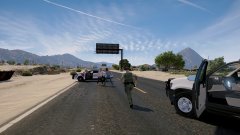
From the album: Red's LSPDFR chaos
-
More than likely you don't have Winrar or 7Zip. https://www.rarlab.com/download.htm This topic has been moved to the appropriate forum. Please post in the correct location in the future.
-
I can only think of two possibilities: 1) You made a mistake at some point. 2) Something was changed in the most recent GTA update. However, the forum isn't flooded with topics about add-on cars not working, so I don't believe it's the latter. I advise removing all of your standalone cars, and two by two readding them. After adding two, go into your game and see if they work.
-
This would be weird if it worked, but try this gameconfig. https://www.gta5-mods.com/misc/gameconfig-for-addons-600
-
Removing one model won't cause others to break unless you unintentionally messed with something else in the process. All your add-on cars should work fine if the vehicles.meta, carvariations and vehicle files are present.
-
This topic has been moved to the appropriate forum. Please post in the correct location in the future.
-
Only thing I can recommend then is verifying integrity again. If after that it still doesn't load when you start the game normally, you may need to reinstall, as something is obviously missing for it not to start at all.
-
You're welcome.


