




Brad Philips Townley
Members
-
Joined
-
Last visited
Everything posted by Brad Philips Townley
-
Your call
-
 Can't find it. Is it in the .ytd for some reason? All the rest are in the folder.
- 132 comments
- 39 reviews
-
It's a modded server called FiveReborn. Your PC will support practically anything
-
-
That's just them fooling around online
-
How is it not working? We can't help if we don't know what the actual issue is
-
It will run LSPDFR comfortably; SAPDFR isn't a mod unless you plan on playing GTA San Andreas.
-
First, are you on GTA 5 or GTA 4? If you downloaded LCPDFR for GTA 5 then you downloaded the wrong mod. LCPDFR is for GTA 4. LSPDFR is for 5. If you're on GTA 5, download LSPDFR, install it, then get the newest version of Rage from ragepluginhook.net
-
Hello everyone. A friend and I are working on two mega packs (four, depending on how you look at it). We will be making skins for cars that make up the fleets of the Suffolk County Police and the Suffolk County Sheriff in New York. These packs will each be available labeled as Suffolk Police/Suffolk Sheriff or Los Santos Police/BCSO/LSSD. We are just wondering if there is any interest for public releases of these packs. If so, please let us know and they will be uploaded here when they are complete.
-
 I don't think you understand that CHP IS a Police Dept. They are the State Police of California. CHP Officers are armed police officers with arrest powers. They have jurisdiction over the entire state and respond to calls as well as patrol the highway. Stop being a bratty bitch and do some damn research before complaining about everything. Also, did you not see any of the videos the other guy just posted? There were at least 4 different PDs, a bunch of fire depts, and lifeguards all using the steady red. Please do the world a favor and fuck off.
- 951 comments
- 158 reviews
-
-

- 3
-
-
-
Thanks @Lundy agreed @OfficerWalters
-
I recently downloaded an ELS car and the patterns are rather slow; how do I speed them up?
-
Every single time I try to launch FiveReborn, I get a FiveReborn Has Stopped Working message.
-
Whenever I change the handling line of a vehicle it causes the game to crash. How do I avoid this while also changing the handling?
-
Did you install a car mod?
-
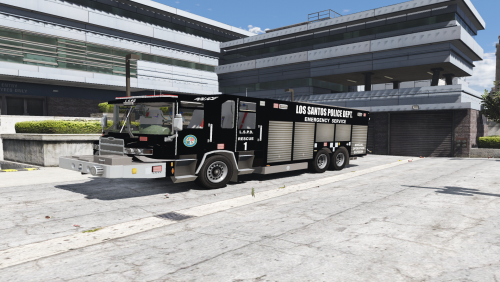 Quick fix: Fire Departments call them rescues, Police Departments call them Emergency Service Units, since they usually also carry SWAT equipment when in service w/ police
- 6 comments
- 1 review
-
I cannot find any guides anywhere on creating the three files listed in the title. The reason I am looking for this information is because a friend of mine, who is developing his first vehicle for ELS, asked me to help him research these things to help him create the files because he is having trouble finding the information himself. He doesn't have an account right now so I'm posting here for him.
-
Use a mods folder Make sure your ASI managers are installed Use Patchday13
-
 Thanks
 -
Buttons aren't working. NumLock is on but can't use the buttons. The progress bar, song name, and artist are all visible in the bottom right though.
-
Only the right one works for me
-
There's a CTRL on both the left and right sides of the keyboard. You have to use the one on the right side. @Randy315
-
There are many, but if you use ELS, they disable some of the controls
-
 @PNWParksFan whenever I change the controller button to RightThumb, RightThumb doesn't work and somehow the .ini reads it as DPadRight And what is the ped model for the FIB model with the FIB jacket on?
- 378 comments
- 23 reviews

