


Creators: Due to background reprocessing of files, approvals and file security checks may be delayed. Thanks for your patience.
.JPG.ccafaadd08df261b09523c5706778859.JPG)
anotherc6vette
Members
-
Joined
-
Last visited
Everything posted by anotherc6vette
-
 ok I added it like you said and im not noticing it under the trainer ? What do i type in in the console to find it ?
- 95 comments
- 29 reviews
-
.thumb.jpg.61de846de400ca98f85d205992527de1.jpg) Hey Bugs if i installed it through the x64e path , does that still install the radiance V ? I am asking because i had it before i installed this car but it seems when i try to go change my radiance V to just bright it has no effect ? I am trying to use the geforce game optimization thing not sure if you are fimiliar but for some reason when it makes everything look better graphics wise it seems to make the lighbar color look dim like more orange than white so trying to see if that would be a postfx graphic issue ?
Hey Bugs if i installed it through the x64e path , does that still install the radiance V ? I am asking because i had it before i installed this car but it seems when i try to go change my radiance V to just bright it has no effect ? I am trying to use the geforce game optimization thing not sure if you are fimiliar but for some reason when it makes everything look better graphics wise it seems to make the lighbar color look dim like more orange than white so trying to see if that would be a postfx graphic issue ?- 265 comments
- 83 reviews
-
 lets just get along gentleman , come on its a game and both of you are willing to help old guys like me by making awesome models/ or even updating current models , to me both of yall do awesome work , I think there are more important things to get hissy over , we are all adults well atleast i hope because if yall are some young highschoolers than yall are way smarter than most with your programming/ modding abilities , but again like I said both of yall have did awesome work to this model , and at the end of the day no offense to either of you but most folks dont really care who made the model they just like cool things that keep this game interesting.
- 221 comments
- 34 reviews
-
Does this car replace any current vehicles ? Or does it create it own new spot in the game ? I just wondering because i have a few car mods and dont want to mess up any of those . Thanks
- 95 comments
- 29 reviews
-
I have a question hope this is the right place to ask , When i pull up my wilderness callout menu where you select the vet or air ambulance when i try to select something nothing happens ? All i get is the bonk sound like i tried to click it but wont actually work, do you know what could cause that type of issue ? Im guessing it would be something with the ragenative but i have deleted and re added that and still nothing works ? Just seems weird that i can pull up the menu just cant select anything ? Thanks for your help
-
-
Scratch that everything works great now , thanks for the awesome work Bugs !!
- 265 comments
- 83 reviews
-
-
Ah gothca , if you went through the patchdays and just changed it to the new the files you wanted would it work that way also ? I know it prob would take longer just trying to see if that was another way to do it ? Also I noticed when i have used an auto installer before that it adds a whole new update folder under the mods folder , And it seems like it consist of a mpheist and patchday3 , why would it make a new folder on the auto installers ?
- 265 comments
- 83 reviews
-
dude hands down you make the best models out there !!! And bugs quick question , why can you not just put the x64e file in your mods folder and then change all the vehicle models that way ?
- 265 comments
- 83 reviews
-
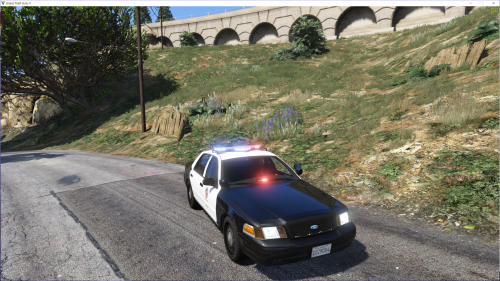 Hey Pim why would my led dash light be all blue ? or is that the way it should be ?
- 36 comments
- 20 reviews
-
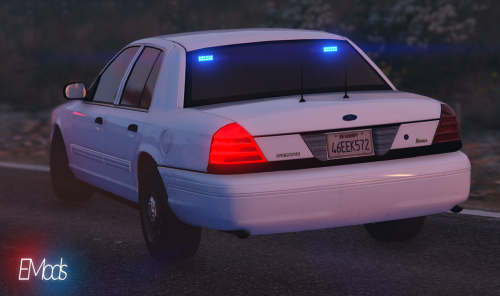 I notice it says police.ytd and so forth , I was wondering will these take the place of the police 1 slot or do they replace the undercover cars ?
- 28 comments
- 3 reviews
-
-

- 1
-
-
THanks , yep i deleted the car mod that had the auto installer and it messed up stuff , sucks because that mod only had an auto install Thanks i was always wondering why i did not have a x64e folder now i know
-
Thanks GIlmar I have that path ill try that way , I wonder why i dont have the patchday4 under the mods folder ? Im going back through steam and validating my game cache see if it works this time since Pim says i should have that folder under the mods
- 221 comments
- 34 reviews
-
-
- 1
-
-
Yeah have the steam version , so if I do that through steam it says I have everything? I see the patchday4 but it's not in just the mods folder where the update.rpf and the x64 folder are though ? for me to get to the patchday4 i have to go through the x64 folder than dlcpacks? Thanks for tryin to help
- 221 comments
- 34 reviews
-
anyone know why there would not be a patchday4 folder in the mods folder? Or do you have to create one ?
- 221 comments
- 34 reviews
-
Hey guys not sure if im asking in the right place but I was needing some help , I recently downloaded the BXbugs crown vic model that has an auto installer , well long story short im trying to add the ford explorer mod well i noticed in the mods folder i made the auto installer must have created another update folder so now in my mods folder i have an update.rpf and x64 folder and now an update folder , well my question is , since i have that second update folder that was added from the bugs mod is that keeping me from loading the explorer mod ? Hope that wasnt to confusing and thanks for any help Also guys in my root update folder i dont have an X64e it just an X64 folder ? Is that right ?
-
.thumb.jpg.4066677156985e22489bfecddc2f6c45.jpg) BXbugs ive noticed when you do the package installer it adds a new update folder in your mods folder ? Is it supposed to do that ?
BXbugs ive noticed when you do the package installer it adds a new update folder in your mods folder ? Is it supposed to do that ?- 376 comments
- 81 reviews
-
Yeah on the installation , I do not have a patchday4 in my mods folder , but i do notice it when i go through the x64 / dlcpacks ? I tried installing it that way but it didnt work? Do i need to create a patchday4 folder first ?
- 221 comments
- 34 reviews
-
 Im having the same problem , and its on my factory game installed crown vic ? the lights are not red/blue they are almost pink/white ? it also did that to my firetruck
- 336 comments
- 70 reviews
-
thanks
-
Hey guy i was having some weird glitch with my vehicles not being able to leave the ground , so what i did was uninstall the lcpdfr , well i guess somehow it messed my factory GTA , well i made a backup folder of the original GTA V folder without any of the LSPDFR stuff , well when i went to try to play just regular GTA it gave me an error that said Failed to execute ... im guessing it is a steam issue . well i was wondering what the point of backing up the original folder if it doesnt actually do anything ? And if there is a way to fix this without having to reinstall the whole game over ? Thanks guys Also is there a way to reinstall my GTA V from the original backup folder I made ?
.JPG.ccafaadd08df261b09523c5706778859.thumb.JPG.abce10cb0adda650fad75c858ba635ef.JPG)
.thumb.jpg.61de846de400ca98f85d205992527de1.jpg)
.thumb.jpg.4066677156985e22489bfecddc2f6c45.jpg)
