TNelson
Members
-
Joined
-
Last visited
Everything posted by TNelson
-
I'm not sure that it is Assorted Callouts. Looking at the features on the download page, there's no mention of anything like that, nor is there in the .ini
-
Thanks for the replies, guys. I've been playing since release and never had anything at all like that. Guess I'm just lucky!
-
Hey guys! I was just playing and realized that I've never had an instance in LSPDFR where I approach a driver on a traffic stop and had them shoot at me. I remember in LCPDFR this would happen occasionally, and really made me act more defensively on stops. Is this a feature that I've just never experienced, or has it been removed all together? I kinda miss it.
-
-
Just as far as signage goes. I don't plan on messing with the actual buildings.
-
I'm planning on changing it from the NOOSE HQ to a courts/jail facility.
-
Thanks, that's awesome! Really appreciate it.
-
I'm looking for the location of the texture files for the Los Santos Government Facility building off of Sustancia Road in the Tataviam Mountains. More specifically, the sign at the main gate that says the name of the facility. Would really help me out!
-
The properties window is empty for me. Maybe I need to change something in Z3D's settings?
-
So with the release of ELS, I decided to take the plunge into modeling. I started with (what I thought would be) an easy practice project to add some lights to the blazer2. I added OfficerFiveO's lin3, named it as extra_4, and exported the model as blazer2_hi.ft and blazer2.yft. I was editing the "_hi" model originally if that makes any difference. I added my modded .ytd and .yft's to my mods folder in patchday13. I also added the lin3 textures to the .ytd. When I launch the game, it loads up and works fine. When I try to spawn the blazer through the trainer, the game immediately crashes and gives me an error saying that game files are corrupt. I know it's my modded blazer, but I'm not sure what I did wrong. Thanks in advance for the help! Edit: Tried to run the game again, but this time driving down to the beach to see if I could catch a natively spawned blazer2. As soon as I got near the beach, the game crashed again with the same error. So it's definitely the model being spawned that's causing the crash.
-
 The lights act like they're set to strobes in the vcf's, but they're definitely "leds". Anyone else having the same issue? Not having this problem, though.
- 93 comments
- 28 reviews
-
 Is anyone actually able to make a traffic stop with ELS? The cars either don't stop at all, or hit the accelerator and fly off.
- 2,699 comments
- 240 reviews
-
I'm having the same problem after deleting and reinstalling my mods folder for the new patch. ELS, advancedhook, and PLD load fine, however.
-
Doesn't OpenIV do that for you when GTA updates? I don't remember what the prompt was, exactly, but I know it had me update some folder. Where did you get RPH .47? It's no longer available on the website. I deleted and reinstalled my mods folder. Game launches now but cars in mods folder don't spawn. Thread regarding that issue is here
-
Posted on RPH forums but I've yet to get a response. I've been playing since the last GTA update on a reverted version of GTA, but saw that RAGE Plugin Hook was updated today. I downloaded and installed it, went through the setup no problem, and reverted back to the most recent version of GTA. I also saw that AdvancedHook.asi was outdated and recently updated, so I downloaded and installed that as well. RAGE Plugin Hook launches GTA just fine, but I get stuck in an infinite loading screen. If I open the terminal in the loading screen, I can see that LSPDFR and all of my plugins loaded successfully. I did some reading online and deleted my save files and changed gta.exe to high priority in task manager, but I still can't get the game to load. Edit: Now installed the RPH .49 and having the same issue. If I launch GTA without RPH, the game crashes after sitting in the story mode loading screen for a minute. Edit 2: Anyone? I've tried changing the DX version, changing grass detail, deleting all my savefiles, installing new save files, changing gameconfig.xml, updated GPU drivers, and verified game integrity at least 3 times. I have no clue what else to do, and I think I've run out of forum solutions to try. Losing my freaking mind over this.
-
-
-
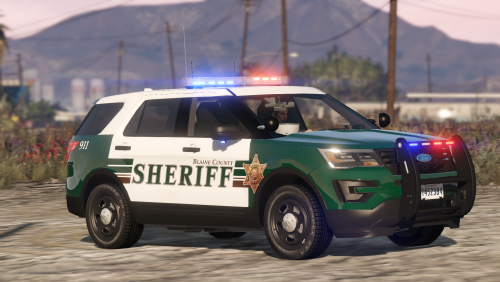 Really digging the pack so far, but the flashpatterns are different for me than in the video. Like, the lights and coronas work just fine, but it's got the stock flash patterns. Am I doing something wrong? Edit: Nevermind, installed BEL and it looks awesome.
- 77 comments
- 32 reviews
-
Thanks for the help, really appreciate it!
-
Is there a way to use the stock SA Exempt plates on modded police cars? I read in another thread that it's set in carvariations, and I found "<plateprobabilities>", with no value entered, but I'm not sure what to add to get what plate.
-
It's a pretty simple texture, so I'll start working on it. Paying for textures is totally unnecessary- it's really not that hard.
-
 Interesting, seeing as I have multiple installed for the Tahoe that work just fine. Oh well, hopefully we can get that updated at some point.
- 445 comments
- 108 reviews
-
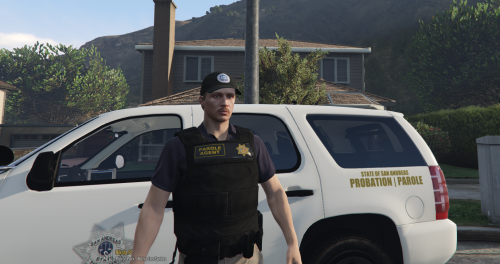 HD SADCR Parole Agent vest. Replaces the PIA vest in EUP. Perfect for gang task force gameplay!
 -
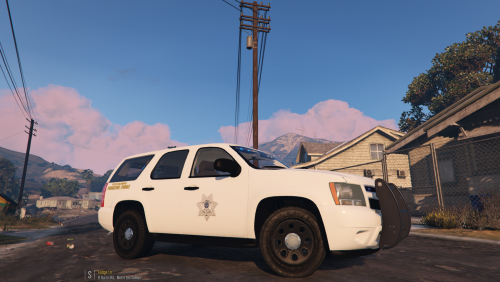 Simple San Andreas State Parole/Probation Agent texture. Perfect for gang task force gameplay!
 -
"FLAG_HAS_LIVERY" exists for fbi in that vehicles.meta as well, but it's still not working. Edit: Also, the trainer livery menu shows a '-1'
- 445 comments
- 108 reviews