
AlexBraun
Members
-
Joined
-
Last visited
Everything posted by AlexBraun
-
 The gun was actually disabled, just to show that you can enable and disable (currently working on the edit function) single props in a collection as well :D, but it wasn't really obvious in the picture :/
 -
From the album: W.I.P. Scripts
Collections are just what they say they are: Collections of Attachments.. Makes it easier for the user to toggle multiple Attachments at the same time. -
 It depends on the department, what tattoo they have, where it is on their body, etc.
- 2,341 comments
- 236 reviews
-
There are two reasons we didn't add in tattoos to the EUP Menu. 1. We didn't see much reason to add in Tattoos, since most players play without tattoos and they are not really welcomed in Law Enforcement. 2. Tattoos are a pain in the *** to work with.
- 2,341 comments
- 236 reviews
-
Open your dlclist.xml in update.rpf/data and check for an entry named EUP.
-
-
Can you give us your log file please? Just so we can check whether EUP menu caused the issue, and if so, fix it to prevent it from happening in the future.
-
You need to install the EUP Menu from the "Menu" folder inside the EUP 7.3 zip file.
-
Did you install the menu from the 'Menu' folder inside the 7.3 .rar file?
- 2,341 comments
- 236 reviews
-
The EUP Menu won't work with RPH 0.39, it requires RPH 0.40 as a minimum.
- 2,341 comments
- 236 reviews
-
You don't have to register on Mega to download from there, and it was neccessary because neither me nor @Alex_Ashfold were able to upload the file successfully to the LCPDFR website.
- 2,341 comments
- 236 reviews
-
-

- 1
-
-
The EUP menu is separated from the OIV installer, just install the menu from the subfolder "Menu" like any other RAGEPluginHook plugin.
- 2,341 comments
- 236 reviews
-
Just download the .txt and copy the link from there into your preferred browser (Chrome, Firefox, Vivaldi,...)
- 2,341 comments
- 236 reviews
-
Did you download the updated file? We had to re upload the .OIV file due to a mistake we made with the installation process. Just download and install it again and it should work.
- 2,341 comments
- 236 reviews
-
-
The Emergency Uniforms Pack file has been updated due to a mistake in the .OIV file. Make sure you download the newest version before submitting any questions.
- 2,341 comments
- 236 reviews
-
-
- 2
-
-
 You can create your very own personalized characters. You can name them whatever you like and rename them later on if you don't like the name anymore.
 -
For the face and basic appearance I've set these parameters that can be changed. I did not try creating them with their uniform on, but that's just a single native, so should be easy.
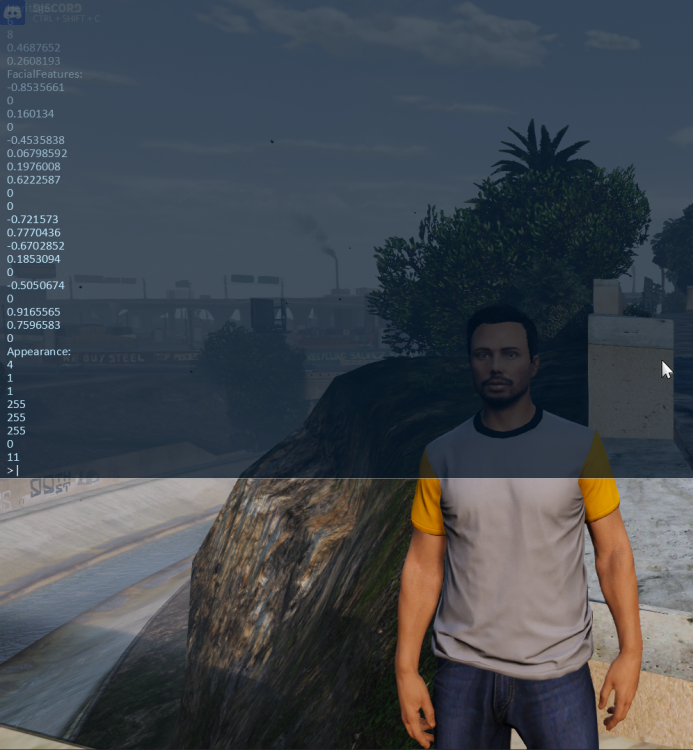
-
Spawning in characters and randomizing them is no problem, I tried doing a stress test with how many characters I could randomize simultaneously for the EUP script, and it were a lot. So that shouldn't be a bottleneck if and when that idea gets realized.
-
If this issue happens to you, don't worry, just open up the console (F4) and type in "LoadPlugin EUPClothingMenu".
- 2,341 comments
- 236 reviews
-
As far as I know it is a protection mechanism in one of your other mods. It is there to prevent the game from crashing when respawning at the hospital. Just reload your character from SkinControl and you should be fine.
-
 Cop.Invincible = true; Cop.CanAge = false;
 -
*gasp* So Jenkins never really died? For real now though, looks great :)
-
 That new leg holster though!
 -
Can you give us your OpenIV.log file so we can see if the DLC files get loaded in properly?