
AlexBraun
Members
-
Joined
-
Last visited
Everything posted by AlexBraun
-
 Tip for next time you update this plugin: Instead of using ScriptSettings from SHVDN, you can use the InitializationFile class from RAGE Plugin Hook, this minimizes dependencies and allows it to be used even when ScriptHookV isn't updated. I've already taken the liberty of converting your code for you: var iniFile = new InitializationFile("PursuitPack.ini"); var flag1 = iniFile.ReadBoolean("Options", "Stolen Stockade", true); var flag2 = iniFile.ReadBoolean("Options", "Stolen Vehicle", true); var flag3 = iniFile.ReadBoolean("Options", "Drive By", true); var flag4 = iniFile.ReadBoolean("Options", "Motorcycle Pursuit", true); var flag5 = iniFile.ReadBoolean("Options", "High Speed Car Chase", true); var flag6 = iniFile.ReadBoolean("Options", "Wanted Criminal In Car", true); var flag7 = iniFile.ReadBoolean("Options", "Foot Pursuit", true); var flag8 = iniFile.ReadBoolean("Options", "Bicycle Pursuit", true); var flag9 = iniFile.ReadBoolean("Options", "Faggio Pursuit", true); var flag10 = iniFile.ReadBoolean("Options", "Armed Faggio Pursuit", true); var flag11 = iniFile.ReadBoolean("Options", "Police Car Stolen", true); var flag12 = iniFile.ReadBoolean("Options", "Ambulance Stolen", true); var flag13 = iniFile.ReadBoolean("Options", "Stolen Fire Truck", true); var flag14 = iniFile.ReadBoolean("Options", "Low Value Car Stolen", true); var flag15 = iniFile.ReadBoolean("Options", "Racing Car", true); var flag16 = iniFile.ReadBoolean("Options", "Truck Pursuit", true); var flag17 = iniFile.ReadBoolean("Options", "Garbage Truck Pursuit", true); var flag18 = iniFile.ReadBoolean("Options", "Tank Pursuit", true); var flag19 = iniFile.ReadBoolean("Options", "Stolen Bus", true); var flag20 = iniFile.ReadBoolean("Options", "Stolen Taxi", true); var flag21 = iniFile.ReadBoolean("Options", "Stolen Dump", true); var flag22 = iniFile.ReadBoolean("Options", "Monster Truck Rampage", true); var flag23 = iniFile.ReadBoolean("Options", "Stolen Military Insurgent", true); var flag24 = iniFile.ReadBoolean("Options", "Stolen Police Bike", true); var flag25 = iniFile.ReadBoolean("Options", "Stolen Tractor", true); You're welcome.
- 191 comments
- 7 reviews
-
-

-

- 2
-
-
 Once again, that would interfere with the .NET script if that one's enabled as well. The DAU (dumbest assumable user [Yes, we actually use that term in programming]) wouldn't know about that interference and that would probably confuse Discord since there are 2 apps with the same ID communicating with it at the same time but with different information.
 -
Rage Presence RagePresence allows players to share their actions from Grand Theft Auto V to everyone on Discord using Discord's new Rich Presence feature. Installation: Drag discord-rpc.dll into your GTA 5 installation folder where the .exe files are, and put RagePresence.dll in the scripts folder. Requirements: Grand Theft Auto V - v1180+ ScriptHookV.Net 2.10+ Latest Discord Client for Windows Check out our Discord if you need any support.
-
-
 Exactly, the game sees Michael as a safe point which it can revert to if all other options of recovering from the error (death as NPC which is not the current player characters model) If you want to prevent this error from happening, enable god mode.
- 2,349 comments
- 238 reviews
-
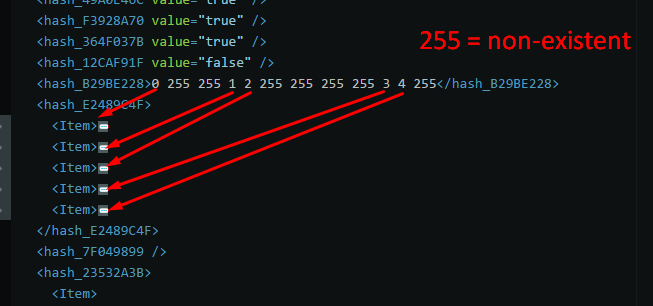
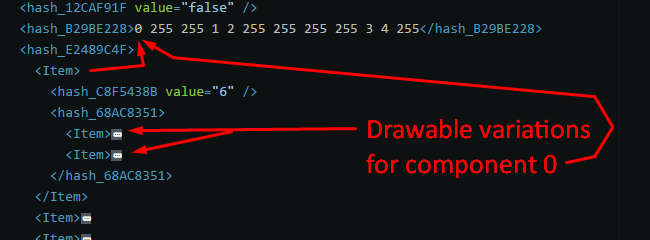
There are 12 numbers, from left to right they go by the component Ids. A number under 11 means the n-th <Item> element (n being the number that was given)
-
The parts of the players (lowr, jbib, accs) are called components. These components have different models, also known as drawables, and identifiable by the number after the component name. And they can have different texture variations, which can be identified by the letter at the end. (a = texture id 0, b = texture id 1, c = texture id 2, ...)
-
Do you know what drawables are?
-
RagePluginHook's logs.
-
The features are working fine, it's most likely due to your low graphics settings that they are non-functional for you. Try setting the graphics settings a bit higher and also please post logs next time.
-
The <Item> elements within <hash_E2489C4F> correspond to the individual components, and each of the <Item> elements within the <hash_68AC8351> element of each component <Item> element, are responsible for the drawable variations. Edit for clarification: I used the s_m_y_hwaycop_01 ymt file in these pictures.
-
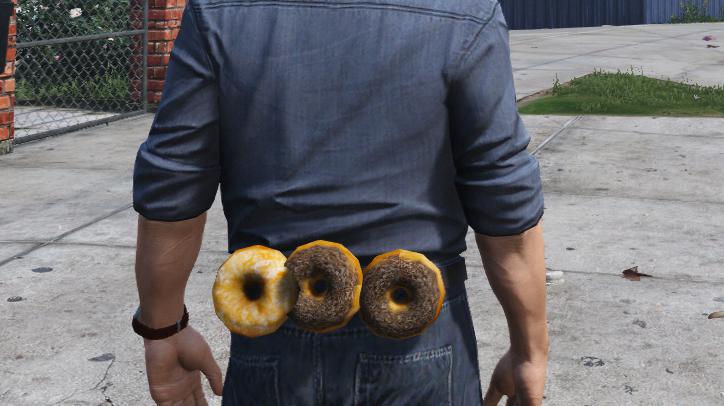
I have found a new way to add in clothing to peds without having to replace any of the existing drawables or textures! This will possibly lead to a lot of additional clothing mods.
-

From the album: W.I.P. Scripts
Yes, this is a repost of a GIF I posted on imgur about a month ago. Might have appeared on 9gag as well according to a friend of mine.. -
Just a place for me to share my scripts that I've made when I got bored or started working on a new project. (Warning: Some images and/or scripts could make no sense)
-
Check their individual readme files or mod pages to find out.
-
That means that they are not Plugins, but callouts. They have to be placed inside of /Plugins/LSPDFR otherwise they won't run. To load them in, use LSPD First Response.
-
Place PeterUCallouts.dll inside of /Plugins/LSPDFR instead of /Plugins. That should fix the error.
-
Please give us the log file so we can see what errors are occurring.
-
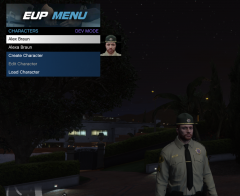
From the album: W.I.P. Scripts
Trying to figure out how to render a full character like in the pause menu.. -
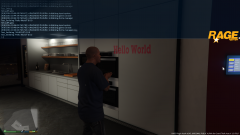
From the album: W.I.P. Scripts
Interactive and changeable nametags, how cool would that be? (Very early WIP for now, gotta enhance EUP Menu first) -
Then you must've done something horribly wrong. The update to EUP 7.3B doesn't cause any issues with most users, nor did it in the testing phase. Even if it did cause issues, you could've just reverted back to the old version or removed the mod by deleting the line responsible for EUP in update.rpf/common/data/dlclist.xml.
- 2,349 comments
- 238 reviews
-
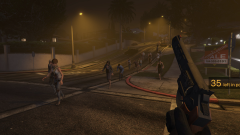
From the album: W.I.P. Scripts
This is for an upcoming project by me and @OfficerHenry2x. -
We can see that the demand for a tattoo section inside the EUP menu is big, however, it won't be easy implementing it without breaking the current loading/saving system (Meaning character saves won't load unless manual changes are made).
- 2,349 comments
- 238 reviews
-
-
- 1
-
-
You can either use the wardrobe function (recommended) or edit the .ini files included with the EUP menu. (Modifications to generated .ini files are possible, but not supported by us)
-
The 'restoration' of the character when he/she dies is not caused by the EUP menu itself, and can't be fixed by us as of right now. I'll look into it though to try and feature a temporary fix in the next update.