



Skip to content
View in the app

A better way to browse. Learn more.

LCPDFR.com

A full-screen app on your home screen with push notifications, badges and more.

To install this app on iOS and iPadOS
  1. Tap the Share icon in Safari
  2. Scroll the menu and tap Add to Home Screen.
  3. Tap Add in the top-right corner.
To install this app on Android
  1. Tap the 3-dot menu (⋮) in the top-right corner of the browser.
  2. Tap Add to Home screen or Install app.
  3. Confirm by tapping Install.

EUP 7.3

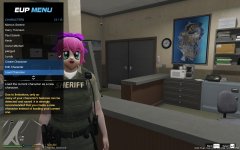
Stay Tuned on LSPDFR this week for a complete EUP Menu overhaul brought to you by @PieRGud and @AlexBraun

New Features:
- Goodbye Skin Control
- Ability to create, save and load up to 100+ Characters
- Customize your own oufits with your own custom wardrobe
- Determine your character voice and walk style and make it permanent to this character
- More clothing and accessories
- Tactical and Winter Add-ons now part of EUP

Credit

Alex Ashfold, PieRGuD, Alex Braun

Copyright

© EUP Team

From the album:

Emergency Uniforms Pack WIPs

· 451 images

Account

Navigation

Search

Search

Configure browser push notifications

Chrome (Android)
  1. Tap the lock icon next to the address bar.
  2. Tap Permissions → Notifications.
  3. Adjust your preference.
Chrome (Desktop)
  1. Click the padlock icon in the address bar.
  2. Select Site settings.
  3. Find Notifications and adjust your preference.