


Marceloo
Members
-
Joined
-
Last visited
Everything posted by Marceloo
-
LSPDFR 0.4 actually has this feature built in. Under Grand Theft Auto V\lspdfr\data you will find agency.xml, backup.xml, regions.xml and a couple of other files serving this exact purpose. And an unlimited number of additional vehicles can be easily installed using Lenny's Mod Manager. I would also recommend installing EUP, Ultimate Backup and then: This way, you will be able to customize everything way more easily under Grand Theft Auto V\lspdfr\data\custom.
-
 I don't think anyone is going to use it because of how bad it sounds. Please use the files provided by LSPDFR and if you need to - ask other plugin developers for permission to use their voice files. I'm pretty sure most would agree to it.
 -
 I've messaged @TWISTEDSCOPES about this yesterday. There was some kind of problem with links and the pack had to be temporarly taken down. I hope it will be back soon.
 -
Finally an ELS LAPD pack! I can't wait for the 2009 Charger. That's one of my favourite police cars ever,
-
Have you updated your game and also installed the latest versions of RPH and scripthook? If so, please tell me what other mods you have installed. Also, make sure that you remove update.rpf from your mods folder after every update.
-
@antiboy6 please realise that using caps lock does not actually make you scream through the internet and don't tell me to shut up while I'm trying to help you. You are being rude as hell. If you need any help, please tell us what you problem is. ScripthookV has been updated and is fully working (yes, 22 Jun 2017 was two days ago), So is RPH. You don't need to revert your game version or anything else. Anyway, if you really want to use the older RPH version, then go for it. Just be aware that you won't receive any help neither from the official RPH Support or from us (most likely).
-
I don't really get what you are trying to say. ScripthookV has been updated many hours ago. OpenIV is back as well. You can revert your game to previous version at any time and the older version of RPH will work with it just fine. What is this topic for, exactly? :o
-
But it seems to be the only way to get RDE working with LSPDFR without crashes. Buildings, cars, peds and other things (which are the most important elements when it comes to actually using RDE with LSPDFR) are still there. Any plans on releasing an official fix, @Yard1?
-
(from: https://pl.gta5-mods.com/misc/realism-dispatch-enhanced) Worked fine for me, hope it will for you as well :)
-
Hi everyone and thanks for reading my topic. Yesterday I've decided to give LSPDFR another try after a long break. I've made a clean installation with RPH 0.51 and then installed the necessary mods (mostly the ones that have already been updated for the newest GTA version). When I launch RPH and play the game normally (without going on duty) everything is fine, no crashes whatsoever. However, when I do eventually go on duty, the game crashes after just about one or two minutes of driving around the city, no matter if I just drive, perform a traffic stop or respond to a call. Mods installed: RagePluginHook.log: Please let me know if there is any other log / information I can give you that may help solving this problem. Thanks in advance :)
-
 Couldn't do an air patrol without it, great job! Exactly what I was looking for!
- 161 comments
- 23 reviews
-
-

- 1
-
-
 I have to admit it - I've never seen such a great pack of callouts. Whenever one of them appears on my screen, I immadiately rush to it. They're interesting, in-depth and very well done. And there's also a great variety. Rating anything else other than five stars would be a missunderstanding :)
- 166 comments
- 75 reviews
-
 @Albo1125 Thank you :) I'll need to contact you later as I've been having a lot of problems with the scaling and I hope you could help me a little. Cheers!
- 3 comments
- 2 reviews
-
What mods do you have installed? Any visual modifications?
-
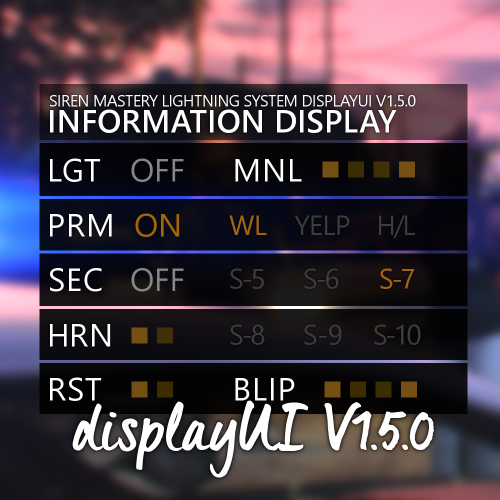
"displayUI" is an user interface made for @Albo1125's SirenMastery plugin. It's look has been mainly inspired by the UI used in @Lt.Caine's Emergency Lightning System IV V8.51 for LCPDFR. It's goal is to display all the important information to the player, while remaining simple and classy, perfectly fitting the rest of the GTA V's interface. You need the original mod in order for displayUI to work: INSTALLATION: - Copy and paste the contents of this download's Grand Theft Auto V folder into your own Grand Theft Auto V folder. - You can edit the UI size in the Plugins/SirenMastery/Config/UIConfig.ini file (it is recommended to use 0.35 size for this UI) KNOWN BUGS: - The mute button is bugging out (but it's SirenMastery's problem, not the UI's itself) DON'T FORGET TO WRITE A REVIEW AFTER YOU'VE TESTED THE UI OUT. THANK YOU! Please note that it is the first ever version of this mod, so it might not be perfect yet. Thanks to @Lt.Caine for being a nice person and allowing me to rip-off his work. ...and to @TmBB101 for showcasing the mod in his video! Feel free to leave comments and suggestions down below and expect me to shine with my low-quality english. DO NOT REDISTRIBUTE WITHOUT MY PERMISSION
- 3 comments
- 2 reviews
-
-
- 6
-
-
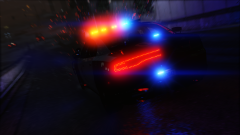 Great photo, definitely gonna try those mods out.
 -
He was just trying to race you :D
-
 The " SirenMastery_ReloadUI" command works now, but it only reloads the .ini files. All the images remain the same, even though they are replaced in the "UI" folder.
- 851 comments
- 108 reviews
-
-
Hey, @Albo1125! I've recently installed Siren Mastery. Everithing works great, except one thing - the " SirenMastery_ReloadUI" console command. Seems like RPH does not recognize it at all. Even when i type "help" in my console it shows "?????????????" by the plugin name. I'm running RAGE Plugin Hook v0.45. Any idea why it doesn't work?
- 851 comments
- 108 reviews
-
Download RAGE Plugin Hook and open the .zip (or just open the one you have previously downloaded). Copy all the files from the .zip and paste them into the game main directory. Those pasted files in the game folder will be highlited and you will know exactly what do you need to remove. :)
-
From what I can tell you, you would definietely need more than 8GB of RAM to smoothly run all the plugins for LSPDFR. As for the GPU, GTX 960 4GB is enough if you want to play clear GTA V on Very High/Ultra (60fps) and LSPDFR with lots of plugins on Medium (around 50fps with 8GB of RAM). It also depends on whether you absolutely need to have constant 60 frames per second.
-
Google Translate is strong is this thread :D All the controls of this mod are listed in the readme included in the download. You need to HOLD the selected button to turn of the engine. Also, make sure to set "Vehicle Engine" in the LSPDFR menu (N) to "On" instead of "Always on", otherwise the engine will turn back on after you get out of the car. //POLISH: W plikach tekstowych zawartych w paczce, w której znajduje się mod wypisane są wszystkie przyciski, które możesz też sobie sam konfigurować. I na przyszłość, nie używaj Google Tłumacza, bo "Fashion" to moda, a nie mod xD
-
Use Rockstar Editor to record replays of your pursuits, then add the "news stuff" in post-production. It's pretty simple :)
-
 My character camera is much higher after installing this mod (I can only see my officer's head and shoulders). Why is it so?
- 1,515 comments
- 85 reviews


