




Abel Gaming
Members
-
Joined
-
Last visited
Everything posted by Abel Gaming
-
 LOL :P Gotta love Prophet :)
 -
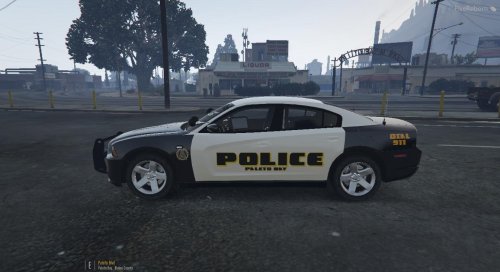
About This: My first Grand Theft Auto V skin attempt. This skin is based off DeFuniak Springs, Flordia 2014 police Dodge Charger. Please be sure to tell me how I did in the comments, and if you have any tips or suggestions for me, please feel free to leave those in the comments as well! Please do not re-upload this without my permission! Model Used: 2014 DODGE CHARGER UNMARKED UMX v1.1 - By Carperino Images: Front and Side Image: Back Image:
-
 Not sure what's going on with it. Maybe a conflicting mod, but I'm not sure what it could be.
- 59 comments
- 6 reviews
-
In FiveReborn what you have to do is make a "plugins" folder then inside the plugins folder, add "ScriptHookVDotNet.asi" then create another folder inside your "plugins" folder and call it "scripts" then place the following files in your scripts folder NativeUI.dll PoliceMenu V.net.dll That should work :D
- 59 comments
- 6 reviews
-
-
Not sure if this has anything to do with it, but in your GTA V directory, do you have ScriptHookDotNet as well?
- 59 comments
- 6 reviews
-
No one else seems to be having trouble, did you put NativeUI.dll in the scripts folder as well?
- 59 comments
- 6 reviews
-
-
Does no conflict EUP, and currently working on the add-on vehicles feature as someone over on GTA5-Mods requested it as well :)
- 59 comments
- 6 reviews
-
Description PoliceMenuV is a mod menu developed by Abel Gaming for players who seek to have quick and easy access to police items within Grand Theft Auto V. This is much like a mod menu, or trainer, strictly dedicated to police items. If you have any suggestions, feel free to leave them below! Configuration Tool Place the configuration tool, MetroFramework.dll, and MetroFramework.Fonts.dll inside your scripts folder as well, run it, then when done editing, click save settings in the top corner. It will generate a new .INI file with your configurations! Controls Open Menu - F5 (By default) Quick Vehicle Repair - F1 (By default) Install Instructions Simply drag the scripts folder into your GTA V directory OR drag the files from inside the scripts folder into your scripts folder if you already have one! Requirements ScriptHook V ScriptHook V Dot Net Native UI .Net Framework 4.5.2+ Important Things To Remember About Comments Modding takes a lot of time and hard work. It doesn't matter if you're on my file or someone else, please be considerate of their hard work and their dedicated time as they probably worked very hard towards making their mod.
- 59 comments
- 6 reviews
-
-

- 6
-
-
Important Resources: Scripthookdotnet Visual Studio 13 or up .Net Framework 4.5.2 Tutorial Start: 1) We will begin with this base script: using System; using System.Collections.Generic; using System.Linq; using System.Text; using System.Windows.Forms; using GTA; using GTA.Native; namespace Mod { public class Mod : Script { public Mod() { //set interval Interval = Settings.GetValueInteger("INTERVAL", "SETTINGS", 10000); //bind tick event this.Tick += new EventHandler(ModTick); //bind keydown event. this.KeyDown += new GTA.KeyEventHandler(ModKeyDown); } //tick method, ran every 20 secs public void ModTick(object sender, EventArgs e) { if (Player.Character.isInjured) { Player.Character.Health = 1000; } } //key down handler //A lot of your script will go here public void ModKeyDown(object sender, GTA.KeyEventArgs e) { if (Keys.F6 == e.Key) { //Add some kind of code to happen on key press } } } } Be sure you go to references, and import all listed at the top. 2) I will now provide some code sources below: Car Spawning Vector3 vehPos = World.GetNextPositionOnStreet(Player.Character.Position.Around(10.0f)); World.CreateVehicle(new Model("POLICE"), vehPos); Vehicle Repair Player.Character.CurrentVehicle.Repair(); Wash Vehicle Player.Character.CurrentVehicle.Wash(); Max Player Health Player.Character.Health = 1000; Max Player Armour Player.Character.Armor = 1000; Change Player Model Player.Model = ("M_Y_SWAT"); Player models can be found here Change Player Voice Player.Character.Voice = ("VOICE NAME HERE"); Example of player voice Player.Character.Voice = ("M_Y_COP_WHITE"); 3) Before exporting your script, go to properties and make sure you are using Framework 4.5.2 or above. On your build and assembly name, add ".net" to the end of it! Now build the file, and add it to your scripts file! Video Tutorial Here
-
Please direct me and lead me to the current topic if this is the wrong place... I have been looking to make a GTA IV script recently. I have finished making public updates to my current script, PoliceMenu, and I want some new ideas. I am open to anything really. I make small, simple script and release them on GTA4-Mods since they aren't LCPDFR related, but I want some ideas of what could possibly make LCPDFR and GTA IV Policing better! Open to any ideas, so shoot them to me in a message or in the comments below! Thank you!
-
 Thanks man! No longer making public updates, but if you want something added, message me and I'll make a private version and send you it!
- 23 comments
- 1 review
-
 Perfect rating! These skins are absolutely insane and I am in complete love right now!
 -
Extract the ZIP file and put the following items into your GTA IV directory dsound.dll ScriptHook.dll ScriptHookDotNet.asi scripts folder (just drag the whole folder over) You have installed it :)
- 23 comments
- 1 review
-
-
Same issue previously, eventually just gave up after finding no answers at all on the web.
-
-
 Thanks man! :)
 -
Like the title change, I am going to rename it!
-
That's a good idea! I will be sure to see what I can do! :)
-
Next Update Expected: 4/15/16 Liberty Crime Information Center For Police Clans This program is in early development! I just wanted to get the idea out there so I could take some suggestions! I will include all the locations in a spoiler below in case anyone wants to add or remove any! Please let me know if you have any suggestions or questions! Thank you :) Locations:
-
 No, you can make normal .net scripts! Hope this works for you! :)
 -
Asking for EXE programs (tools) that would make things (modding) easier for people.
-
Hello everyone, I hope everyone is doing well! As a development team, Abel Software is always turning to the community for programs you guys would like to see! If you have any ideas or suggestions of an EXE program or tool you would like to see be brought to the GTA V and GTA IV community, comment it below and we will message you for more details! This is a chance for the community to decide what they would like to see! We appreciate all comments and suggestions!

