BlueLine Vibes
Insiders
-
Joined
-
Last visited
Everything posted by BlueLine Vibes
-
-
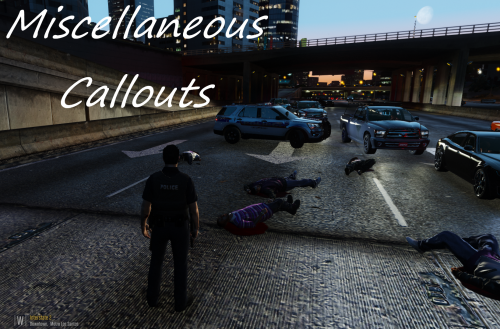 Enjoyed the callout package very much. Video Showcase of Miscellaneous Callouts - All 3 callouts
- 68 comments
- 21 reviews
-
-

- 1
-
-
 Just some advice - I wouldn't put in your description "I KNOW IT'S BAD". A simple "Hey this is my first upload" would suffice. We all get that you gotta start somewhere, but self-deprecation doesn't show great confidence. Take this as just constructive criticism for your next plugin description. However, I will give it a try
 -
I agree with HomerS on his recommendations. I will take his idea and I will even expand a bit. First do this and it only takes a few seconds. Take your entire LSPDFR folder and put it on your desktop. Next take your Entire Plugins folder and put it on your desktop. Next, make sure you have updated your Visual C++ 2015 Redistributable and Microsoft Framework 4.6 (unless you are on Windows 10 then you have it already) Turn off your Firewall temporarily and your AV software temporarily. Next install in this order. LSPDFR Script Hook V Rage Hook 0.52 Now fire up Rage Hook and when you get to the rage menu go to Plugins. Check off Load All Plugins at start up. You should only see LSPDFR in that section. Save and Launch. It really should not matter if you chose F1 or F4 to bring up Rage Console (personally I like to choose F2 as it doesn't interfere with my trainers). Wait for the game to load and it should load in LSPDFR and Rage Hook logos bottom left of screen. Next bring up your Rage hook console with F1 in your case. Now type in Forceduty and enter. You are officially on duty. Probably as Franklin, Michael or Trevor, doesn't really matter at this point. You want to see if you can get into a police vehicle and pull someone over. Get in a car and press Shift behind vehicle and the default horn key is E if I am not mistaken. Also, point gun at someone and hold E to make arrest. See if these things work WITHOUT PLUGINS FIRST. If you are successful then start slow, add in one plugin at a time. See if that helps.
-
 Great looking Plugin However, when I press E to login to computer, my arrow key is being frozen in the middle of the screen. I applogize if this has been addressed, hard to sift through 26 pages of comments. This is obviously a popular plugin and I can't imagine this is something new as this happened to me on my last computer build as well. I am working off a fresh install of ..... well every thing. Rebuilt PC, clean install of GTA 5 and LSPDFR. The arrow key gets stuck in the middle of the screen and if I Alt Tab and come back into the game, the frames go down to 1 to 2 fps and I can't click on any x buttons to log out, I am forced to Alt + CtL + Del to close game and start the game from scratch. Happened on 3 attempts at YouTube video recording. I don't want to have to uninstall this. EDIT: Was forced to uninstall this. Got no help here in this 'discussion' as to why the arrow key keep locking up in the middle of screen. Hope the bug gets fixed soon.
- 1,743 comments
- 172 reviews
-
 Pleasure to have Albo on this site. Honestly he has created the best mods on this site hands down. I remember when Albo first started here with the "More Jail Points" plugin. He has grown into a super star on this site and rightfully so. This mod alone will eventually surpass his other great mods Traffic Policer and Arrest Manager along with a few other great mods that he has done. Well done my friend. 5/5 for making my YouTube channel that much better and the Plugin alone is a must have for any LSPDFR player out there.
- 1,196 comments
- 127 reviews
-
-
- 5
-
-
 Just edited some wording here so it didn't come out rude. Yes there are new people coming to this site everyday. I think personally as part of the LSPDFR community it is up to us as the community and most of all the modders in the readme files that are downloaded to give clear and concise instructions of pathways for corrections on mods. Other than those 2 cents, Great job Gump. I will definately add this to my collection.
- 59 comments
- 42 reviews
-
 Thanks for the response. I wrote that 5 months ago lol
 -
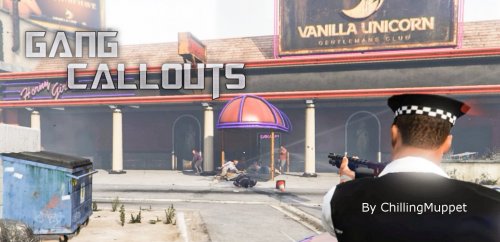 Had a lot of fun with this Plugin. Need more spawn points ;)
 -
-
 Not bad for your first callout. Had a glitch in one, probably due to the spawn site at the mine shaft next to the highway
- 221 comments
- 63 reviews
-
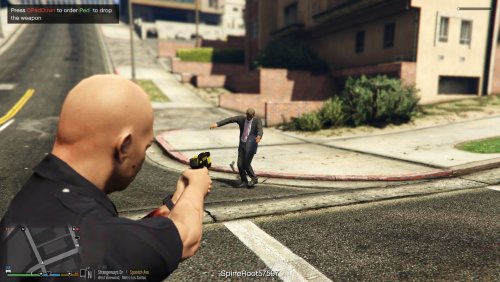 Anyway to turn off the notifications of where you shoot people? like Spine0034 Head004 00 Leftcalf4535 etc??
- 39 comments
- 15 reviews
-
-
- 1
-
-
-
Damn man! Are you a graphic designer? Seriously, this looks fantastic
-
 Thank you RekRam for the fast response. Have a video coming soon and I am linking your uniforms. I will inform my viewers about the patches and insignias. Thanks again for the amazing work. You made this look like a new game ;)
- 273 comments
- 61 reviews
-
-
- 1
-
-
Steve probably has no idea how many people he inspired over the years. I use to watch him play LCPDFR. I actually messaged Steve when I had a different name. He inspired me to get into YouTube myself. He encouraged me to stick with it when I couldn't get past 100 subs. Now 22k subs later, I have to thank him for helping me hang in there and I truly enjoy doing what I do as a hobby all because of @stevethegamer55 Thanks Steve, you deserve this spotlight bud! ~Benzo
-
Quick question here. Under Insignia in the 'going on duty locker room' for example. There is no patches or insignias when using this option. Do we need the trainer to add these on?
- 273 comments
- 61 reviews
-
-
- 1
-
-
 Its possible. I know the Sheriff Pack is fine and the FIB pack oiv is fine. This is a fresh install of GTA 5 as well. Kinda odd
- 779 comments
- 187 reviews
-
Yep same here, crashes right when game is loading. I uninstalled ELS just encase there was a compatibility issue but no go. EDIT* Sheriff pack installs no problem.
- 779 comments
- 187 reviews
-
-
 Just curious if the bed raises and lowers and you are able to attach vehicles. If so, I can video show case this.
- 38 comments
- 3 reviews
-
Absolutely. I am partial to Tarrant County as that is where I live. I grew up here in North Texas DFW, HEB. I saw some of your future cities and I must say, I personally would love to see my local police agencies. However, on my YouTube channel, most will want the bigger cities, either Ft. Worth or Dallas. I get a ton of request for these small cities in different states but unfortunately most of my viewers want larger cities. Hit me up when you come up with another skin or what have you. Benzo
-
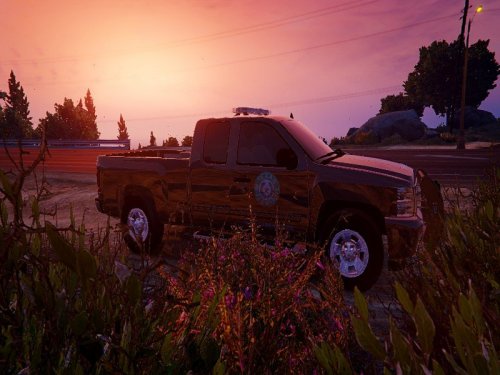 Great Texas Game Warden Skin. Look Forward to even more Texas skins from you. 5/5
- 6 comments
- 1 review
-
-
- 1
-
-
-
I will be interested in the ideas that you come up with. Considering I live here in North Texas, it's nice to see some Texas Vehicle skins. If I make a YouTube video on this I will be sure to link the info to you @ Captain A.Brandon
- 6 comments
- 1 review
-
-
- 1
-