


A Stranger
Members
-
Joined
-
Last visited
Everything posted by A Stranger
-
Did you recently install ELS? Or did you edit the vehicles.meta for any cars?
-
You're welcome! That depends on what you want. If you have a low / med system -> MVGA / VisualV If you have a high-system -> NVE / NVR
-
That's not what that is for. It only back ups the files necessary to revert. Do what I said.
-
You're missing files for UltimateBackup. Reinstall it.
-
Please send your RagePluginHook.log.
-
Yes, you can get that vehicles.meta from the download.
-
You can't "lose" it. If it's the "MODDING DLC" vehicles.meta you want, you can just redownload the MODDING DLC & copy that specific file over.
-
What do you mean; backup file?
-
As in; f.ex the front grill disappearing with the lights? That's because they're marked as "extras". If you open the .xml for ELS of that car, you can see them marked as ELSenabled. Find out which extra it is (Using SimpleTrainer f.ex) and then set the isELSenabled to false.
-
Please send your RagePluginHook.log.
-
Verify your game files and copy them back to your mods folder to get the original files.
-
It is! Remove YobinCallouts.
-
They're outdated. You can check the date yourself.
-
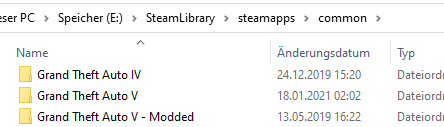
You can have two separate folder. 1. Make sure they're both in the same path. 2. Change the one you want to play to "Grand Theft Auto V". 3. Rename the other as a palceholder. 4. Switch when needed.
-
1. Make sure you are logged in with the right Social Club account. 2. Make sure you weren't offline for more than 7 days.
-
That's a vehicles.meta issue, then.
-
And they're all named properly?
-
It looks like it's either missing files or additional files are being loaded. Check if you have other policeold2 files hanging around.
-
Do you have LML? If so, you'll have to disable it, too. If you do not have LML; verify your game files.
-
Also, remove OP_Immersive_Dispatch.
-
Can you screenshot your issue, please?
-
Two things. 1. If you use NVR / NVE remove the "emissive" folder in /dlcpacks. 2. Make sure the car has a .hi.ytd file. If it doesn't; but the original does, remove that hi.ytd file.
-
Do the same.
-
If you have Epic games; do the following: 1. Launch Grand Theft Auto V via the Epic Games Launcher. 2. Load into Story Mode. 3. Tab out of your game (ALT+TAB) and run RagePluginHook. 4. Once it successfully hooks you can tab back into Grand Theft Auto V.
-
It's whatever you installed into your mods folder.


