


taxi44
Members
-
Joined
Everything posted by taxi44
-
 You have three ZIPs all named the same thing with the same named file inside. Which is the newest version?
- 17 comments
- 12 reviews
-
 You know, I was gonna say that it had worked before, but come to think of it, maybe I didn't try to scroll the radio in the car before I installed custom backup.
- 1,196 comments
- 127 reviews
-
 1) In the documentation, it advises to delete the GTA Horn keybinding - but that's impossible. GTA won't allow you to keep unbound keys. Am I missing something? I'd LOVE to be able to free up some keybindings. 2) It seems that SirenMastery does not filter the sounds through whatever environmental effects processing GTA does. I was just fiddling with it trying to rig to where it would just change the horn on the firetruck and leave everything else alone, and in my experimentation I happened to have it set up to where I was in SHERIFF and the U and I keys were playing the horn via SirenMastery while my middle mouse was playing it via ELS. The middle mouse button let out a horn sound with reverberation that sounded realistic, while the SirenMastery button seemed to just play the sound file with no effects. 3) It would be great if we could set SirenMastery to be disabled on ELS vehicles, but then override it for individual vehicles. Like I said, the main reason I want this is so I can give my ELS firetruck a good firetruck horn but have the police cars use a horn more appropriate for them. I don't really need SirenMastery on every vehicle, just the one. 4) It seems that the sirens you set only work for the player. When the AI uses the vehicle, they use default sirens (I was just trying to use this to give the non-ELS riot truck a rumbler siren). Is there a way to make it so the AI use the sirens we set, too?
- 851 comments
- 108 reviews
-
-

- 1
-
-
 I'm glad to hear! I can imagine it's incredibly tedious work, but thank you for doing it!!
- 311 comments
- 39 reviews
-
 Playing Sheriff way up north, got a call for an MVA, ended up taking me clear into the city. You need to make these calls able to generate on the whole highway, not just in LS.
- 221 comments
- 63 reviews
-
-
- 1
-
-
Hey @Albo1125 I see this thing merged two of my comments, and since you liked my comment but didn't reply to it, I figure perhaps you thought the entire thing was just a response to @bnr0723, but actually, in the first paragraph I had a question for you. :) It was this: How does this mod block the T and G keys from activating ELS siren? It worked fine but now I'm having trouble where my siren's getting cut on when I navigate the radio while in the car. I did mod the siren sounds with Modern Siren Pack but I can't imagine changing the sounds would change this behavior like this. I also accidentally hit Scroll Lock, which is the button to manually lock out ELS's controls. Could that have somehow broken whatever Smart Radio uses to lock out the siren?
- 1,196 comments
- 127 reviews
-
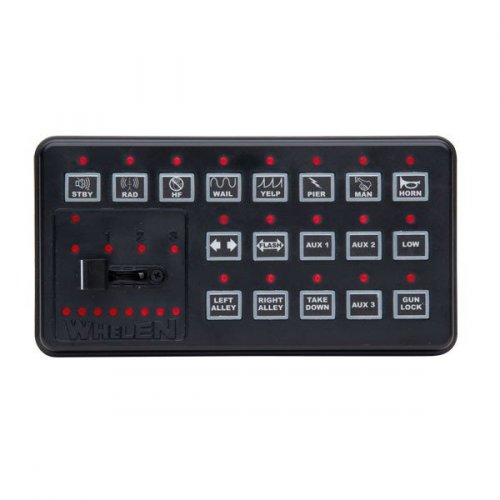 The wail siren has a little pop towards the end. That would be the 9446 siren.
- 29 comments
- 7 reviews
-
@Albo1125 How does this mod block the T and G keys from activating ELS siren? It worked fine but now I'm having trouble where my siren's getting cut on when I navigate the radio while in the car. I did mod the siren sounds with Modern Siren Pack but I can't imagine changing the sounds would change this behavior like this. I also accidentally hit Scroll Lock, which is the button to manually lock out ELS's controls. Could that have somehow broken whatever Smart Radio uses to lock out the siren? Windows 10 game bar interferes with RPH (surprise, surprise). You need to get rid of it. Open settings, go into the gaming settings, and turn off the slider where it says "Use the gaming bar for recording" etc - whatever exactly it is. Just to be safe, you should also uncheck the tickbox about "load game bar when I go full screen in a recognized game" - again, that's a paraphrase, but you'll know it when you see it.
- 1,196 comments
- 127 reviews
-
-
- 2
-
-
 Do you think you will be able to make it so that AI-driven vehicles can use lights without siren?
- 2,698 comments
- 239 reviews
-
This doesn't seem to change all the audio, and it's very jarring and unrealistic to have the dispatchers switch from one sentence to the next.
- 311 comments
- 39 reviews
-
 Would be useful if you could include a text file with a list of the names of the different models, weapons etc. so we can edit the lists and know what we're doing.
 -
 It's a nice car but I do wish all the reds were really red. The ones on the hood for example are but the one behind the windshield on the driver's side is more of an orange, as are the ones in the back.
- 81 comments
- 25 reviews
-
 It's a nice model but I don't like the lights. If you don't view them straight on they look flat (i.e. no corona) and washed-out (i.e. the reds look pink and the blues look like light blue).
- 31 comments
- 36 reviews
-
 When on a traffic stop, nearby drivers seem to get teleported out of their cars and are unable to stay in them. This causes a major traffic jam and lots of run-over peds.
- 535 comments
- 42 reviews
-
I love it! I have two suggestions for it (I know, me and my two suggestions, I don't mean to pidegonhole you :P) 1) It would be great if we could bind the panic button to a button on our keyboard. In the middle of a gunfight it's kinda inconvenient to have to stop, bring up and navigate the radio. 2) I think it was on the old police radio that there was an option to call for traffic stop backup. It was good if you were about to make a felony arrest or something - you could call a backup car, it would pull up, and you could direct the guys to stand where you wanted while you talked to the passenger. They would leave either when you pressed a key to dismiss them or when the traffic stop ended. Basically the reverse of the "officer needs traffic stop backup" callout. It would be amazing if you could bring that feature back, and with you doing it, I know that, if you do, it will be better than ever! Thanks (again xD)! :)
- 1,196 comments
- 127 reviews
-
Hi Albo! Awesome mod as always! What you do is very much appreciated. I have two suggestions to make this great mod even better: 1) When we give someone a court summons, make it appear as an actual court case in the F9 menu. Also, I don't know how it works in Britain, but in the USA, a ticket technically IS a court summons, and paying the fine just means you plead guilty and choose not to appear. So maybe they could have a random small chance to fight the ticket if we choose to issue a ticket, and then that would show up in the court cases, too. 2) Integrate with Computer+ ticketing so that we can fill out tickets in there and then hit a button in the LSPDFR+ menu to hand over the ticket. Currently if you write a ticket on the computer LSPDFR+'s menu is still up and it sorta breaks immersion. Thank you for your great work!! :)
-
Am I the only one having this problem? EDIT: Solved. For anyone else having the trouble: This package comes with a file named fbi_hi2.yft. That convention is wrong. You must rename it to fbi2_hi.yft (notice the change in position of the 2).
- 31 comments
- 36 reviews
-
-
- 1
-
-
-
Is there a way to rig the controls so you can jump directly to LSTG 3 without having to manually cycle through every time?
- 2,698 comments
- 239 reviews
-
 Any chance this will get integrated with LSPDFR+ so that we can write tickets in Computer+ and give them out with LSPDFR+ without using LSPDFR+'s ticket menu?
- 1,743 comments
- 172 reviews
-
 Bug with solicitation callout: If you order one of them (this happened to me with passenger but I assume it would happen with driver) out of the vehicle, then go to the questioning menu, and choose end questioning, they will get back in the vehicle, and then you will be unable to re-open the solicitation traffic stop menu. Steps to reproduce: 1. Pull over car with potential hooker 2. Open solicitation callout menu with E key 3. Use the orders menu to order one of them out 4. Go back to the main menu and go to the questioning menu 5. Choose to question the person you ordered out. When you end questioning, they will get back in the vehicle, and you will be unable to use the E key to open the menu. If that doesn't work, know that I was questioning the passenger and had arrested the driver prior. That may make a difference, don't know.
- 1,081 comments
- 166 reviews
-
-
-
Yeah, RPH bug. But since you also said in that post to post in this thread if one had a crash, and you didn't say not to post if the crash was due to search, I thought you still wanted those crash reports anyway.
-
Crashes every time I try to do a vehicle search, but not when I do a ped search. Crash RCR file attached. CrashReport_Sonnenaufgang94_636005731358036832.rcr

