



DustyV2
Members
-
Joined
-
Last visited
Everything posted by DustyV2
-
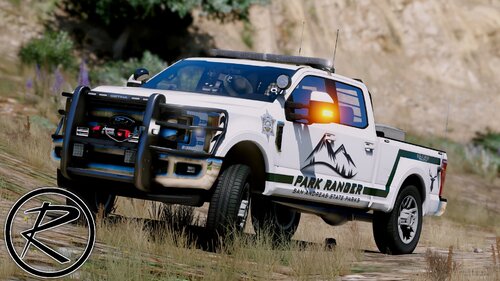
 Another amazing pack by Ripple. I am now using a total of 3 packs from him at once. Working takedowns, awesome and realistic lighting setup, ALPRs, traffic advisor and sexy pushbars. What more could you want? The Dallas PD skins fit perfectly on these aswell.
- 110 comments
- 39 reviews
-
Also having massive FPS loss with this. I'll just wait for ScripthookV update.
-
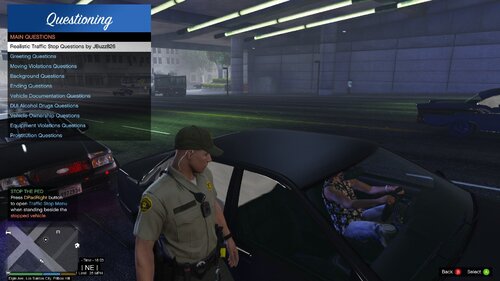 I appreciate you the time and effort you take to troubleshoot when people have issues. Thanks.
- 53 comments
- 9 reviews
-
-

- 1
-
-
I dont know what line it is, but I opened the trafficstopquestions.xml in normal notepad and just searched for "answe>" and found it, edited it, and it works now.
- 53 comments
- 9 reviews
-
-
- 1
-
-
-
-
-
-
Go to your GTAV main folder. Then open up ELS.ini and find "LodCoronaInitDistance" I have mine set to 30.0
-
-
Hello all, So ELS has been giving me some strange behavior on some lighting patterns. It's some kind of lag or glitch causing the lighting pattern to jump around. This only appears for me on WNRL lights on m car, but can happen on all PRML, SECL and WNRL lights in AI vehicles. It started off as only an occasional thing and now it worked its way to happening on pretty much every AI car that I encounter. Issue can be seen here in this video, notice that the light pattern works correctly when the SECL lights are on by themselves, but when I activate LTSG 3 they get all funky. This problem has persisted through a complete GTAV + mods reinstall. Not sure what to do from here, I have googled and combed the internet and have not seen anyone else having this problem. I do have a decent amount of ELS vehicles installed (16). I also tried reducing the amount of custom, forced and SCAN patterns I used with no change. Any ideas would be appreciated, this certainly isnt gamebreaking for me, but it kind of annoys me, especially when I spend time choosing my patterns and they start acting funny.
-
 It is apparent that this plugin/callout received a lot of care and hard work from its developers. I played it for a few hours and was really impressed with the mechanics of everything and had no big glitches or bugs that I can remember, not even a game crash. However; this plugin pack reduces my frames per second by a minimum of 20 at every location on the map while on duty, regardless of if I was using a coastal callout or not. For me this is something that completely ruins it for me, I was already skirting the edge of 60 fps while on duty before and sub-60 simply isnt acceptable. Overall 5 stars because its a great callout pack and works fantastic, my issue with it is mostly subjective.
- 503 comments
- 33 reviews
-
-
- 1
-
-
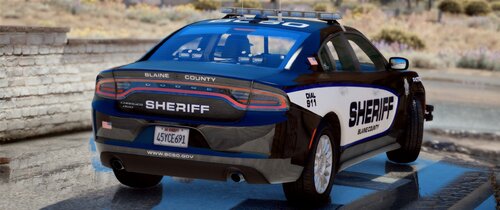 Really well done. Lighting setup is done in a way that makes its different from most other vehicles. Quite good. Only thing I'd like to see/request is putting a lightbar or a couple lights in the back windows of the Tahoe and FPIU on the marked non-slicktop versions.
- 54 comments
- 5 reviews
-
I am getting this same issue. I attempt to load the game and it just crashes
-
Hello, I really apologize if this has been answered before. I checked all the FAQ, stickied posts and did quiet a bit of googling. Many of the custom models I have installed into my game the extras dont pop in when used by an AI until I am pretty much right on top of them. I.E. the lightbar and rambar doesnt show up until I'm maybe 50 feet away. Its really annoying because I can be in a pursuit as the second or third unit and see the AI cars in front of me with no lightbar but still see flashing coronas. Any fix? Thank you
-
-
.thumb.png.e88f1892e13ddb98db35e668d465c34b.png) Mine is in the right place, and I have the name changed to sheriff. Idk whats wrong
Mine is in the right place, and I have the name changed to sheriff. Idk whats wrong- 182 comments
- 44 reviews
-
I need some help, not sure what's going on. I can't get the carvariations.meta to work for the sheriff slot. I've had it work multiple times in the past but after I did a clean install for 0.3 I can't get it to work anymore. I tried putting the car variations in different file locations, putting the vehicle files in different locations with no avail. The lights are still not working. Please help!
- 182 comments
- 44 reviews
-
 In my game on the police cruisers the yelp siren is really soft. Not sure what it's called but its definitely way too quiet
- 316 comments
- 31 reviews
-
-
 The only thing needed to make it 5 stars is additional LED lights around the vehicle. The lightbar isn't enough.
- 563 comments
- 116 reviews
-
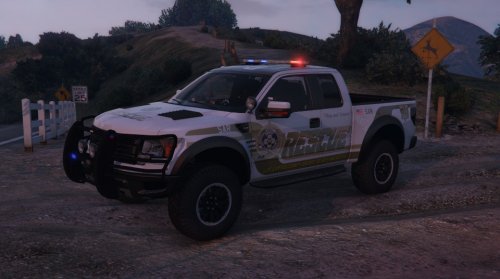 I liked the old skin that said "sheriff" in big letters. Anyway I can get the file for that?
- 64 comments
- 13 reviews
-
Love this model to death, any way we could get it optimized for the sheriff slot though? I don't like seeing sheriff vehicles pulling up and LSPD officers getting out. It's silly.
- 182 comments
- 44 reviews
-
I completely agree. There is so much conspiracy with the R* and modding community that I think I need a tinfoil hat! From what I've heard the patch is great and removes the stuttering issue for most people. Can't wait to try it.


.thumb.png.e88f1892e13ddb98db35e668d465c34b.png)
