




ScrimpyData
Members
-
Joined
-
Last visited
Everything posted by ScrimpyData
-
 Indeed :)
 -
From the album: Scrimps Mods
Yay, they work! Now I'm going to try and remove those door badges :) -
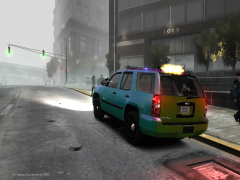 Thanks, I'll do my best to do that :)
 -
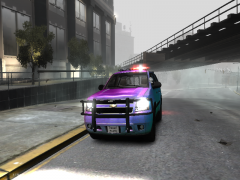 Haha :D I'm trying to improve a bit :P
 -
As I'm not the best with police package vehicles, what do you think that should be added to turn it into a PPV?
-
From the album: Scrimps Mods
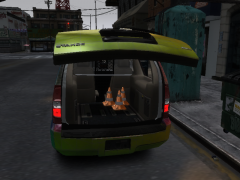
The final version will include traffic cones in the trunk :) And if you know anything I should add as extra objects, feel free to let me know :D -
From the album: Scrimps Mods
The final version will include traffic cones in the trunk :) And if you know anything I should add as extra objects, feel free to let me know :D -
I'd suggest Three Days Grace, Skillet, Black Veil Brides and Green Day :)Parking Skills! :DI have the same issue, and another one as well... (YT was playing Metallica when I clicked on Nirvana: http://gyazo.com/b1866d0df4b430d57b9ee4bb8d0ae5d1 )Luckily I'm going to take a few more soon :P (Don't ask what happened in this one) And my first GTA V pic ever in the spoiler...Damn... I'm almost out of pictures D:I know what I'm going to try this weekend :DWell, I can make you some stuff :) Just give me some details on style/theme/text/etc...Thanks! They actually are a bored 15 year old's work xDI don't know if anyone is still interested in seeing some more of my recent banners, but I'll post them here for the ones that are interested :D (Got quite some more work lately) P.S Sorry for the double postDid I just hear... ... Cake? :OWell, I got some more sources for good royality free music: - RoyalTrax - Approaching Nirvana (I really recommend buying their music :D, you can also get some more info on using their music right here) - ByeByeCopyright I hope this helped you out :)Happy Birthday! :D
 That is.... Amaaazziiinnggg!! I love it :D


Account
Navigation
Search
Configure browser push notifications
Chrome (Android)
- Tap the lock icon next to the address bar.
- Tap Permissions → Notifications.
- Adjust your preference.
Chrome (Desktop)
- Click the padlock icon in the address bar.
- Select Site settings.
- Find Notifications and adjust your preference.
Safari (iOS 16.4+)
- Ensure the site is installed via Add to Home Screen.
- Open Settings App → Notifications.
- Find your app name and adjust your preference.
Safari (macOS)
- Go to Safari → Preferences.
- Click the Websites tab.
- Select Notifications in the sidebar.
- Find this website and adjust your preference.
Edge (Android)
- Tap the lock icon next to the address bar.
- Tap Permissions.
- Find Notifications and adjust your preference.
Edge (Desktop)
- Click the padlock icon in the address bar.
- Click Permissions for this site.
- Find Notifications and adjust your preference.
Firefox (Android)
- Go to Settings → Site permissions.
- Tap Notifications.
- Find this site in the list and adjust your preference.
Firefox (Desktop)
- Open Firefox Settings.
- Search for Notifications.
- Find this site in the list and adjust your preference.