




Kilyin
Members
-
Joined
-
Last visited
Everything posted by Kilyin
-
There's quite a few threads on this already, but the latest update broke any kind of editing with OpenIV. All we can do is wait for a fix.
-
-
-
 Actually, you're right. That is using the exact same values I use for the original Explorer. (sirenSettings value=13, etc). So I need to change it to a 1. That's easy to do, but I'm not gonna use the model until the LODs work, so I reverted back to the arjent explorer. Edit: Correction
- 221 comments
- 34 reviews
-
-

- 1
-
-
-
Very strange, I'll paste working carvariations.meta and vehicles.meta entries I use for a model by NIGHTKID here in mpchristmas2, maybe it'll help? If not, sorry. Model is cvpi3. I can't see a problem with your files, but maybe I'm overlooking something, like a missed closing tag, etc. carvariations.meta vehicles.meta part 1 vehicles.meta part 2 edit: removed extra vehicle from carvariations
-
-
-
rename the files, adjust the handlingId for said vehicle in vehicles.meta to be police3.
- 221 comments
- 34 reviews
-
Yeah, edited my post. Oh okay, I use that all the time (Hold F to completely turn the car off when exiting) and tapping to leave it running, just didn't realize that's what I was using. ;p
-
I have the latest version as far as I know, but I will doublecheck. The only way I can get the wheel lock to work reliably is by using the Fast exit. I have a question though, what is the difference between EnableIVExitStyle and EnableFastExit? Edit: I see you just released an update, just grabbed it, will test that out.
-
I don't use a controller, but I believe so. EnableFastExit = True EnableIVExitStyle = True EnableWheelLock = True I think as long as you have these set to true in the .ini, it should work.
-
Use it in conjunction with fast exit (turn wheel, while holding turn, double tap F)
-
Weird, your .metas should be good from where I'm sitting. I'd swap the model out temporarily with a known working model. Maybe it's a problem with the car. Dunno.
-
Try putting the <audioNameHash>police3</audioNameHash> as <audioNameHash>POLICE3</audioNameHash> And change <vehicleMakeName>USAF</vehicleMakeName> to <vehicleMakeName /> Not sure if that'll fix it, but those are the only differences I see between your .meta and working police addon car metas I'm using.
-
Ah, I would have guessed they were European. Never seen an American cop wearing yellow.
-
Uh, this is a text file... not a script, ped, or file modification.
-
.thumb.jpg.4066677156985e22489bfecddc2f6c45.jpg) Yeah that was kinda why I edited my post to say "I think" and then linked to some liveries for the model that work. Thanks though.
Yeah that was kinda why I edited my post to say "I think" and then linked to some liveries for the model that work. Thanks though.- 376 comments
- 81 reviews
-
it supports any liveries that are made for F5544's CVPI model. I think... but if not, you could follow the template of the skins made by: http://www.lcpdfr.com/files/file/9729-4k-lspdsahp-2011-cvpibxbugs123-model/
- 376 comments
- 81 reviews
-
 Only other thing I can think of is to doublecheck the .ini, make sure the keys are set to what you think they are...
- 3,646 comments
- 306 reviews
-
Just you, they're working for me. Unfortunately, I don't see anything in that log that stands out to me.
- 3,646 comments
- 306 reviews
-
Just copy these files and overwrite the existing ones.
-
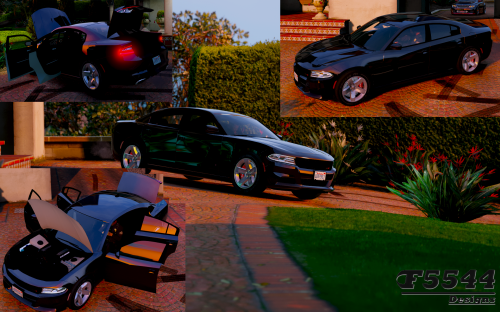 I think you did something wrong, all my windows break and brake lights work. I'm about so sign off though so I'd say doublecheck your install.
- 42 comments
- 3 reviews
-
-
- 1
-
-
putting it in patchday4ng is a 'precautionary' thing. it's fine to replace the actual models in x64e.rpf. If you put it in patchday4ng it wins over x64e.rpf, and you don't have to overwrite the model. That's all. You can put the carvariations in mpchristmas2, or mpluxe. This isn't an exact science. I assumed by the way you worded your post, you were having a problem. If you follow the readme, it will work, but it's not the only way to skin a cat, as it were.
- 42 comments
- 3 reviews
-
-
- 1
-
-
it isn't out of date, the model files can go in patchday4ng as it states, or x64e.rpf (that's where I installed it, but it really doesn't matter)... and I'm not looking at the readme for the carvariations but I'm sure that'll work as well. Why do you think it won't?
- 42 comments
- 3 reviews

.thumb.jpg.4066677156985e22489bfecddc2f6c45.jpg)

