
Gelse16
Members
-
Joined
Everything posted by Gelse16
-
-
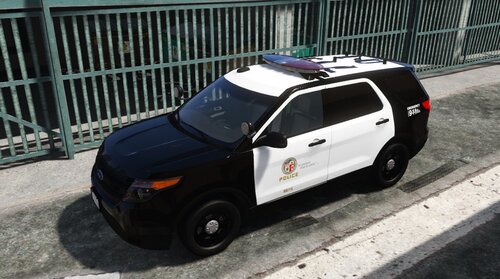 one of my favourite FPIU. looks amazing, a lot of fun ingame! thanks for sharing!
- 18 comments
- 4 reviews
-
-

- 1
-
-
 ok, i have to take a closer look at it, sorry for that. however thanks for reporting guys!!!
 -
which trainer do you use? i only use simple trainer and i was not able to recreate this issue. so at this moment i have no clue what happened on your screen.
-
@SGT Charlie LSPDFR thank you very much for that showcase!!
-
added some gameplay screenshots for comparison. updated all timecycle files to V 1.1 for better immersion.
-
if anyone can do some video for demonstration it would be very nice. unfortunately i can't. there will be coming up some screenshot in near future.
-
ABOUT: If you want to have darker nights in GTAV but you don't want to use ENB or Shaders <--- these files are for you. It will change timecycle values without any graphic mods and fps drops. After installing via OIV you will experience some darkass nights! at night you will need to use searchlights, flashlights and heli assistance with searchlights in the dark. get some better immersion when you're at nightshift duty! INSTALLATION: 1) ALWAYS MAKE BACKUP FIRST!!! 2) Drop all (10 .xml) files located in "DN" into mods/update/update.rpf/common/data/timecycles 3) enjoy! BEWARE: This mod is for Singleplayer only! DO NOT USE MODS ONLINE OR YOU WILL GET BANNED!!! KNOWN BUGS: I haven't experienced this by myself but it is reported that it comes to graphic display bugs if you choose "cloudy" as weather option via trainer. I highly recommend to avoid this option until I have fixed that issue! fixed in V1.2 V 1.1 : edited all timecycle files for a better immersion and to fit better to daytime. simply overwrite all my old timecycle files with the new ones. V1.2: reattached a missing line in clouds.xml (thanks to wakandamuzik) so the cloudy weather issue belongs to the past. simply overwrite my old CLOUDS.XML with the new version. V1.3: small changes to all timecycle files. V1.4: bug fixing.
-
gameconfig works fine for me, i can play modded as usual again. thanks for the hint 😉
-
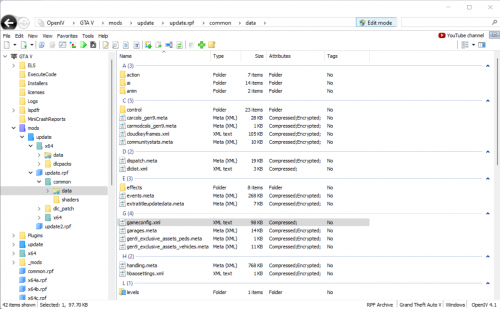 works brilliant, no longer stuck in loading screen or crash to desktop! excellent!
- 23 comments
- 2 reviews
-
-
the game does not even load but crashing to desktop instead. there has never been any problem with my mods folder in the past. so this problem is new to me.
-
here's my lates logfile. the lspdfr plugin doesn't even load. RagePluginHook_28072022_133608.log
-
absolutely same here! can't play anymore... EDIT: even reverting to old version doesn't work, problem still exists 😕
-
-
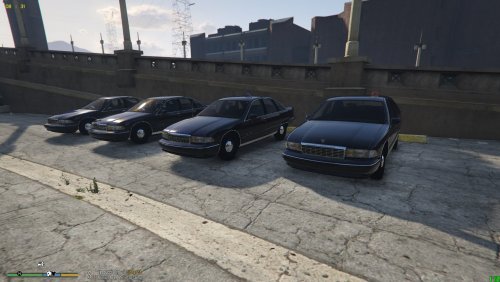 was driving the civil version of one of these years back. absolutely lovely pack coming with els. there's nothing more that i could ask for! BIG THX! 👍
- 9 comments
- 1 review
-
-
- 1
-
-
 AMAZING PACK! i was thinking it will crash my game because of the great amount of cars - but it doesn't! it works flawlessly and includes a lot of beautiful cars! thx a lot! 👍
- 485 comments
- 78 reviews
-
AMAZING PACK! i was thinking it will crash my game because of the great amount of cars - but it doesn't! it works flawlessly and includes a lot of beautiful cars! thx a lot! 👍
- 485 comments
- 78 reviews
-
roughstar dropped another update recently. there's nothing wrong with your downloads. you should not auto-update gta otherwise you have to wait until everything is updated, speaking of lspdfr and rph.
-
as a steam-copy-user i say we should be fine as long as auto-update is deactivated and we start steam and gta in offline mode. roughstar will never be thankful to the modding community which keep their games alive for decades. poor american exceptionalism 😉
-
-
-
-
so this is what you get if you try to help out. i see and will never do it again...
-
wrf? i have no clue, sorry. hopefully someone else does! so the other way is to change the startup routine in the rph settings. just mark lspdfr to autoload at game start, save settings and start.



.thumb.png.328fa2801450b092663a1eb66f95f9f3.png)