
ArztBlut
Members
-
Joined
-
Last visited
Everything posted by ArztBlut
-
-
-
-
Might want to start by checking that the call out is updated. After that make sure you've placed the files in all the correct locations. Do other callouts work? Just had a quick look at the plugin page. Apparently its not supported for LSPDFR 0.4 and above. Sadly until the plugin developer updates it you won't be able to use it.
-
-
-
Not really sure what's been causing it but my game is constantly crashing at random points. Any ideas based on my log? RPH Log.txt
-
-
 I got the same problem, i tried by replacing the vehicle.meta files with the same model from the original creator but it seems the problem is coming from somewhere else.
- 445 comments
- 108 reviews
-
You could always make some custom vehicles, like: ATVs, More Off-road and Aggressive looking SUV or something, Maybe Custom Helis?
-
I am hyped as hell for another update to this mod pack, I am in love with these cars!
-
At this point there is no point in me keeping GTA 5 anymore, Online is boring as hell, and mods don't even bloody work in singleplayer looks like i must leave oh well what waste of money ... ugh
-
It seems so far, just having a Mods folder is causing my game to either crash or close its self no matter what. Heres what i could get from the rage plugin log file: " [25/06/2017 4:11:57 PM.961] Started new log on 25/06/2017 4:11:57 PM.961 [25/06/2017 4:11:57 PM.962] ==================================================================================================== [25/06/2017 4:11:57 PM.956] Log path: D:\Program Files\Rockstar Games\Grand Theft Auto V\RagePluginHook.log [25/06/2017 4:11:57 PM.962] Log verbosity: Trivial [25/06/2017 4:11:57 PM.963] Initializing input system [25/06/2017 4:11:57 PM.966] Initializing game console [25/06/2017 4:11:57 PM.972] Console key has been set to F4 (key code: 115) [25/06/2017 4:11:58 PM.018] Initializing console variable "ConsoleScrollAmount". [25/06/2017 4:11:58 PM.018] Type: System.Int32, Reading section: "Miscellaneous", key: ConsoleScrollAmount [25/06/2017 4:11:58 PM.021] Read value: <null> [25/06/2017 4:11:58 PM.021] Initializing console variable "DisableRenderVersionText". [25/06/2017 4:11:58 PM.022] Type: System.Boolean, Reading section: "Miscellaneous", key: DisableRenderVersionText [25/06/2017 4:11:58 PM.026] Read value: False [25/06/2017 4:11:58 PM.026] Setting value of console variable "DisableRenderVersionText" to stored value. [25/06/2017 4:11:58 PM.026] Initializing console variable "ConsoleKey". [25/06/2017 4:11:58 PM.026] Type: System.Windows.Forms.Keys, Reading section: "Miscellaneous", key: ConsoleKey [25/06/2017 4:11:58 PM.027] Read value: F4 [25/06/2017 4:11:58 PM.027] Setting value of console variable "ConsoleKey" to stored value. [25/06/2017 4:11:58 PM.027] Console key has been set to F4 (key code: 115) [25/06/2017 4:11:58 PM.027] Initializing console variable "PluginTimeoutThreshold". [25/06/2017 4:11:58 PM.028] Type: System.Int32, Reading section: "Miscellaneous", key: PluginTimeoutThreshold [25/06/2017 4:11:58 PM.028] Read value: 10000 [25/06/2017 4:11:58 PM.028] Setting value of console variable "PluginTimeoutThreshold" to stored value. [25/06/2017 4:11:58 PM.028] Initializing console variable "AlwaysShowConsoleOutput". [25/06/2017 4:11:58 PM.029] Type: System.Boolean, Reading section: "Miscellaneous", key: AlwaysShowConsoleOutput [25/06/2017 4:11:58 PM.029] Read value: <null> [25/06/2017 4:11:58 PM.029] Initializing console variable "ShowConsoleCommandInfoOnPluginLoad". [25/06/2017 4:11:58 PM.029] Type: System.Boolean, Reading section: "Miscellaneous", key: ShowConsoleCommandInfoOnPluginLoad [25/06/2017 4:11:58 PM.030] Read value: <null> [25/06/2017 4:11:58 PM.030] Initializing console variable "ShowOnScreenWarnings". [25/06/2017 4:11:58 PM.030] Type: System.Boolean, Reading section: "Miscellaneous", key: ShowOnScreenWarnings [25/06/2017 4:11:58 PM.031] Read value: <null> [25/06/2017 4:11:58 PM.031] Console initialized [25/06/2017 4:11:58 PM.031] Initializing forms manager [25/06/2017 4:11:58 PM.033] Version: RAGE Plugin Hook v0.55.1131.11501 PUBLIC ALPHA for Grand Theft Auto V [25/06/2017 4:11:58 PM.040] ================ RAGE Plugin Hook ================ [25/06/2017 4:11:58 PM.046] Detected Windows 10 Home (64-bit) (10.0.15063.0)! [25/06/2017 4:11:58 PM.047] Checking game support [25/06/2017 4:11:58 PM.318] Product name: Grand Theft Auto V [25/06/2017 4:11:58 PM.318] Product version: 1.0.1103.2 [25/06/2017 4:11:58 PM.318] Is steam version: False [25/06/2017 4:11:58 PM.320] Initializing DirectX [25/06/2017 4:11:58 PM.321] Initializing Direct3D [25/06/2017 4:11:58 PM.322] Loading C:\WINDOWS\system32\d3d11.dll [25/06/2017 4:11:58 PM.322] Loaded at 0x7FFE82A50000 [25/06/2017 4:11:58 PM.322] D3D11CreateDeviceAndSwapChain at 0x7FFE82AB0980 [25/06/2017 4:11:58 PM.323] Creating Direct3D 11 device and swap chain [25/06/2017 4:11:58 PM.334] Attempting feature level 10_1 [25/06/2017 4:11:58 PM.348] Failed to create D3D11 device for Grand Theft Auto V: 887a0001 [25/06/2017 4:11:58 PM.359] Attempting feature level 10_1 for fallback [25/06/2017 4:11:58 PM.371] Fall back attempt failed with: 887a0001! [25/06/2017 4:11:58 PM.371] Initialized DirectX "
-
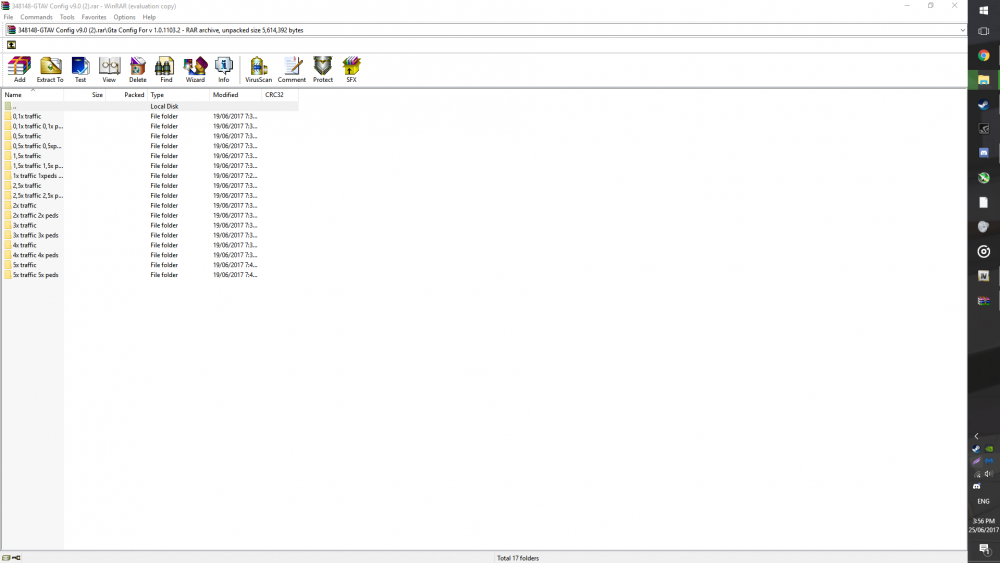
Yeah its updated, i checked as well its got all the new stuff from the latest DLC, and i tried that game config. Which one inside of this game config would i use though?
-
I am having an issue with the game as the Mods folder used to add custom cars, weapons ect through OpenIV simply refuses to work and just simply crashes my game during loading, even without the mods folder, LSPDFR just doesn't work i can't go on duty or even open the console for RAGE plguin i have tried reinstalling the mods and the game its self, but no results, i tried finding a Gameconfig file online to maybe fix the Mods folder issue but the one i found on Realism Dispatch just puts me in a infinite loading loop, and all others i found have the same results, a crash to desktop. If anyone could assist me in fixing my problems i would be very happy. I will try and see if i can get a crash log once i can get RAGE to not close its self when the game crashes.
-
In a nutshell Openiv and my computer were imploding but yeah its fixed now.
-
I think i fixed it now, it was an issue with the way EUP files were put in my mods folder, they were doing some special stuff idk, but it works now.
-
I am having a problem where, i have installed EUP with the OIV version it seems that my game would crash before i could even get to the loading screen, i checked if it was my other mods but it seems to be EUP so i am not sure why its doing it.
-
-
Ugh, The meta files are pain ill get it working at some point, but i still love the models good job on it.
-
Well i manged to get Police 5 and 6 working, Sheriff 3 just doesn't spawn, and Sheriff 4 crashes my game any ideas?
-
I am having issues with the extra cars, (Eg: Police5, 6 Sheriff3,4 ect) And i think its an issue with the Meta files, i checked if they were even added and they weren't so if anyone has the correct Meta files that would be great, and it should be added with the download.
-
Well either way, Good luck with developing the next update i am looking forward to when it comes out.
-
Maybe a Riot Van texture or Police Heli, Maybe some Boats? Or Some FBI skins both Marked and unmarked cars?
-

(2).thumb.png.e4272bf3fa803ea82bac384d786b1349.png)
.thumb.png.656f907bc2febc81911b0b821cb502c8.png)





.thumb.png.9019e6158cd062662b7a9562d8f80982.png)