xGessx
Members
-
Joined
-
Last visited
Everything posted by xGessx
-
Mmm.... I was thinking on doing that, I'll try Yep, it was that, thanks! Another thing, this doesn't work in EFLC, any idea why? I don't think i have to put using EFLC ; or something like that because If i do it says it's wrong.
-
Same here... I think they changed the edit time Edit: They did , I could change a post that I did like 5 days ago , So I don't see any reason in not editing... just saying
-
In the link that Sniper gave me, I been studying it for some big time and came up with something... The only thing that It doesn't really explain is how to put an .ini file to re-configure keys. It does explain the interval, but not the keys using System; using System.Collections.Generic; using System.Linq; using System.Text; using System.Windows.Forms; using GTA; namespace WashScriptIV { public class WashScript : Script { //Constructor public WashScript() { this.KeyDown += new GTA.KeyEventHandler(washButton); } //If player is in vehicle and M key has been pressed , wash his vehicle //Method public void washButton(object sender, GTA.KeyEventArgs e) { if (Keys.M == e.Key && Player.Character.isInVehicle()){ Player.Character.CurrentVehicle.Wash(); Game.DisplayText("Your car has been washed"); } } } } It said put above the constructor Keys keyP; Then in the constructor itself keyP = Settings.GetKeyValue ("WASHKEY" , "SETTINGS", Key.M); Then I created an .ini file with this [sETTINGS] WASHKEY = N Tried with N but no luck, only worked with M. So basically i had this at the end and nothing using System.Linq; using System.Text; using System.Windows.Forms; using GTA; namespace WashScriptIV { public class WashScript : Script { Keys keyP; //Constructor public WashScript() { this.KeyDown += new GTA.KeyEventHandler(washButton); keyP = Settings.GetValueKey("WASHKEY", "SETTINGS", Keys.M); } //If player is in vehicle and M key has been pressed , wash his vehicle //Method public void washButton(object sender, GTA.KeyEventArgs e) { if (Keys.M == e.Key && Player.Character.isInVehicle()){ Player.Character.CurrentVehicle.Wash(); Game.DisplayText("Your car has been washed"); } } } } Edit: Just in case name of .net is WashScript.net.dll and .ini file is WashScript.ini Anyone? Thanks in advance
-
It's pretty obvious that someone would've asked this no? Why not look first?... Also the Edit button is your friend against double posts...
-
Indeed... Google Translate works like a charm
-
Some pictures
-
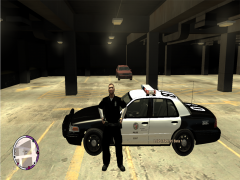
From the album: xGessx
LAPD Officer showing his car. -
Lol, you saw it? :P Every time someone doesn't read Support Page I'm gonna put my marvelous creation to inform them.
-
Since when people started saying things that weren't totally true from my country.
-
By the US ? I don't really know... US is like that when they want something and they cannot have it, they fuck everyone in the country... There's much more stuff than old cars, cigars, or Castro lol (Che Guevara wasn't even Cuban he was from Argentina lol). In Looks... It's probably the best - looking country If it wasn't for all those old cars and old buildings lol. And really good women(No offense... but not the black ones lol...IMO). Many many stuff... After they did the Perestroika in USSR , Cuba became even worst because USSR used to help Cuba, so they would be giving the finger to the Americans. And the US couldn't do anything, because at that time USSR was powerful. And some story there!
-
I give tickets for many stuff as... Throwing any kind of stuff on the floor, having a dirty car, using the horn for no reason... ETC.
-
http://www.gtaforums...=386816&st=1460 Scroll Down until you find a large Code like box with Text. There it says it... It isn't really an Official Update but more like a tweak from someone. I'm using it and I'm pretty sure that I'm using a mod that uses Alice.Yeah... when the AI arrests someone they get the first empty patrol that they see... I have a Script that increases random criminality around the town(More car stealers, robbers can steal money from you etc.) And many times random people come at me and steal my car...Iconography said it all... Why didn't you just send a PM to unr3al (The video clearly says that it is by unr3al...)And in Europe too lol... I used to live in Spain and the lanes in the streets if you compare them to here they're FRIGIN' small. One lane here in US is like 2 or 3 lanes in Spain. I remember that before moving to US my dad bought a 4x4 jeep that was really big(In Spain) , it almost didn't even fit in the street. And now here when i see that same car in the street, is probably one of the smallest jeeps around. Also: I feel bad by not putting pictures of police cars from where I'm from ... so here they come lol, prepare to suffer ugliness. (LOLWUT a Mercedes police car in Cuba? WTF? First time I see this lol) They'll probably change to these cars: Bike: My father used to be a Cop in cuba, he was a Caballito(Police in bikes). Edit: Lol , I looked the bike cop in Google, and when i showed it to my dad he's like " Oh i know that guy... He was the chief of a company" Lol who would've known...That's really messed up... Bail someone that shot a cop? WTF EDIT: 400th post FTWThank you both!VERY HELPFUL , Sniper a lot, I'm gonna read that for sure. Also just one more thing: I opened C# menu, but I'm not really used to this GUI(Only to Adobe GUI lol) so which do I select from these to make a GTA IV Script? SS: There's more but those 2 were the more logical IMO, I don't really know lol. Edit: Assembler language? I saw that but it says that's it's for CPU and stuff like that, more like stuff inside the computer? Other edit: I added this into the first lines (PS: I chose C# Class Library) using System; using System.Windows.Forms; using GTA; I figured out how to add reference for the classes, i added the ScriptHookDotNet.dll as it. Thanks Sniper That's what the sample scripts in for Developer have in the beginning.
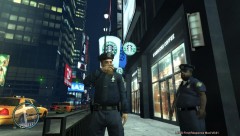 The fatcop wants your coffee badly... Look at him lol.Yeah , I'm also trying to upload pictures with FRAPS(But they're BMP) so I converted it into PNG with Photoshop and tried to upload (It's like 1.54 mb) and It just keeps loading and says something of refresh the page after. Also tried with imageshack.us and putting the link in there but It would say that there's something wrong.Well I made a simple Area Calculator (Like Rectangle : l*w, Square : L^2, Triangle: etc etc) And it's good I would say(I'm gonna keep it for Math lol). And I already know HTML CSS and AS2 like I said , but VB isn't that hard. It's just that there's few or no tutorials at all about GTA IV. I saw one and the only thing that it taught was to go to the Scripts in for Developers folder from Scripthook, and teach you to change "INFERNUS" for "BANSHEE" so when you pressed the key the Banshee would spawn instead of the Infernus... pretty absurd IMO I'd like to learn C# before VB , but many people say it's very hard, so I don't really know. Visual Studio 2010 has C#, C+, C++ and VB but I don't really know lol. One last thing, where are the classes of GTA IV? I tried looking for them In the scripthook folder but no luck.In GPM there's tutorials that are really good.Let me answer that. I just did not read, nor do I care, since that discussion was ended by Olanov.