


Creators: Due to background reprocessing of files, approvals and file security checks may be delayed. Thanks for your patience.


Alex_Ashfold
Insiders
-
Joined
-
Last visited
Everything posted by Alex_Ashfold
-
INSTALL THIS: thanks
-
No the menu is not in the EUP 7.4 auto install, it's different install and modifications.
-
You need the menu installed too
-
Using a mods folder.
-
My pleasure.
-
This is not related to EUP, but you installed Zipo RAID Injury mod, which give you that walk idle, because you have no armor. To recover your armor get into cover or just remove the injured mod script.
-
 Don't worry, you have installed everything like you should of, this is 7.4 bug, because I removed the Noose Security top accidently from the file, It will comeback in the next release. No need to reinstall, just enjoy the udpate and the outfits (except this one lol)
- 2,346 comments
- 236 reviews
-
-

- 2
-
-
-
No My eup doesn't exist anymore, to edit EUP, simply edit in the eup folder directly (be sure to backup the file first)
- 2,346 comments
- 236 reviews
-
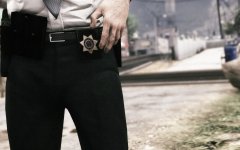 Not it's not a 7.4 feature.
 -
No need to reinstall, I removed something I shouldn't like I already said, keep in mind it's an early access
-
Use the automatic Installer
-
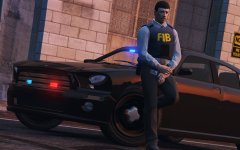
From the album: Emergency Uniforms Pack WIPs
Teah..yeah I'll fix the clipping hand, early showcasing, that's all. and the IAA ID was just a placeholder to showcase the female, I am not planning on using it.© EUP Team
-
Not sure if you saw, but that might help you
-
Please do not post in the comments for support and refer to the support thread and don't forget to fully read the first post (especially in your case) I will no longer reply here.
- 2,346 comments
- 236 reviews
-
There should be the EUP Menu in your Plugins folder, have you downloaded this ?
-
That's because you haven't properly set up your game and mods folder. Again read the FAQ If you never installed any mods, read this before you install any mods or ask for help. No matter what mod you're using, you need the latest version of ScripthookV To edit your GTA V files (Peds, cars, textures, weapons and etc.) you need to install and activate OpenIV You are gonna need a mods folder, follow this tutorial here EUP Menu works with RageHook plugin, so make sure you have the latest version Before you install this mod you are gonna need. - A trainer I recommend simple native trainer and/or Menyoo
-
Were you using a mods folder?
-
Game patch? Ragehook version? Log ? Can you give more information other than ''it runs fine without EUP'' thanks..
-
Add these between mpxmas_604490 and rde <Item>dlcpacks:\mplowrider2\</Item> <Item>dlcpacks:\mpjanuary2016\</Item> <Item>dlcpacks:\mpvalentines2\</Item> <Item>dlcpacks:\patchday9ng\</Item> <Item>dlcpacks:\mpexecutive\</Item> <Item>dlcpacks:\patchday10ng\</Item> <Item>dlcpacks:\mpstunt\</Item> <Item>dlcpacks:\patchday11ng\</Item> or use this file dlclist.xml
-
Make sure you have all Rockstar games DLCs in your dlclist.xml and dlcpacks
-
This is a work in progress, which aim to give BCSO a more Cowboy looking,, with jeans, cowboy boots, cowboy hats and maybe even some warm jackets with a fur collar. If you follow the excellent TV Show Longmire, you'll recognize the style and inspiration.
-
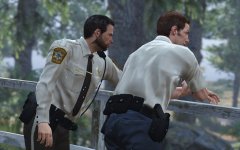
From the album: Longmire Based-off Blaine County Sheriff
© Alex Ashfold
-
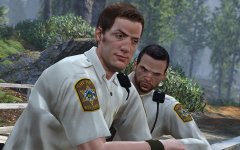
From the album: Longmire Based-off Blaine County Sheriff
© Alex Ashfold
-
Try this: Put all the dlc from your original folder into your mods/update/x64/dlcpacks
- 2,346 comments
- 236 reviews


