



Cosmo
Members
-
Joined
-
Last visited
Everything posted by Cosmo
-
 It's possible if you use some sort of trainer or mod, but I don't think there's any way on my end to do that.
- 80 comments
- 19 reviews
-
Have you made sure that all the files are in the right spot? I just installed 2.1 and once I added the bearcat_sign_2 to the ytd it worked fine. With 2.0, all you need to do is like Officer27 said and delete the bear_sign_1 and add a bearcat_sign_2. Sorry about that, here's an LSPD texture for it :) enjoy
- 80 comments
- 19 reviews
-
It works, as in, it runs, but have you actually used it with other people? When I was using an older version it bugged out dying, the callouts were broken and the callouts also broke traffic stops.
-
That would be PoliceMod, which unfortunately does not seem to be compatible, even with older versions.
-
So far Multifive has been working very well for me and I was looking for some sort of Traffic Stop script to use on peds during sessions with other people using the same mod. However, Multifive can not be launched with Ragehook, which rules out LSPDFR. I have been trying to make just a basic traffic stop scripthook plugin. I know C++ but am not familier with the native functions and other things like that, so some help would be greatly appreciated. I have the basic code for checking whether they are in a vehicle and getting the ped infront of them, but I have no idea how I would code that ped to actually pull over. Anyone that knows more about scripthook natives and knows how to do something like this it would be really great to get some feedback, whether here or in a pm. It would be going to a very good cause, As I know many people would love to do some police roleplay 'online'! (Note: This is not intended at all to compete/replace LSPDFR as this plugin would not have any callouts or be even close to as in-depth)
-
 You're welcome! I'm very happy to finally get it out there
 -
Blam. Dev version up in here.
-
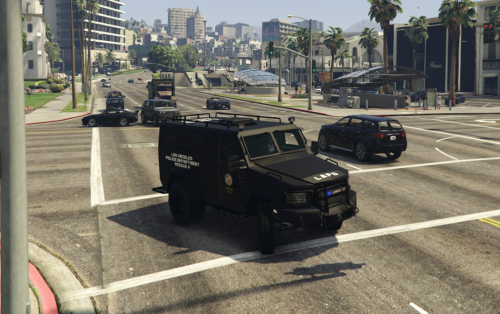
Hello everyone, This is the DEV Lenco Bearcat by Cosmo. INTRO: I hope you enjoy it very much. This is for vehicle developers only who know how to edit vehicles! If you're looking to simply put it in your game, go to this page: Please do not message me asking how to edit the vehicle unless it is about a specific feature of the bearcat, the extra seats, etc.For all other questions, please refer to GTA V car modeling tutorials. Donations are always accepted and any amount is greatly appreciated. All donations go towards the costs of vehicle development (Purchasing models, zMod Subscription, etc). FEATURES: Ten fully functioning seats (Thanks to Yard1 who helped make that possible). All regular/expected car features such as dirt, window cracks, damage, etc.. Fully UV-Mapped and Templated. Custom Handling (Thanks to Sgt. Kanyo for the GTA IV handling line). Can attach boat and small trailers. 2k and 4k textures/templates INSTALLATION: A very in-depth installation is included inside the README in the download, please refer to that for the full instructions. *** Don't forget to make backups or use a mods folder *** Using OpenIV, you put everything from the folder Vehicle Files which includes riot.ytd, riot.yft, etc into: update>x64>dlcpacks>patchday8ng>dlc.rpf>x64>levels>gta5>vehicles.rpf You then place the vehicles.meta into: update>update.rpf>common>data>levels>gta5 You then place the handling.meta into: update>update.rpf>common>data You then place the vehiclelayouts.meta into: update>update.rpf>common>data>ai You need to put all of these files in the correct places or else that vehicle will not work properly. Do not upload this file on to any other website without permission or claim this as entirely your own work. (PS: Don't laugh at my terrible material/texture names... I already know they're bad lol)
-
From the album: Cosmo's Screenshots & Stuff
All that rain probably washed away the evidence. -
Pretty much anything cool in-game that I see. Most of my pictures have a dark/blue tint, deal with it.
-
From the album: Cosmo's Screenshots & Stuff
-
From the album: Cosmo's Screenshots & Stuff
-
I hope the lightbar has rainbow lights too. That would be pretty awesome.
-
If I sent you the vehicles.meta file, it would be the same exact one that's in the download. Are you sure you're putting both vehicles.meta and vehiclelayouts.meta in the correct place? As far as I know no one else has had any issue with the 2.0/2.1 metas so I'm pretty sure they work.
- 80 comments
- 19 reviews
-
Inside the Vehicle.meta folder, there should be a vehicles.meta file, that is editted and should work if you replace it in the correct spot. The line is just an option in case you already have an editted one from another car mod, but if you don't then you can just replace the files with the ones included.
- 80 comments
- 19 reviews
-
Are you using the custom vehicle layout and vehicle meta? You need those in order to have more seats.
- 80 comments
- 19 reviews
-
Oh well I had done LSPD with the first version since it used default lightbar, and then LAPD with the other lightbars, but I can upload an LSPD skin as well :) Ah yes I hadn't noticed that the rear lights were missing on that one, must've unlinked something on accident. And the Arjent lightbar was created by BxBugs123, not I, but I'll see what I can do.
- 80 comments
- 19 reviews
-
I think most, if not all, are in: x64e.rpf/models/cdimages/streamedpeds_ig.rpf And the .ytd's are in the folders named accordingly And the heist ones are in streamedpeds_hc.rpf
-
For anyone not following the actual file, the Bearcat is now updated to version 2.0. Head over there and tell me what you think :) The Dev version will also most likely be uploaded today
-
Description change in preparation for update :) Update will actually be soon and not soon™ Edit: And by soon, I mean today
-
I haven't, but that's a good idea. I'll have to try that too
-
Well what I have currently just won't work in the game and I can't figure out why. But I'm planning on putting the interior I have into a modified Brickade and seeing if that works out. If it does then I would try it on the bus again
-
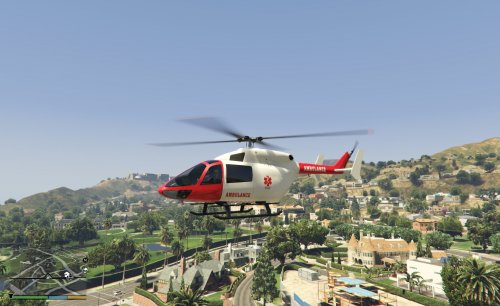 It has the ability to rappel, but you need some sort of script or plugin that lets you rappel from helicopters.
- 11 comments
- 1 review
-
-

- 1
-
-
Yeah that makes sense, then yes, the 1.2 version has the correct dummies for that and should work :)
- 11 comments
- 1 review
-
That is true, in that sense it could work then. I assumed you were talking about replacing the polmav with this and that would probably not work too well since the way the seats face and what not. I'll throw up a quick update with those on it :)
- 11 comments
- 1 review

