


corleone
Members
-
Joined
-
Last visited
Everything posted by corleone
-
Might do it if I get some spare time around my other projects. ;) I'm done with the lights on the Savana, NYPD style: Now I just need to map it, make a template and a paintjob. Are there anyone out there that knows how to make a handling line? This one needs one, bad! Send me a PM and I'll send you the the beta (or alpha really). You will be credited, of course! ;) Same if someone would like to make a LCPD template. Will send the template asap.
-
Works for me! ;) Did you "take a look around"? :p Imported 3ds files often appers all over the place.
-
-
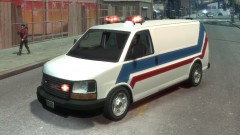
From the album: Corleone's album
Just a litte in-game/ELS test of the GMC Savana. -
Allright. Try to submesh --> detach the part. Then right click on the hirachy list and make sure its assigned correctly. Then try "assign to selection" again in the materials editor. And are you sure the part has two UV's?
-
Basic question, but have you made sure that the part are assigned to your paintjob material? And to the right UV?
-
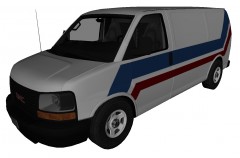 I am considering releasing a unlocked, stock version, yeah!Good that you solved. Just a couple of tips; - you don't need the lb_streethawk_els_h.wft (the one you renamed) in the hierachy. Just move the chassis (lightbar) out of it and delete lb_streethawk_els_h.wft name from the list. - don't store the textures to the wft file. - use OpenIV to add the textures to the wtd. Much, much easier. No need to convert the files to dds first, just drag the png's in to OpenIV.
The Savana Sgt.Kanyo linked to are locked, which makes it useless for me since I want to make a police version. Therefore I have to make my own, unlocked version! ;) Its still a WIP. ;)Good work, Harper! :happy:
I am considering releasing a unlocked, stock version, yeah!Good that you solved. Just a couple of tips; - you don't need the lb_streethawk_els_h.wft (the one you renamed) in the hierachy. Just move the chassis (lightbar) out of it and delete lb_streethawk_els_h.wft name from the list. - don't store the textures to the wft file. - use OpenIV to add the textures to the wtd. Much, much easier. No need to convert the files to dds first, just drag the png's in to OpenIV.
The Savana Sgt.Kanyo linked to are locked, which makes it useless for me since I want to make a police version. Therefore I have to make my own, unlocked version! ;) Its still a WIP. ;)Good work, Harper! :happy:
From the album: Corleone's album
GMC Savana WIP.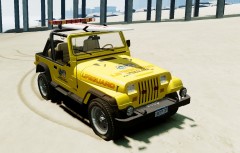
From the album: Corleone's album
Model released:= JEEP WRANGLER 1988 LCFD LIFEGUARD EDITION =- - NAME: Jeep Wrangler 1988 LCFD Lifeguard Edition - VERSION: 1.1 - LIGHTBAR: Whelen Edge - MULTIPLE LIVERIES: Yes (x4) - OPTIMIZED FOR: Any car - MOD STATUS: Complete - 100% - CREDITS: Original model by Ubisoft Reflections. Ripped by Policefanatic. Converted to GTAIV by corleone. Mapping and template by corleone. Whelen Edge by KevinDV. Surfboard by James Moffat. Handling line by Yusef_Amir, modified by corleone. Other lights, paintjob and modifications by corleone. - NOTES: The surfboard and its mount can now be removed by making the second yellow box in the emerglights texture and the surfboard texture transparent. - HANDLING: 2000.0 5.0 85 0.0 0.30 -0.55 0.5 5 0.20 1.0 150.0 0.80 0.35 0.5 39.0 1.55 1.95 16.5 0.18 0.46 2.0 1.2 1.7 0.15 -0.14 -0.01 0.5 1.0 1.0 1.0 1.5 0.0 25000 220000 1 0 Rembember to add "+livery" @ vehicles.ide. - corleone :)- 17 comments
- 5 reviews
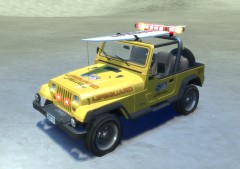
From the album: Corleone's album
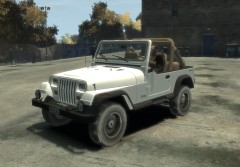 I'm thinking about doing another lifeguard model.
From the album: Corleone's album
Any suggiestions for "themes" and what lightbar to use? :)))If you are a student, 3DS Max is free: http://usa.autodesk.com/adsk/servlet/item?siteID=123112&id=14185424![City of Johannesburg E-One Hurricane ladder truck [WIP]](//s3-gallery.int-cdn.lcpdfrusercontent.com/gallery/album_657/sml_gallery_8683_657_160875.jpg) Mighty fine! :D
Mighty fine! :D


![City of Johannesburg E-One Hurricane ladder truck [WIP]](http://s3-gallery.int-cdn.lcpdfrusercontent.com/gallery/album_657/sml_gallery_8683_657_160875.jpg)