


corleone
Members
-
Joined
-
Last visited
Everything posted by corleone
-
-
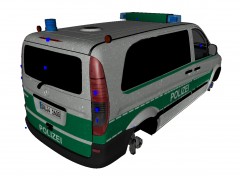
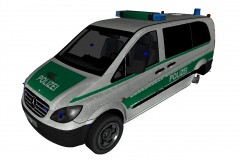
-= MERCEDES-BENZ VITO GERMAN POLICE =- - NAME: Mercedes-Benz Vito German Police Edition - VERSION: 0.95 - LIGHTBAR: Haensch DBS 3000 - MULTIPLE LIVERIES: No (Although you can add extra liveries yourself by using G-texture or OpenIV) - OPTIMIZED FOR: Any police car - MOD STATUS: Complete - NOTES: There are several "bugs" with this model: - Bullet holes comes and goes as they please. - Unbreakable side windows. - Missing some interior. - Terrible engine. - Back passanger doors open the wrong way. - Passangers enters the back cage trough the passanger doors. MODEL IS RELEASED AS IT IS. - HANDLING: 2500.0 0.3 85 0.0 0.0 -0.8 0.35 4 0.180 1.0 130.0 0.20 0.550 0.26 40.0 1.12 0.95 17.0 0.13 0.4869 1.6 1.0 0.8 0.048 -0.10 0.0 0.5 1.0 0.6 1.2 1.5 0.0 55000 440010 0 0 - CREDITS: - Mercedes-Benz Vito by Unknown. - Converted to GTA IV by corleone. - Haensch DBS 3000 by godra. - Haensch Nova by BlackHunter. - Mapping and templates by corleone. - Paintjob by polak101. - Wheels by Teddy. - Other lights and modifications by corleone. corleone :)
- 6 comments
- 6 reviews
-
 [quote name='Bid96' To fix that corleone try changing thenVEH@STD with VEH@VAN in the vehicles.ide file
 -
The passangers are seated in the a cage in the back. Right now they enter to the passanger doors. Looks kind of funney. I don't think its possible to slide the doors. : /
-
Yes, it can carry 4 passangers.
-
-
From the album: Corleone's album
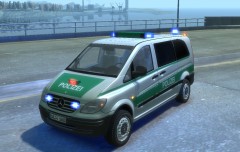
In-game screenshot. Added a anhaltesignalgeber on the hood, ELS mapped to POLIZEI and STOP. Mapped the blinkers on the roof. Added MB wheels. Thanks Teddy! ; ) -
From the album: Corleone's album
-
From the album: Corleone's album
-
Well, you have two saved files right? The one where all your work is; the mapped vehicle (#1). And then you have the saved file with the door interior (#2). In save #1 select the "File" tab, select "Merge" --> "All" --> "Merge". Then: I've seperated the door from the rest of the model: Rename the door to what it's supposed to be. You'll get there mate. Take your time. I lose motivation from time to time to.
-
I'll make you a small tutorial for you. You'll have it within the day. So the template.png are orange? Is that right? Why don't you open it in photoshop/gimp and change the color, or make it black and white. That should fix it. ;) This is how it works in GIMP: Image -> Mode -> Grayscale. I'm no photoshop expert, but I guess it's more or like the same there.
-
-
-= ALBANY POLICE STINGER ELS =- - NAME: Albany Police Stinger - VERSION: 1.0 - LIGHTBAR: Whelen Justice - MULTIPLE LIVERIES: No - OPTIMIZED FOR: police4 - MOD STATUS: Complete - 100% - CREDITS: Original model by Rockstar Games. Whelen Justice by Bxbugs123. Other ELS mapping by corleone. corleone :)
- 3 comments
- 4 reviews
-
Select and delete the interior parts of the door. Open a new ZModeler with the stock model you are working on. Select the interior part of the door and detach it. Delete everything else. Save it. Then merge the saved file with the door interior with the latest save file where you deleted the interior part. Then you attach the interior part to the door without the interior. Now you have a proper mapped door with a proper interior mapping. Hope you understood. ;)
-
Sorry about that. I tried to delete as much as possible that weren't needed, but it's still very high poly.
- 8 comments
- 2 reviews
-
-
-= MERCEDES-BENZ VITO POLICE =- - NAME: Mercedes-Benz Vito Police - VERSION: 0.95 - LIGHTBAR: Whelen Edge - MULTIPLE LIVERIES: Yes - OPTIMIZED FOR: Any police car - MOD STATUS: Complete - NOTES: There are several "bugs" with this model: - No bullet holes shows. - Unbreakable side windows. - Missing some interior. - Terrible engine. - Back passanger doors open the wrong way. - Passangers enters the back cage trough the passanger doors. MODEL IS RELEASED AS IT IS. - HANDLING: 2500.0 0.3 85 0.0 0.0 -0.8 0.35 4 0.180 1.0 130.0 0.20 0.550 0.26 40.0 1.12 0.95 17.0 0.13 0.4869 1.6 1.0 0.8 0.048 -0.10 0.0 0.5 1.0 0.6 1.2 1.5 0.0 55000 440010 0 0 - CREDITS: - Mercedes-Benz Vito by Unknown. - Whelen Edge by KevinDV. - Converted to GTA IV by corleone. - Mapping, templates and paintjob by corleone. - Standby BL76 leds by corleone, textures by Break. - Rambar by corleone. - Whelen SA314 by Bxbugs123. corleone :)
- 8 comments
- 2 reviews
-
-
-= Maibatsu Mule RVR ELS-H =- - NAME: MAIBATSU MULE RVR ELS-H - VERSION: 1.0 - LIGHTBAR: Mars beacons - MULTIPLE LIVERIES: No (Although you can add extra liveries yourself by using G-texture or OpenIv) - OPTIMIZED FOR: Firetruk - MOD STATUS: Complete - 100% - CREDITS: - Mule by Rockstar Games. - Mapping, template and paintjob by corleone. - Mars beacons by Intensified, modified to ELS-H by corleone. - Other lights by corleone. HANDLING: 5500.0 6.0 80 0.0 0.0 -0.4 0.0 6 0.11 1.0 100.0 0.15 0.60 0.2 40.0 0.90 0.80 13.0 0.15 0.46 1.4 1.0 1.0 0.15 -0.20 0.0 0.5 1.0 1.0 0.8 1.5 0.0 25000 4048 0 2 corleone :)
- 4 comments
- 2 reviews
-
The MB Vito is being beta tested. Release soon! Meanwhile I'm been working on adding lights to the Mule. It's gonna be a Norwegian RVR vehicle. (Paid for by the insurance companies to save as much interior and property as fast as possible during a fire/water leak or similar.) Credits: Mule by Rockstar Games. Mapping, template and paintjob by corleone. Mars beacons by Intensified, thanks! Other lights by corleone.
-
Awesome! :DDD
-
Did you assign the selected parts to the material?
-
-
-
Right click on the object (body_body_body) in the hierarchy list and select Properties. Select Mesh --> Vertices --> Format --> UV Channels --> Change from 1 to 2. (y)


