


corleone
Members
-
Joined
-
Last visited
Everything posted by corleone
-
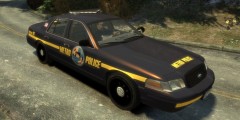 The lightbar is by KevinDV. The Crown Vic is converted to GTA IV by F5544, modified by KevinDV and Cj24. The Whelen Slimlighter is by PFCBarefoot. I put it all together. ;) Will release it later today.
 -
-
From the album: Corleone's album
Federal Signal Valor lightbar. -
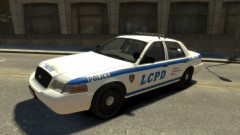 Its F5544's crown vic, fixed, improved and remapped by KevinDV and Cj24. So its not the exact model as the unlocked model on this site.
Yep, first time. ;) The lightbar isn't released to the public. : )Thanks, EVI. Won't be long now before a release. My first try at making a Crown Vic. The paintjob is just something I threw together in about 5 mins. - Model is Ford Crown Victoria from Driver SF, converted to GTA IV by F5544, modified by KevinDV and Cj24. - Rims by Bxbugs123, Textures by Lt.Caine. - Honeycomb Grill made by KevinDV. - Laptop and Divider by Lt.Caine. - Spotlights made by Cj24. - Federal Signal Valor by KevinDV. - Whelen Slimlighter by PFCBarefoot. - Back lights by Lt.Caine.
Its F5544's crown vic, fixed, improved and remapped by KevinDV and Cj24. So its not the exact model as the unlocked model on this site.
Yep, first time. ;) The lightbar isn't released to the public. : )Thanks, EVI. Won't be long now before a release. My first try at making a Crown Vic. The paintjob is just something I threw together in about 5 mins. - Model is Ford Crown Victoria from Driver SF, converted to GTA IV by F5544, modified by KevinDV and Cj24. - Rims by Bxbugs123, Textures by Lt.Caine. - Honeycomb Grill made by KevinDV. - Laptop and Divider by Lt.Caine. - Spotlights made by Cj24. - Federal Signal Valor by KevinDV. - Whelen Slimlighter by PFCBarefoot. - Back lights by Lt.Caine.
From the album: Corleone's album
My first try at making a Crown Vic. The paintjob is just something I threw together in about 5 mins. - Model is Ford Crown Victoria from Driver SF, converted to GTA IV by F5544, modified by KevinDV and Cj24. - Rims by Bxbugs123, Textures by Lt.Caine. - Honeycomb Grill made by KevinDV. - Laptop and Divider by Lt.Caine. - Spotlights made by Cj24. - Federal Signal Valor by KevinDV. - Whelen Slimlighter by PFCBarefoot. - Back lights by Lt.Caine.Nice work! Yes and yes!Also make sure you export the file with the same name as your model file. If your model in zmodeler have the name: fbi.wft, you need to export the file to fbi.wft. When you're done exporting, you can change the filename of your model file.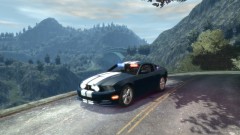
From the album: Corleone's album
This is the police version. Made by me and Ridgerunner. ;)
From the album: Corleone's album
Use the num pad. Left: 4 Right: 6 Up: 8 Down: 2 Enter: 5


