


corleone
Members
-
Joined
-
Last visited
Everything posted by corleone
-
No. Someone needs to convert them. Different format.
-
Not completely necessary. You can just use a box if you like it simple. ;)
-
There are several tutorials out there on how to map/add els lights.
-
-
From the album: Corleone's album
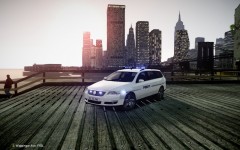
2010 VW Passat Danish Edition now released. Screenshot by Break. -
-= 2010 VW Passat Danish Edition =- - NAME: VW PASSAT POLICE DK EDITION - VERSION: 0.95 - LIGHTBAR: Whelen Liberty - MULTIPLE LIVERIES: Yes x4 - OPTIMIZED FOR: Any police vehicle - MOD STATUS: Complete - CREDITS: - GTA SA model by alper93. - Converted to IV by Kinksta. - Mapping and template by Kinksta and corleone. - Fixed and freshened up by corleone. - Whelen Liberty by PFCBarefoot, modified by corleone. - LED textures by Break. - Paintjobs by NicolaiB. - NOTES: This is a very high poly model. Slower computers may have problems running it smoothly! Also there are several bugs, like the back sides of the bumpers, bonnet and boot are invincible. Everytime I tried to fix that the model crashed my game. So this model is released as it is. corleone :)
- 3 comments
- 2 reviews
-
The els secondaries are mapped to the middle light. Turn on the secondaries and use els setting H-3 and there will be light! ; ) I made the lightbar, ahling023 put it on the car model. It's up to him if he want's to release or not.
-
-
-
-
From the album: Corleone's album
-
(Eric) James aka. BritishPoliceMods. But he doesn't give a shit about credits, so I guess he doesn't mind... Would have been nice if you send me a message first, asking, but OK, no worries. We're cool! :D
-
-
Open SparkIV/OpenIV, find vehshare.wtd inside vehicles.img and extract all the textures from that to your work folder. You might also need the textures in vehshare_truck.wtd. You also might need this:
-
From the album: Corleone's album
-
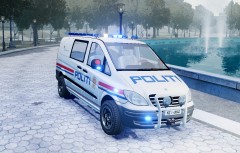
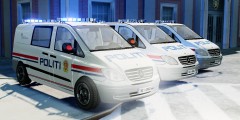
New WIP: Mercedes Vito Norwegian Police Edition: Credits: - Mercedes Vito by Unknown. - Whelen Edge by KevinDV. - Converted to GTA IV by corleone. - Paintjob by corleone. Things to be done: - Add a rambar with some big lights. - Add some more leds. (mirrors, wings and grille) - Fix the interior.
-
From the album: Corleone's album
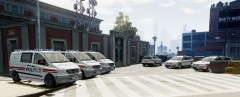
Vito's and Passats. -
Yeah, if I actually would have used this model for something I probably would have done so. ;) But I think people get the deal. :D
-
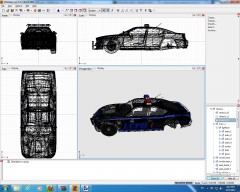 Might do. Basically it's just a modified Federal Signal StreetHawk, originally made by Lt.Caine.
 -
Sorry mate. Creating models from scratch are still abit out of my league! Anywhooo, the tutorial are now complete. Good luck!
-
I may make some other tutorials, yes. If the community want's that. Any suggestions? It may look a bit long, but basically every part repeat itself, so it ain't that long! ;)
-
You might have a couple of times! ;))
-
Hah, you might say. ;)
-
-
Like I said, I'm limited to a certain images in each post (15 images). That's why I made so many reserved post so I can get the tutorial with all the images in one bunch. And as I also said, the unused posts will be deleted when I'm done, so I really don't see a problem here. ;) Don't know how long this tutorial will be, so it's better to be on the safe side! And thanks! ;)


